
命令行安装FFmpeg:git clone git://source.ffmpeg.org/ffmpeg.git ffmpeg(或:到https://github.com/gabriel/ffmpeg-iphone-build下载ffmpeg-iphone-build)
安装命令行工具(Command Line Tools)
打开终端,输入命令:xcode-select --install

选择“安装”,然后同意安装协议。


下载gas-preprocessor:https://github.com/mansr/gas-preprocessor, 先将gas-preprocessor.pl拷贝到/usr/sbin/目录中。
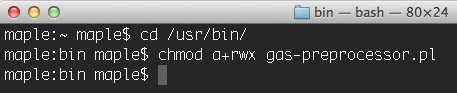
然后修改gas-preprocessor.pl文件的权限。注:需要有读,写和执行的权限。具体操作为,首先在命令行下进入/usr/bin目录,然后执行chmod命令,如下图所示:
运行build-ffmpeg.sh文件:
1、cd /build-ffmpeg.sh 脚本的目录下
2、sh build-ffmpeg.sh
#!/bin/bash
###########################################################################
#  Choose your ffmpeg version and your currently-installed iOS SDK version:
#
VERSION="2.0.2"
SDKVERSION="7.0"
#
#
###########################################################################
#
# Don‘t change anything under this line!
#
###########################################################################
# No need to change this since xcode build will only compile in the
# necessary bits from the libraries we create
ARCHS="armv7 armv7s i386"
DEVELOPER=`xcode-select -print-path`
cd "`dirname \"$0\"`"
REPOROOT=$(pwd)
# Where we‘ll end up storing things in the end
OUTPUTDIR="${REPOROOT}/dependencies"
mkdir -p ${OUTPUTDIR}/include
mkdir -p ${OUTPUTDIR}/lib
mkdir -p ${OUTPUTDIR}/bin
BUILDDIR="${REPOROOT}/build"
mkdir -p $BUILDDIR
# where we will keep our sources and build from.
SRCDIR="${BUILDDIR}/src"
mkdir -p $SRCDIR
# where we will store intermediary builds
INTERDIR="${BUILDDIR}/built"
mkdir -p $INTERDIR
########################################
cd $SRCDIR
# Exit the script if an error happens
set -e
if [ ! -e "${SRCDIR}/ffmpeg-${VERSION}.tar.bz2" ]; then
    echo "Downloading ffmpeg-${VERSION}.tar.bz2"
    curl -LO http://ffmpeg.org/releases/ffmpeg-${VERSION}.tar.bz2
else
    echo "Using ffmpeg-${VERSION}.tar.bz2"
fi
tar jxf ffmpeg-${VERSION}.tar.bz2 -C $SRCDIR
cd "${SRCDIR}/ffmpeg-${VERSION}"
set +e # don‘t bail out of bash script if ccache doesn‘t exist
CCACHE=`which ccache`
if [ $? == "0" ]; then
    echo "Building with ccache: $CCACHE"
    CCACHE="${CCACHE} "
else
    echo "Building without ccache"
    CCACHE=""
fi
set -e # back to regular "bail out on error" mode
for ARCH in ${ARCHS}
do
    if [ "${ARCH}" == "i386" ];
    then
        PLATFORM="iPhoneSimulator"
        EXTRA_CONFIG="--arch=i386 --disable-asm --enable-cross-compile --target-os=darwin --cpu=i386"
        EXTRA_CFLAGS="-arch i386"
        EXTRA_LDFLAGS="-I${DEVELOPER}/Platforms/${PLATFORM}.platform/Developer/SDKs/${PLATFORM}${SDKVERSION}.sdk/usr/lib -mfpu=neon"
    else
        PLATFORM="iPhoneOS"
        EXTRA_CONFIG="--arch=arm --target-os=darwin --enable-cross-compile --cpu=cortex-a9 --disable-armv5te"
        EXTRA_CFLAGS="-w -arch ${ARCH} -mfpu=neon"
        EXTRA_LDFLAGS="-mfpu=neon"
    fi
    mkdir -p "${INTERDIR}/${ARCH}"
    ./configure --prefix="${INTERDIR}/${ARCH}" --disable-ffmpeg --disable-ffplay --disable-ffprobe --disable-ffserver --disable-iconv --disable-bzlib --enable-avresample --sysroot="${DEVELOPER}/Platforms/${PLATFORM}.platform/Developer/SDKs/${PLATFORM}${SDKVERSION}.sdk" --cc="${DEVELOPER}/Toolchains/XcodeDefault.xctoolchain/usr/bin/clang" --as=‘/usr/local/bin/gas-preprocessor.pl‘ --extra-cflags="${EXTRA_CFLAGS} -miphoneos-version-min=${SDKVERSION} -I${OUTPUTDIR}/include" --extra-ldflags="-arch ${ARCH} ${EXTRA_LDFLAGS} -isysroot /Applications/Xcode.app/Contents/Developer/Platforms/${PLATFORM}.platform/Developer/SDKs/${PLATFORM}${SDKVERSION}.sdk -miphoneos-version-min=${SDKVERSION} -L${OUTPUTDIR}/lib" ${EXTRA_CONFIG} --enable-pic --extra-cxxflags="$CPPFLAGS -I${OUTPUTDIR}/include -isysroot ${DEVELOPER}/Platforms/${PLATFORM}.platform/Developer/SDKs/${PLATFORM}${SDKVERSION}.sdk"
    make && make install && make clean

done
mkdir -p "${INTERDIR}/universal/lib"
cd "${INTERDIR}/armv7/lib"
for file in *.a
do
cd ${INTERDIR}
xcrun -sdk iphoneos lipo -output universal/lib/$file  -create -arch armv7 armv7/lib/$file -arch armv7s armv7s/lib/$file -arch i386 i386/lib/$file
echo "Universal $file created."
done
cp -r ${INTERDIR}/armv7/include ${INTERDIR}/universal/
echo "Done."
在FFmpeg目录下的build文件夹可以找到生成的库
本文出自 “追逐风飞的花” 博客,请务必保留此出处http://metoo.blog.51cto.com/7809119/1382158
编译支持iOS7 和 Xcode5 FFmpeg 库,布布扣,bubuko.com
原文:http://metoo.blog.51cto.com/7809119/1382158