
单表头页面是对一个单独的表进行增删改查的页面。如下图所示:
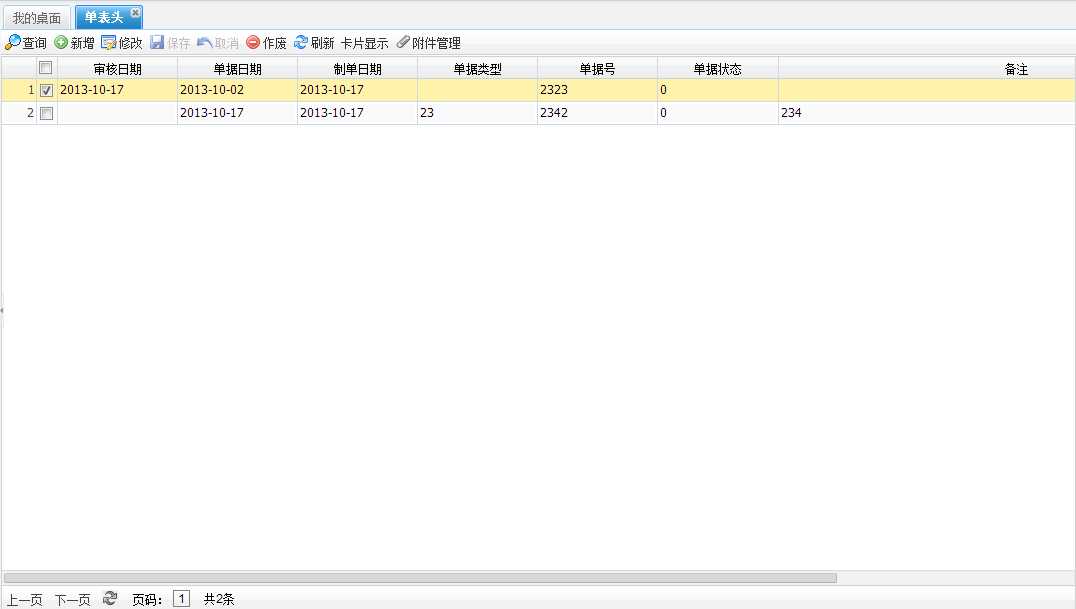
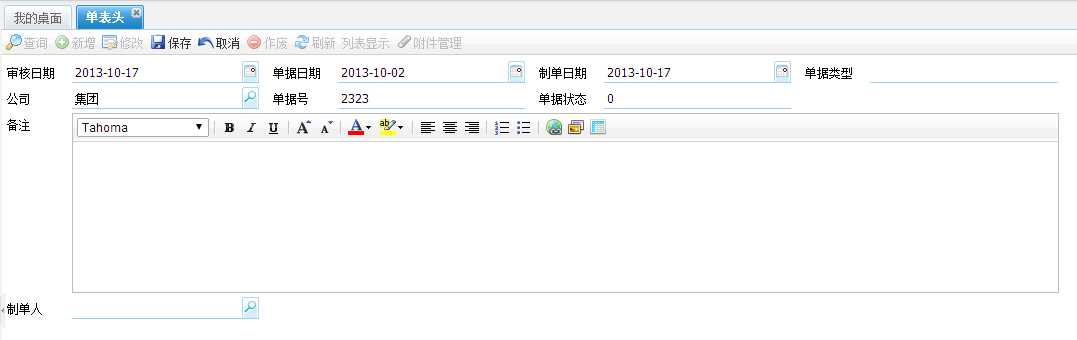
从本教程开始,不再对前面重复的步骤进行说明了。
7、创建Service类
|
1
2
3
4
5
6
7
8
9
10
11
12
13
14
15
16
17
18
19
20
21
22
23
24
25 |
/** * 产品,单表头 * * @author xuqc * @date 2013-10-17 下午02:32:53 */@Servicepublic class T204Service extends
AbsToftServiceImpl { private
AggregatedValueObject billInfo; public
AggregatedValueObject getBillInfo() { if(billInfo == null) { billInfo = new
HYBillVO(); VOTableVO vo = new
VOTableVO(); vo.setAttributeValue(VOTableVO.BILLVO, HYBillVO.class.getName()); vo.setAttributeValue(VOTableVO.HEADITEMVO, ProductVO.class.getName()); vo.setAttributeValue(VOTableVO.PKFIELD, ProductVO.PK_PRODUCT); billInfo.setParentVO(vo); } return
billInfo; }} |
8、创建Controller类
|
1
2
3
4
5
6
7
8
9
10
11
12
13
14
15
16
17
18
19 |
/** * 单表头 * * @author xuqc * @date 2013-10-17 下午02:55:09 */@Controller@RequestMapping(value = "/busi/scene/t204")public class T204Controller extends
AbsToftController { @Autowired private
T204Service t204Service; @Override public
T204Service getService() { return
t204Service; }} |
9、创建jsp文件,根据功能节点上面的配置,jsp文件应该是位于/busi/scene/t204.jsp,这个文件内容如下:
|
1
2
3
4
5
6
7
8
9
10
11
12
13
14
15
16
17
18
19
20
21
22
23
24
25
26
27
28
29
30
31
32
33
34
35
36
37
38
39
40
41
42
43
44
45
46
47
48
49 |
<!DOCTYPE html PUBLIC "-//W3C//DTD HTML 4.01 Transitional//EN"
"http://www.w3.org/TR/html4/loose.dtd"><%@ page language="java"
pageEncoding="UTF-8"
contentType="text/html; charset=UTF-8"%><html> <head> <%@ include file="/common/header.jsp"%> </head> <body> <nw:Bill templetVO="${templetVO}"
headerGridImmediatelyLoad="true"
bodyGridsPagination="false"
headerGridCheckboxSelectionModel="true" headerGridSingleSelect="false"/> </body> <script type="text/javascript"> //档案类型单表头的界面 MyToolbar = Ext.extend(uft.jf.ToftToolbar, { constructor : function (config){ Ext.apply(this, config); MyToolbar.superclass.constructor.call(this); this.btn_del.setText(‘作废‘);//修改按钮名称 }, //返回界面所需要的按钮 getBtnArray : function(){ var btns = new
Array(); btns.push(this.btn_query); btns.push(this.btn_add); btns.push(this.btn_edit); btns.push(this.btn_save); btns.push(this.btn_can); btns.push(this.btn_del); btns.push(this.btn_ref); btns.push(this.btn_list); btns.push(this.btn_card); btns.push(this.btn_filemanage); btns.push(this.btn_print); btns.push(this.btn_export); btns.push(new
uft.extend.Button({ text : ‘自定义按钮‘, scope : this, handler : function(){ alert(1); } })); return
btns; } }); ${moduleName}.appUiConfig.toolbar = new
MyToolbar(); var app = new
uft.jf.ToftPanel(${moduleName}.appUiConfig); </script> <%@ include file="/common/footer.jsp"%></html> |
这样一个基本的包含增删改查的页面就开发完成了,以后会逐渐增加各种高级的功能。
具体的示例可以参考:http://xuqc.fangwei.name:9080/demo-webapp administrator/143305
NW开发教程系列二:单表头页面,布布扣,bubuko.com
原文:http://www.cnblogs.com/aimer311/p/3605385.html