
在使用QUI开发的业务系统中,如果长时间没操作,session过期后,再次操作系统超时会自动跳转到登陆页面,如果当前有一些操作没有保存,需要重新登录后再次填写信息,用户体验很不好!
为了避免超时后页面跳转到登录页面,我改善了一下:当超时后点击链接时弹出登录页面,用户在弹出的登陆页面登录后,他先前的一些操作不会丢失,可以继续操作。
下面是具体实现方式:
权限验证基类页
|
1
2
3
4
5
6
7
8
9
10
11
12
13
14
15
16
17
18
19
20
21
22
23 |
public
class AuthBasePage : BasePage{ protected
override void OnInit(EventArgs e) { //判断是否得到身份认证 //您也可以用session判断 if
(null!=HttpContext.Current.User.Identity&&!HttpContext.Current.User.Identity.IsAuthenticated) { Response.Write("<script type=\"text/javascript\">"); Response.Write("var topWin = (function (p, c) {while (p != c) {c = p;p = p.parent}return c;})(window.parent, window);"); Response.Write("try{ topWin.openLoginWindow();}catch(e){window.location=‘/Login.aspx‘}"); Response.Write("</script>"); Response.End(); } HttpCookie authCookie = Context.Request.Cookies[FormsAuthentication.FormsCookieName]; FormsAuthenticationTicket authTicket = FormsAuthentication.Decrypt(authCookie.Value); userData = authTicket.UserData; JavaScriptSerializer javaScriptSerializer = new
JavaScriptSerializer();<br> //此处使用了吉日嘎拉权限管理系统的单点登录 userInfo = javaScriptSerializer.Deserialize<BaseUserInfo>(userData); userInfo.ServiceUserName = BaseSystemInfo.ServiceUserName; userInfo.ServicePassword = BaseSystemInfo.ServicePassword; base.OnInit(e); } |
在QUI主框架页面,增加下面的JS代码
|
1
2
3
4
5
6
7
8
9
10
11
12
13
14
15
16
17
18
19
20
21
22
23
24
25
26
27
28
29 |
//避免超时跳转到登录页面,使用户的操作丢失,造成不好的体验function
openLoginWindow() { var
diag = new
top.Dialog(); diag.Title = "系统超时,您已经退出,请重新登录"; //窗口ID diag.ID = "a1"; diag.URL = "/PageUtils/DialogLogin.aspx"; diag.Width = 350; diag.Height = 190; diag.ShowCloseButton = false; diag.ShowCancelButton = false; diag.ShowOkButton = false; diag.ButtonAlign = "center"; diag.AllowChangeIndex = false; diag.show(); diag.addButton("btnRest", " 重 置 ", function
() { top.document.getElementById("_DialogFrame_a1").contentWindow.restForm(); //改变一下窗口背景 $("#_DialogBGMask").css("z-index", "-1").css("opacity", "1").empty().append("<img src=‘/system/images/screen/000.jpg‘ style=‘width:100%;height:100%‘ />"); }); diag.addButton("btnLogin", " 登 录 ", function
() { top.document.getElementById("_DialogFrame_a1").contentWindow.validateForm(); //改变一下窗口背景 $("#_DialogBGMask").css("z-index", "-1").css("opacity", "1").empty().append("<img src=‘/system/images/screen/000.jpg‘ style=‘width:100%;height:100%‘ />"); }); //改变一下窗口背景 $("#_DialogBGMask").css("z-index", "-1").css("opacity", "1").empty().append("<img src=‘/system/images/screen/000.jpg‘ style=‘width:100%;height:100%‘ />");} |
可以看到,在session超时后,打开新页面时会调用主框架的openLoginWindow()方法,弹出登录窗口层,这样就不会跳转到登录页面了,当然如果您刷新了主框架则会跳转到登陆页的。
弹出窗口DialogLogin.aspx页面的关键代码
<div id="screenLock" class="timeOut">
<form id="form1" action="" showOnMouseOver="false">
<table width="100%">
    <tr>
	<td  class="ali03" style="width:70px">站点:</td>
    <td><input type="text" name="sitename" id="sitename" style="width:140px;" class="validate[required,length[0,20]] float_left" />
        <span class="star float_left">*</span><div class="validation_info">请输入站点名称</div>
    </td>
    </tr>
    <tr>
	<td  class="ali03">用户:</td>
    <td><input type="text" name="username" id="username" style="width:140px;"  class="validate[required,length[0,20]] float_left" />
         <span class="star float_left">*</span><div class="validation_info">请输入用户名称</div>
    </td>
    </tr>
	<tr>
	<td  class="ali03">密码:</td>
	<td><input type="password" name="password" id="password" style="width:140px;"  class="validate[required,custom[noSpecialCaracters]] float_left"/>
         <span class="star float_left">*</span><div class="validation_info">请输入密码</div>
	<input type="text" style="width:2px;display:none;"/>
	</td>
	</tr>
	<tr>
	<td ></td>
	<td><span id="passInfo" class="red"></span></td>
	</tr>
</table>
</form>
</div>
<script type="text/javascript">
    //手动触发验证,被验证的表单元素是containerId容器里的。 可以验证整个表单,也可以验证部分表单。
    function validateForm() {
        var valid = $("#form1").validationEngine({ returnIsValid: true });
        if (valid == true) {
            loginDeal();
        } else {
            top.Dialog.alert(‘填写不正确,请按要求填写!‘);
        }
    }
    //重置表单
    function restForm() {
        $("#sitename").val("");
        $("#username").val("");
        $("#password").val("");
        //$(‘#myform‘)[0].reset();
    }
    //登录操作
    function loginDeal() {
        $.ajax({
            type: "GET",
            async: false,
            url: "/PageUtils/DialogLogin.aspx",
            data: {
                "sitename": $("#sitename").val(),
                "username": $("#username").val(),
                "password": $("#password").val(),
                "act": "login"
            },
            dataType: "json",
            success: function (result) {
                if (result) {
                    if (result.Status == "OK") {
                        //登录成功 关闭弹出窗口层
                        top.Dialog.close();
                    } else {
                        top.Dialog.alert("账号或密码错误" + result.Message);
                    }
                } else {
                    top.Dialog.alert("出现系统错误");
                }
            },
            error: function (XMLHttpRequest, textStatus, errorThrown) {
                top.Dialog.alert("出现系统错误");
            }
        });
    }

    //手动触发验证
    $(function () {
        $("#password").keydown(function (event) {
            if (event.keyCode == 13) {
                validateForm(‘#form1‘);
            }
        })
    })


</script>
超时后点击链接时弹出的登陆页窗口效果
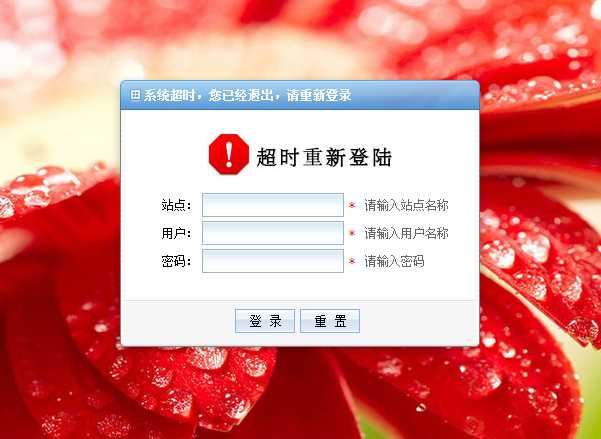
成功登录以后会关闭窗口层,显示最后操作的界面。
原文:http://www.cnblogs.com/hnsongbiao/p/3675074.html