
上两章已经介绍httpd配置文件的作用,如下主要是介绍apache的源码安装。
http://httpd.apache.org/download.cgi下载地址。
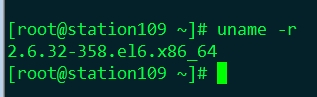
1)系统版本介绍

2)64的系统
3)安装依赖包和包组。
yum -y install pcre-devel这个不装httpd直接编译不过去。
yum groupinstall ”Development tools"这个包不装包的错误是说gcc。
yum groupinstall "Server Platform Development"这个不装报openssl的错误。
4)安装apr和apr-util包。
ps:
注意下载的时候要下载1.5版本以上的。因为我这里安装到的apache是最新的版本2.4.9版本。
如果apr用的版本低会导致enevt工作模式不能用。
tar xf apr-1.5.0.tar.bz2
./configure --prefix=/usr/local/apr
make && make install
tar xf apr-util-1.5.2.tar.bz2
./configure --prefix=/usr/local/apr-util --with-apr=/usr/local/apr/
make && make install
5)安装httpd-2.4
2.4的新特性:
1)支持event
2)支持异步读写
3)MPM支持在运行时装载
4)在每模块每目录上指定日志级别
5)基于FQDN的虚拟主机不再需要NameVirtualHost指令
6)支持使用自定义变量
新增了一些模块。mod_proxy_fcgi,mod_ratelimit速率限定模块,mod_request请求方法限定模块。
mod_remoteip限定ip模块。
6)安装httpd
下载地址:http://httpd.apache.org/download.cgi
tar xf httpd-2.4.9.tar.bz2
./configure --prefix=/usr/local/apache --sysconfdir=/etc/httpd24 --enable-so --enable-ssl --enable-cgi
--enable-rewrite --with-zlib --with-pcre --with-apr=/usr/local/apr --with-apr-util=/usr/local/apr-util/
--enable-modules=most --enable-mpms-shared=all --with-mpm=event
make && make install
most:启动大多数常用的模块
all所有的工作模块
指定路径和安装目录,启用so,ssl,rewrite,zlib,pcre等功能。
指定之前安装apr地址,并以event做默认的工作模式。
so:动态加载模块功能
ssl:支持https协议功能
cgi:支持cgi机制
reqrite:支持URL重新功能
zlib:调用网络压缩功能的
most:启动大多数常用模块
all:常用模块都编译进来。
event:默认以这个为工作模式。2.4版本新的特性。版本低的不支持。
vim /usr/local/apache/modules查看编译进来的模块

7)导出二进制程序
vim /etc/profile.d/httpd.sh

source 重读生效。
这样可以直接使用apachectl start启动
8)查看端口

9)访问

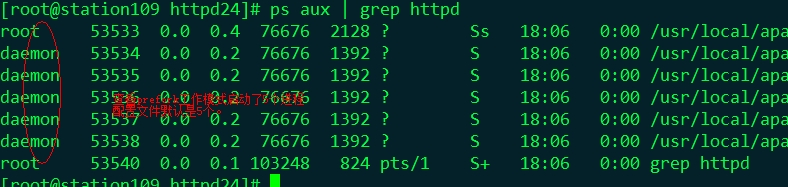
10)切换工作模式,现在是event模式。切换到prefork。


11)写服务启动脚本
如果服务多了这样apachectl start启动不方便。
都是按照service SERVER start的方式启动。
http://httpd.apache.org/docs/2.4/
cp /etc/rc.d/init.d/httpd /etc/rc.d/init.d/httpd24把yum的启动脚本cp一份给源码编译安装的。
vim /etc/httpd24/httpd.conf
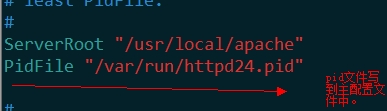
直接修改vim /etc/rc.d/init.d/httpd24这个脚本。
#!/bin/bash
. /etc/rc.d/init.d/functions
if [ -f /etc/sysconfig/httpd ]; then
. /etc/sysconfig/httpd
fi
HTTPD_LANG=${HTTPD_LANG-"C"}
INITLOG_ARGS=""
apachectl=/usr/local/apache/bin/apachectl
httpd=/usr/local/apache/bin/httpd
prog=httpd
pidfile=${PIDFILE-/var/run/httpd24.pid}
lockfile=${LOCKFILE-/var/lock/subsys/httpd24}
RETVAL=0
STOP_TIMEOUT=${STOP_TIMEOUT-10}
start() {
echo -n $"Starting $prog: "
LANG=$HTTPD_LANG daemon --pidfile=${pidfile} $httpd $OPTIONS
RETVAL=$?
echo
[ $RETVAL = 0 ] && touch ${lockfile}
return $RETVAL
}
stop() {
echo -n $"Stopping $prog: "
killproc -p ${pidfile} -d ${STOP_TIMEOUT} $httpd
RETVAL=$?
echo
[ $RETVAL = 0 ] && rm -f ${lockfile} ${pidfile}
}
reload() {
echo -n $"Reloading $prog: "
if ! LANG=$HTTPD_LANG $httpd $OPTIONS -t >&/dev/null; then
RETVAL=6
echo $"not reloading due to configuration syntax error"
failure $"not reloading $httpd due to configuration syntax error"
else
# Force LSB behaviour from killproc
LSB=1 killproc -p ${pidfile} $httpd -HUP
RETVAL=$?
if [ $RETVAL -eq 7 ]; then
failure $"httpd shutdown"
fi
fi
echo
}
case "$1" in
start)
start
;;
stop)
stop
;;
status)
status -p ${pidfile} $httpd
RETVAL=$?
;;
restart)
stop
start
;;
condrestart|try-restart)
if status -p ${pidfile} $httpd >&/dev/null; then
stop
start
fi
;;
force-reload|reload)
reload
;;
graceful|help|configtest|fullstatus)
$apachectl $@
RETVAL=$?
;;
*)
echo $"Usage: $prog {start|stop|restart|condrestart|try-restart|force-reload|reload|status|fullstatus|graceful|help|configtest}"
RETVAL=2
esac
exit $RETVAL
chkconfig --add httpd24
chkconfig --list httpd24
service httpd24 start

ok脚本正常使用。
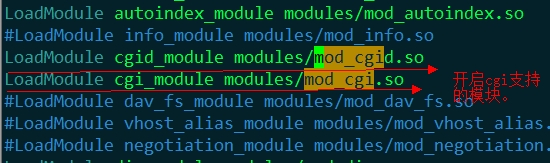
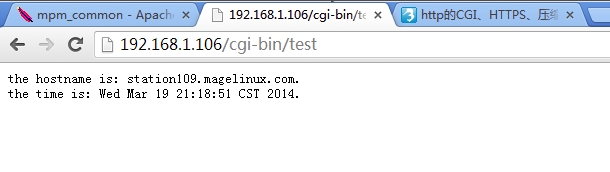
一,CGI配置
vim /etc/httpd24/httpd.conf开启cgi支持的模块


二,虚拟主机
前提先做DNS解析
vim /etc/named.conf

区域配置文件benet.com

区域配置文件accp.com

vim /etc/httpd24/httpd.conf

vim /etc/httpd24/extra/httpd-vhosts.conf
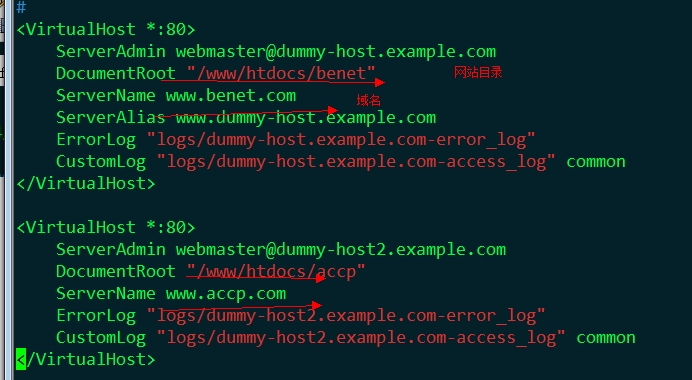
在这两个域名中放进去不同的文件,进行分辨。

service httpd24 restart启动服务
物理机上指过去DNS
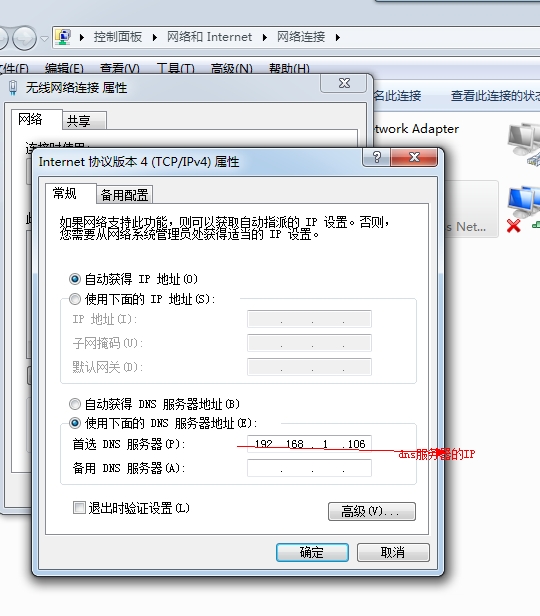
浏览器访问测试:


基于IP地址的虚拟主机,IP地址必须真实存在。


基于端口的虚拟主机。。


三,https加密访问
mod_deflate
mod_status
本文出自 “落叶飘远方” 博客,请务必保留此出处http://shunzi.blog.51cto.com/8289655/1379802
源码编译apache实现CGI,虚拟主机,httpds安全访问,压缩等功能。,布布扣,bubuko.com
源码编译apache实现CGI,虚拟主机,httpds安全访问,压缩等功能。
原文:http://shunzi.blog.51cto.com/8289655/1379802