
这种页面是所有页面模式中最复杂的,也是最经常遇到的页面。如下图:
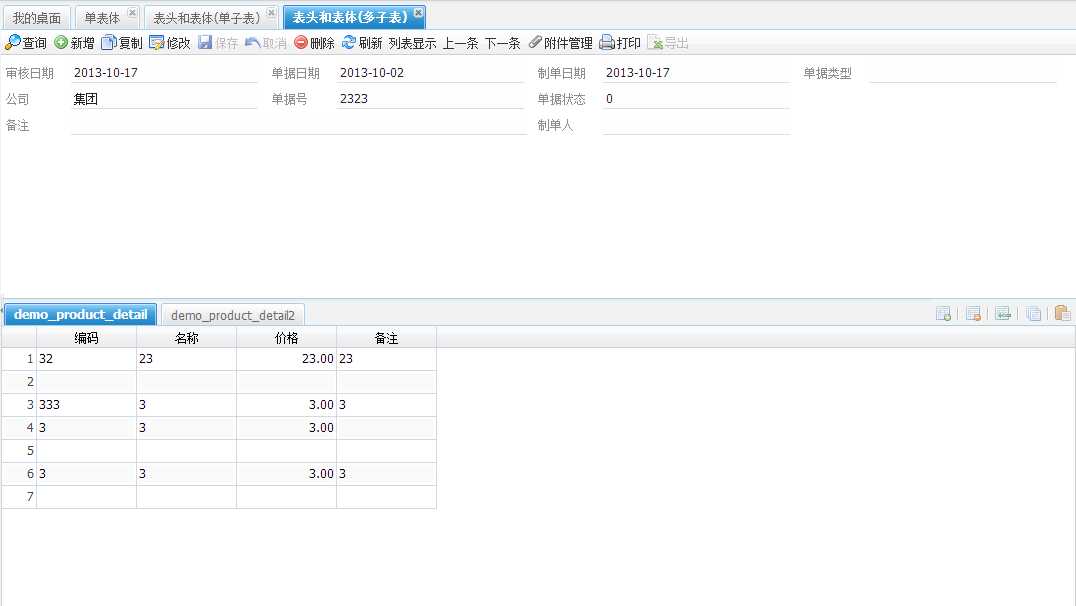
省略前面的步骤。
7、Service开发
|
1
2
3
4
5
6
7
8
9
10
11
12
13
14
15
16
17
18
19
20
21
22
23
24
25
26
27
28
29
30
31
32
33
34
35
36
37
38
39
40
41
42
43
44
45
46 |
/** * 产品,表头和表体(多表体) * * @author xuqc * @date 2013-10-17 下午02:44:40 */@Servicepublic class T212Service extends
AbsBillServiceImpl { public
String getBillType() { return
"PROD"; } private
AggregatedValueObject billInfo; public
AggregatedValueObject getBillInfo() { if(billInfo == null) { billInfo = new
ExAggProductVO(); VOTableVO vo = new
VOTableVO(); // 由于是档案型,所以这里手工创建billInfo vo.setAttributeValue(VOTableVO.BILLVO, ExAggProductVO.class.getName()); vo.setAttributeValue(VOTableVO.HEADITEMVO, ProductVO.class.getName()); vo.setAttributeValue(VOTableVO.PKFIELD, ProductVO.PK_PRODUCT); billInfo.setParentVO(vo); VOTableVO childVO = new
VOTableVO(); childVO.setAttributeValue(VOTableVO.BILLVO, ExAggProductVO.class.getName()); childVO.setAttributeValue(VOTableVO.HEADITEMVO, ProductDetailVO.class.getName()); childVO.setAttributeValue(VOTableVO.PKFIELD, ProductVO.PK_PRODUCT); childVO.setAttributeValue(VOTableVO.ITEMCODE, "demo_product_detail"); childVO.setAttributeValue(VOTableVO.VOTABLE, "demo_product_detail"); VOTableVO childVO1 = new
VOTableVO(); childVO1.setAttributeValue(VOTableVO.BILLVO, ExAggProductVO.class.getName()); childVO1.setAttributeValue(VOTableVO.HEADITEMVO, ProductDetail2VO.class.getName()); childVO1.setAttributeValue(VOTableVO.PKFIELD, ProductVO.PK_PRODUCT); childVO1.setAttributeValue(VOTableVO.ITEMCODE, "demo_product_detail2"); childVO1.setAttributeValue(VOTableVO.VOTABLE, "demo_product_detail2"); CircularlyAccessibleValueObject[] childrenVO = { childVO, childVO1 }; billInfo.setChildrenVO(childrenVO); } return
billInfo; }} |
8、Controller开发
|
1
2
3
4
5
6
7
8
9
10
11
12
13
14
15
16
17
18
19 |
/** * 主子表,多子表 * * @author xuqc * @date 2013-10-17 下午02:55:09 */@Controller@RequestMapping(value = "/busi/scene/t212")public class T212Controller extends
AbsBillController { @Autowired private
T212Service t212Service; @Override public
T212Service getService() { return
t212Service; }} |
9、jsp文件
|
1
2
3
4
5
6
7
8
9
10
11
12
13
14
15
16
17
18
19
20
21
22
23
24
25
26
27
28
29
30
31
32
33
34
35
36
37
38
39
40
41
42
43
44
45
46
47
48
49
50
51
52
53
54
55
56
57
58
59
60
61
62
63
64
65
66
67
68
69
70
71
72
73
74
75
76 |
<!DOCTYPE html PUBLIC "-//W3C//DTD HTML 4.01 Transitional//EN"
"http://www.w3.org/TR/html4/loose.dtd"><%@ page language="java"
pageEncoding="UTF-8" contentType="text/html; charset=UTF-8"%><html><head><meta http-equiv="Content-Type"
content="text/html; charset=UTF-8"
/><%@ include file="/common/header.jsp"%><script>function yellowRenderer(value,meta,record){ meta.style+=‘background-color: #FFF000;‘;}function redRenderer(value,meta,record){ meta.style+=‘background-color: #EE0000;‘;}</script></head><body><nw:Bill templetVO="${templetVO}"
headerGridImmediatelyLoad="true"
isBuildHeaderGrid="true" bodyGridsPagination="false,false"
headerGridCheckboxSelectionModel="true"
headerGridSingleSelect="false"
/></body><script type="text/javascript"> MyToolbar = Ext.extend(uft.jf.ToftToolbar, { getBtnArray : function(){ var btns = new
Array(); btns.push(this.btn_query); btns.push(this.btn_add); btns.push(this.btn_copy); btns.push(this.btn_edit); btns.push(this.btn_save); btns.push(this.btn_can); btns.push(this.btn_del); btns.push(this.btn_ref); btns.push(this.btn_list); btns.push(this.btn_card); btns.push(this.btn_prev); btns.push(this.btn_next); btns.push(this.btn_attach); btns.push(this.btn_print); btns.push(this.btn_export); return
btns; } }); MyBodyAssistToolbar = Ext.extend(uft.jf.BodyAssistToolbar,{ btn_row_add_handler : function(){ MyBodyAssistToolbar.superclass.btn_row_add_handler.call(this); var grid = this.getActiveBodyGrid(),datas = []; for(var i=0;i<100;i++){ var rowDefaultValues = this.getRowDefaultValues(grid.id); datas.push(rowDefaultValues); } grid.addRow(datas); grid.getStore().totalLength=grid.getStore().getTotalCount()+100; grid.updateInfo(); } }); ${moduleName}.appUiConfig.bodyAssistToolbar=new
MyBodyAssistToolbar(); ${moduleName}.appUiConfig.toolbar = new
MyToolbar(); var app = new
uft.jf.ToftPanel(${moduleName}.appUiConfig); function afterEditBody(e){ if(e.field = ‘categoryname‘){ //uft.Utils.setColumnHidden(‘demo_product_detail‘,{‘productprice‘:true}); } } function afterEditHead(field,value,oriValue){ if(e.field = ‘i‘){ //uft.Utils.setColumnHidden(‘demo_product_detail‘,{‘productprice‘:true}); } } Ext.onReady(function(){ //uft.Utils.setColumnHidden(‘demo_product‘,{‘nodecode‘:true}); }); </script> <%@ include file="/common/footer.jsp"%></html> |
具体的示例可以参考:http://xuqc.fangwei.name:9080/demo-webapp administrator/143305
NW开发教程系列六:表头和表体(多表体),布布扣,bubuko.com
原文:http://www.cnblogs.com/aimer311/p/3611561.html