
当你打开Safari的时候,输入网址,会有许多候选网址,点击后,自动填充到输入框,进入网页。
打开词典查单词的时候,输入前面部分字母,软件会给出符合的候选单词。
这样做的目的,是为了省去用户繁琐的输入,节省时间,提升用户体验。
先上效果图
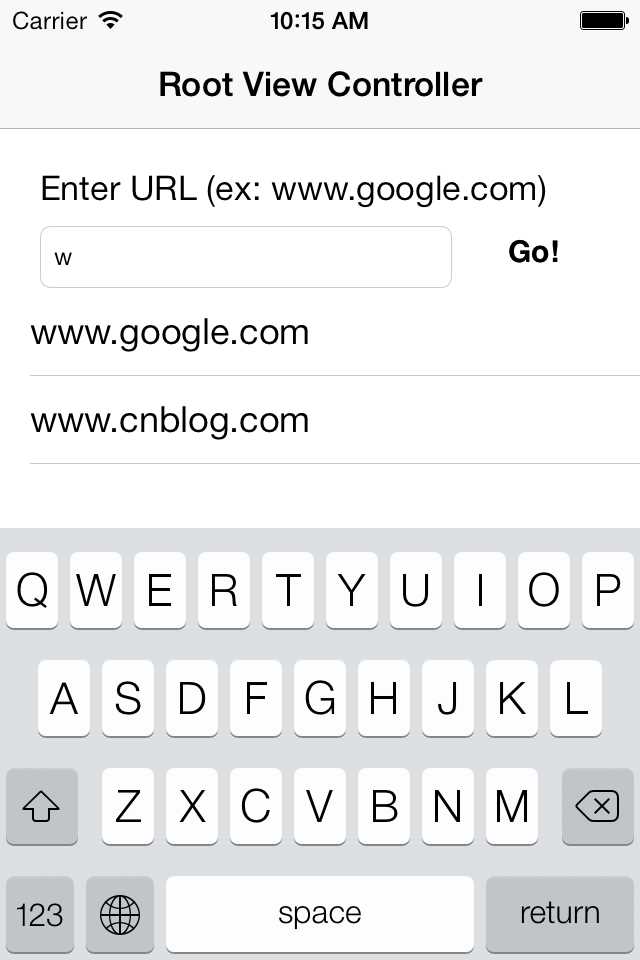
今天对基本的UITextField进行改装,让其具备此功能。
新建项目后,在Main.storyboard里,放好UItextField和UIButton。
下一步,使用control+drag将UITextField拖到interface文件里,选择outlet,名为*urlField
同理,UIButton拖进去,选择IBAction,名为goPressed
先引入将要使用的3个委托,两个是UITableView有关,一个用于收回键盘
建立两个Array, pastUrls和autocompleteUrls
建立一个UITableView用于呈现候选数据,下面是interface内代码
#import <UIKit/UIKit.h>@class WebViewController;@interface
RootViewController : UIViewController <UITableViewDelegate, UITableViewDataSource, UITextFieldDelegate> @property
(nonatomic, retain) UITextField *urlField;@property
(nonatomic, retain) NSMutableArray
*pastUrls;@property
(nonatomic, retain) NSMutableArray
*autocompleteUrls;@property
(nonatomic, retain) UITableView *autocompleteTableView;- (IBAction)goPressed;- (void)searchAutocompleteEntriesWithSubstring:(NSString
*)substring;@end |
pastUrls放入匹配的数据,初始化UITableView,并将其隐藏

- (void)viewDidLoad {
  self.pastUrls = [[NSMutableArray alloc] initWithObjects:@"www.google.com", @"www.cnblog.com", nil];
  self.autocompleteUrls = [[NSMutableArray alloc] init];

  autocompleteTableView = [[UITableView alloc] initWithFrame:CGRectMake(0, 80, 320, 120) style:UITableViewStylePlain];
  autocompleteTableView.delegate = self;
  autocompleteTableView.dataSource = self;
  autocompleteTableView.scrollEnabled = YES;
  autocompleteTableView.hidden = YES;
  [self.view addSubview:autocompleteTableView];


  [super viewDidLoad];
}
|
1
2
3
4
5
6
7
8
9
10
11
12 |
- (IBAction)goPressed:(id)sender { // 按下button,收回键盘,隐藏UITableView [urlField resignFirstResponder]; autocompleteTableView.hidden = YES; // Add the URL to the list of entered URLS as long as it isn‘t already there if
(![pastUrls containsObject:urlField.text]) { [pastUrls addObject:urlField.text]; } } |
|
1
2
3
4
5
6
7
8
9
10
11
12
13
14
15
16
17
18
19
20
21
22
23
24 |
- (void)searchAutocompleteEntriesWithSubstring:(NSString
*)substring { // Put anything that starts with this substring into the autocompleteUrls array // 过滤,剩下符合输入文字的候选 [autocompleteUrls removeAllObjects]; for(NSString
*curString in pastUrls) { NSRange
substringRange = [curString rangeOfString:substring]; if
(substringRange.location == 0) { [autocompleteUrls addObject:curString]; } } [autocompleteTableView reloadData];}#pragma mark UITextFieldDelegate methods//当用户增,删字符的时候,都会调用此方法<br>//- (BOOL)textField:(UITextField *)textField shouldChangeCharactersInRange:(NSRange)range replacementString:(NSString
*)string { autocompleteTableView.hidden = NO; NSString
*substring = [NSString
stringWithString:textField.text]; substring = [substring stringByReplacingCharactersInRange:range withString:string]; [self
searchAutocompleteEntriesWithSubstring:substring]; return
YES;} |
|
1
2
3
4
5
6
7
8
9
10
11
12
13
14
15
16
17
18
19
20
21
22
23
24
25
26
27
28 |
- (NSInteger)tableView:(UITableView *)tableView numberOfRowsInSection:(NSInteger) section { return
autocompleteUrls.count;}- (UITableViewCell *)tableView:(UITableView *)tableView cellForRowAtIndexPath:(NSIndexPath
*)indexPath { UITableViewCell *cell = nil; static
NSString *AutoCompleteRowIdentifier = @"AutoCompleteRowIdentifier"; cell = [tableView dequeueReusableCellWithIdentifier:AutoCompleteRowIdentifier]; if
(cell == nil) { cell = [[[UITableViewCell alloc] initWithStyle:UITableViewCellStyleDefault reuseIdentifier:AutoCompleteRowIdentifier] autorelease]; } cell.textLabel.text = [autocompleteUrls objectAtIndex:indexPath.row]; return
cell;}#pragma mark UITableViewDelegate methods//将用户选择的候选网址,设置到输入框里,并调用button的方法- (void)tableView:(UITableView *)tableView didSelectRowAtIndexPath:(NSIndexPath
*)indexPath { UITableViewCell *selectedCell = [tableView cellForRowAtIndexPath:indexPath]; urlField.text = selectedCell.textLabel.text; [self
goPressed]; } |
UITextField AutoComplete iOS输入框内文本自动完成,布布扣,bubuko.com
UITextField AutoComplete iOS输入框内文本自动完成
原文:http://www.cnblogs.com/sparks/p/3611038.html