
当overflow-x和overflow-y其中一个设置为visible时,如果另一个不是visible,那么它会被自动重置为auto
看看效果先:
第一次遇到这个问题时,我还以为是chrome的一个bug,结果测试了一下,所有浏览器都是这样的,
看一下效果

.div1 {
    width: 100px;
    height: 100px;
    background: #eee;
    position: relative;
    overflow-x: hidden;
    overflow-y: visible;
}
.div2 {
    width: 100px;
    height: 100px;
    background: #f00;
    position: absolute;
    left: 50px;
    top: 50px;
}
<div class="div1">
    <div class="div2"></div>
</div>
理想中的效果是
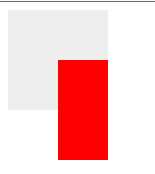
但是结果却是
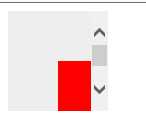
我只能说,这太不合理了,对于这个问题,w3c规范是这么说的
The computed values of ‘overflow-x’ and ‘overflow-y’ are the same as their specified
values, except that some combinations with ‘visible’ are not possible: if one is specified as
‘visible’ and the other is
‘scroll’ or ‘auto’,
then ‘visible’ is set to
‘auto’. The
computed value of ‘overflow’ is equal to the computed value of ‘overflow-x’ if ‘overflow-y’ is the same; otherwise it is the pair of
computed values of ‘overflow-x’ and ‘overflow-y’.
翻译过来就是:
overflow-x和overflow-y的计算值跟给定的值相同,除了某些跟‘visible‘值的不合理组合:如果一个其中一个属性的值被赋为‘visible‘,而另一个被赋值为‘scroll‘或‘auto‘,那么‘visible‘会被重置为‘auto‘。overflow的计算值与overflow-x相等(如果overflow-y相同的话);否则就是一对overflow-x和overflow-y的计算值
其实另一个值设置为hidden的时候,visible也会被重置为auto
查了很久,就是不知道当一个属性设置为visible的时候,另一个设置为scroll这些值有啥不合理的地方
现在只能这么想,规范就是规范,既然规范这么说了,那就按照规范来……真是无奈
参考资料:
https://developer.mozilla.org/zh-CN/docs/CSS/overflow-x
overflow-x和overflow-y其中一个设置为visible时的奇怪现象,布布扣,bubuko.com
overflow-x和overflow-y其中一个设置为visible时的奇怪现象
原文:http://www.cnblogs.com/strayling/p/3610446.html