
1、 首先安装先下载redis数据库
下载地址: http://code.google.com/p/servicestack/wiki/RedisWindowsDownload
目前是2.02版本,也可以到我的115网盘下载: http://115.com/lb/5lbf215
2、解压安装文件。得到以下目录
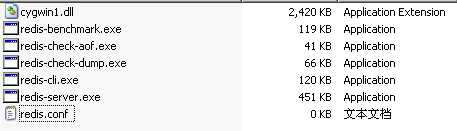
redis-server.exe:服务程序
redis-check-dump.exe:本地数据库检查
redis-check-aof.exe:更新日志检查
redis.conf 配置文件
3、启动Redis服务(conf文件指定配置文件,若不指定则默认):
D:\redis-2.0.2>redis-server.exe redis.conf
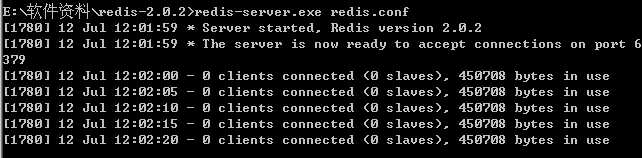
4、 启动cmd窗口要一直开着,关闭后则Redis服务关闭。
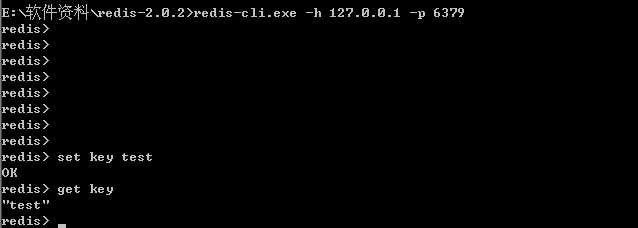
这时服务开启着,另外开一个窗口进行,设置客户端:
D:\redis-2.0.2>redis-cli.exe -h 202.117.16.133 -p 6379
然后可以开始玩了:
二、php5.4 连接使用redis ,
1、先下载 phpredis.dll扩展包。下载地址: https://github.com/nicolasff/phpredis/downloads
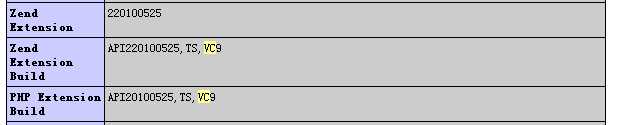
用phpinfo 查看到时TS vc9。那么下载的版本就对应好
2、解压缩之后得到两个文件,分别将两个文件复制到php 目录的 ext目录下。

3、修改php.ini文件。加入extension 扩展
extension=php_igbinary.dll
extension=php_redis.dll
4、
重启apache ,查看phpinfo 界面。如下则表示安装成功

5、phpredis hellow word 开始你的redis使用
<?php $redis =
new Redis();
//redis对象 $redis->connect("192.168.60.6","6379");
//连接redis服务器 $redis->set("test","Hello
World");
//set字符串值 echo $redis->get("test");
//获取值?> |
php操作redis 的详细手册。中文手册: http://www.cnblogs.com/zcy_soft/archive/2012/09/21/2697006.html
redis
配置文件详细说明,以下摘至 http://www.cnblogs.com/wenanry/archive/2012/02/26/2368398.html
感谢网友分享。
1. Redis默认不是以守护进程的方式运行,可以通过该配置项修改,使用yes启用守护进程
daemonize no
2. 当Redis以守护进程方式运行时,Redis默认会把pid写入/var/run/redis.pid文件,可以通过pidfile指定
pidfile /var/run/redis.pid
3. 指定Redis监听端口,默认端口为6379,作者在自己的一篇博文中解释了为什么选用6379作为默认端口,因为6379在手机按键上MERZ对应的号码,而MERZ取自意大利歌女Alessia Merz的名字
port 6379
4. 绑定的主机地址
bind 127.0.0.1
5.当 客户端闲置多长时间后关闭连接,如果指定为0,表示关闭该功能
timeout 300
6. 指定日志记录级别,Redis总共支持四个级别:debug、verbose、notice、warning,默认为verbose
loglevel verbose
7. 日志记录方式,默认为标准输出,如果配置Redis为守护进程方式运行,而这里又配置为日志记录方式为标准输出,则日志将会发送给/dev/null
logfile stdout
8. 设置数据库的数量,默认数据库为0,可以使用SELECT <dbid>命令在连接上指定数据库id
databases 16
9. 指定在多长时间内,有多少次更新操作,就将数据同步到数据文件,可以多个条件配合
save <seconds> <changes>
Redis默认配置文件中提供了三个条件:
save 900 1
save 300 10
save 60 10000
分别表示900秒(15分钟)内有1个更改,300秒(5分钟)内有10个更改以及60秒内有10000个更改。
10. 指定存储至本地数据库时是否压缩数据,默认为yes,Redis采用LZF压缩,如果为了节省CPU时间,可以关闭该选项,但会导致数据库文件变的巨大
rdbcompression yes
11. 指定本地数据库文件名,默认值为dump.rdb
dbfilename dump.rdb
12. 指定本地数据库存放目录
dir ./
13. 设置当本机为slav服务时,设置master服务的IP地址及端口,在Redis启动时,它会自动从master进行数据同步
slaveof <masterip> <masterport>
14. 当master服务设置了密码保护时,slav服务连接master的密码
masterauth <master-password>
15. 设置Redis连接密码,如果配置了连接密码,客户端在连接Redis时需要通过AUTH <password>命令提供密码,默认关闭
requirepass foobared
16. 设置同一时间最大客户端连接数,默认无限制,Redis可以同时打开的客户端连接数为Redis进程可以打开的最大文件描述符数,如果设置 maxclients 0,表示不作限制。当客户端连接数到达限制时,Redis会关闭新的连接并向客户端返回max number of clients reached错误信息
maxclients 128
17. 指定Redis最大内存限制,Redis在启动时会把数据加载到内存中,达到最大内存后,Redis会先尝试清除已到期或即将到期的Key,当此方法处理 后,仍然到达最大内存设置,将无法再进行写入操作,但仍然可以进行读取操作。Redis新的vm机制,会把Key存放内存,Value会存放在swap区
maxmemory <bytes>
18. 指定是否在每次更新操作后进行日志记录,Redis在默认情况下是异步的把数据写入磁盘,如果不开启,可能会在断电时导致一段时间内的数据丢失。因为 redis本身同步数据文件是按上面save条件来同步的,所以有的数据会在一段时间内只存在于内存中。默认为no
appendonly no
19. 指定更新日志文件名,默认为appendonly.aof
appendfilename appendonly.aof
20. 指定更新日志条件,共有3个可选值:
no:表示等操作系统进行数据缓存同步到磁盘(快)
always:表示每次更新操作后手动调用fsync()将数据写到磁盘(慢,安全)
everysec:表示每秒同步一次(折衷,默认值)
appendfsync everysec
21. 指定是否启用虚拟内存机制,默认值为no,简单的介绍一下,VM机制将数据分页存放,由Redis将访问量较少的页即冷数据swap到磁盘上,访问多的页面由磁盘自动换出到内存中(在后面的文章我会仔细分析Redis的VM机制)
vm-enabled no
22. 虚拟内存文件路径,默认值为/tmp/redis.swap,不可多个Redis实例共享
vm-swap-file /tmp/redis.swap
23. 将所有大于vm-max-memory的数据存入虚拟内存,无论vm-max-memory设置多小,所有索引数据都是内存存储的(Redis的索引数据 就是keys),也就是说,当vm-max-memory设置为0的时候,其实是所有value都存在于磁盘。默认值为0
vm-max-memory 0
24. Redis swap文件分成了很多的page,一个对象可以保存在多个page上面,但一个page上不能被多个对象共享,vm-page-size是要根据存储的 数据大小来设定的,作者建议如果存储很多小对象,page大小最好设置为32或者64bytes;如果存储很大大对象,则可以使用更大的page,如果不 确定,就使用默认值
vm-page-size 32
25. 设置swap文件中的page数量,由于页表(一种表示页面空闲或使用的bitmap)是在放在内存中的,,在磁盘上每8个pages将消耗1byte的内存。
vm-pages 134217728
26. 设置访问swap文件的线程数,最好不要超过机器的核数,如果设置为0,那么所有对swap文件的操作都是串行的,可能会造成比较长时间的延迟。默认值为4
vm-max-threads 4
27. 设置在向客户端应答时,是否把较小的包合并为一个包发送,默认为开启
glueoutputbuf yes
28. 指定在超过一定的数量或者最大的元素超过某一临界值时,采用一种特殊的哈希算法
hash-max-zipmap-entries 64
hash-max-zipmap-value 512
29. 指定是否激活重置哈希,默认为开启(后面在介绍Redis的哈希算法时具体介绍)
activerehashing yes
30. 指定包含其它的配置文件,可以在同一主机上多个Redis实例之间使用同一份配置文件,而同时各个实例又拥有自己的特定配置文件
include /path/to/local.conf
#
 Redis configuration file example
#
Note on units: when memory size is needed, it is possible to specifiy#
it in the usual form of 1k 5GB 4M and so
forth:##
1k => 1000 bytes#
1kb => 1024 bytes#
1m => 1000000 bytes#
1mb => 1024*1024 bytes#
1g => 1000000000 bytes#
1gb => 1024*1024*1024 bytes##
units are case insensitive
so 1GB 1Gb 1gB are all the same.#
By default Redis
does not run as a
daemon. Use ‘yes‘ if you
need it.#
Note that Redis will write a pid file in /var/run/redis.pid
when daemonized.daemonize
yes#
When running daemonized, Redis writes a pid file in /var/run/redis.pid
by#
default.
You can specify a custom pid file location here.pidfile
/usr/local/redis/run/redis.pid#
Accept connections on the specified port, default is
6379port
6379#
If you want you can bind a single interface,
if the
bind option is not#
specified all the interfaces will listen for incoming
connections.##bind
192.168.20.12#
Close the connection after a client is idle for N
seconds (0 to disable)timeout
300#
Set server verbosity to ‘debug‘#
it can be one of:#
debug (a lot of information, useful for development/testing)#
verbose (many rarely useful info, but not a mess like the debug level)#
notice (moderately verbose, what you want in production probably)#
warning (only very important / critical messages are logged)loglevel
verbose#
Specify the log file name. Also ‘stdout‘ can
be used to force#
Redis to log on the standard output. Note that if you
use standard#
output for logging
but daemonize, logs will be sent to /dev/null#logfile
stdoutlogfile
./logs/redis.log#
Set the number of databases. The default database
is DB 0, you can select#
a different one on a per-connection basis using SELECT <dbid> where#
dbid is a number between 0 and ‘databases‘-1databases
16################################
SNAPSHOTTING ###################################
Save the DB on disk:##
save <seconds> <changes>##
Will save the DB if both
the given number of seconds and the
given#
number of write operations against the DB occurred.##
In the example below the behaviour will be to save:#
after 900 sec (15 min) if at
least 1 key changed#
after 300 sec (5 min) if at
least 10 keys changed#
after 60 sec if at
least 10000 keys changed##
Note: you can disable saving at all commenting all the "save" lines.save
900 1save
300 10save
60 10000#
Compress string objects using LZF when dump .rdb databases?#
For default that‘s
set to ‘yes‘
as it‘s
almost always a win.#
If you want to save some CPU in the saving child set it to ‘no‘ but#
the dataset will likely be bigger if you
have compressible values or keys.rdbcompression
yes#
The filename where to dump the DBdbfilename
dump.rdb#
The working directory.##
The DB will be written inside this directory, with the filename specified#
above using the ‘dbfilename‘ configuration
directive.##
Also the Append Only File will be created inside this directory.##
Note that you must specify a directory here, not a file name.dir
./data/#################################
REPLICATION ##################################
Master-Slave replication. Use slaveof to make a Redis instance a copy of#
another Redis server. Note that the configuration is local to the slave#
so for example
it is possible to configure the slave to save the DB with a#
different interval, or to
listen to another port, and so
on.##
slaveof <masterip> <masterport>#
If the master is password protected (using
the "requirepass" configuration#
directive below) it is possible to tell the slave to authenticate before#
starting the replication synchronization process, otherwise the master will#
refuse the slave request.##
masterauth <master-password>##################################
SECURITY ####################################
Require clients to issue AUTH <PASSWORD> before processing any other#
commands. This might be useful in environments in which you do not
trust#
others with access to the host running redis-server.##
This should stay commented out for backward
compatibility and because
most#
people do not
need auth (e.g. they run their own servers).##
Warning: since Redis is pretty fast an outside user can try up
to#
150k passwords per second against a good box. This means that you should#
use a
very strong password otherwise it will be very easy to break.##
requirepass foobared###################################
LIMITS #####################################
Set the max number of connected clients at the same time. By default there#
is no limit, and it‘s
up to the number of file descriptors the Redis process#
is able to open. The special value ‘0‘ means
no limits.#
Once the limit is reached Redis will close all the new connections
sending#
an error ‘max
number of clients reached‘.##
maxclients 128#
Don‘t use more
memory than the specified amount of bytes.#
When the memory limit is reached Redis will try to
remove keys with an#
EXPIRE set. It will try to
start freeing keys that are going to expire#
in little time and preserve
keys with a longer time to live.#
Redis will also try to
remove objects from free lists if possible.##
If all this fails, Redis will start to reply with errors to commands#
that will use more
memory, like SET, LPUSH, and so
on, and will
continue#
to reply to most read-only commands like GET.##
WARNING: maxmemory can be a good idea mainly if you
want to use Redis
as a#
‘state‘ server
or cache,
not as a
real DB. When Redis is used as a
real#
database the memory usage will grow over the weeks, it will be obvious if#
it is going to use too
much memory in the long run, and you‘ll
have the time#
to upgrade. With maxmemory after the limit is reached you‘ll start to get#
errors for write
operations, and this
may even lead to DB inconsistency.##
maxmemory <bytes>##############################
APPEND ONLY MODE ################################
By default Redis
asynchronously dumps the dataset on disk. If you can live#
with the idea that the latest records will be lost if something
like a crash#
happens this is the preferred way to run Redis. If instead you care a lot#
about your data and don‘t
want to that a single record can get lost you should#
enable the append only mode: when this mode is enabled Redis will append#
every write operation received in the file appendonly.aof. This file will#
be read on startup in order to rebuild the full dataset in memory.##
Note that you can have both the async dumps and the
append only file if you#
like (you have to comment the "save" statements
above to disable the dumps).#
Still if append
only mode is enabled Redis will load the data from the#
log file at startup ignoring the dump.rdb file.##
IMPORTANT: Check the BGREWRITEAOF to check how to rewrite the append#
log file in background when it gets too big.appendonly
yes#
The name of the append only file (default:
"appendonly.aof")appendfilename
appendonly.aof#
The fsync() call tells the Operating System to actually write data on disk#
instead to wait for more
data in the output buffer. Some OS will really flush#
data on disk, some other OS will just try to
do it
ASAP.##
Redis supports three different modes:##
no: don‘t fsync, just let the OS flush the
data when it wants. Faster.#
always: fsync after every write to the append only log . Slow, Safest.#
everysec: fsync only if one
second passed since the last fsync. Compromise.##
The default is
"everysec" that‘s
usually the right compromise between#
speed and data
safety. It‘s up to you to understand if you
can relax this to#
"no" that
will will let the operating system flush the
output buffer when#
it wants, for better
performances (but if you
can live with the idea of#
some data loss consider the default persistence
mode that‘s snapshotting),#
or on
the contrary, use "always" that‘s
very slow but a bit safer than#
everysec.##
If unsure, use "everysec".#
appendfsync alwaysappendfsync
everysec#
appendfsync no################################
VIRTUAL MEMORY ################################
Virtual Memory allows Redis to work with datasets bigger than the actual#
amount of RAM needed to hold the whole dataset in memory.#
In order to do so
very used keys are taken in memory while the
other keys#
are swapped into a swap file, similarly to what operating systems do#
with memory pages.##
To enable VM just set ‘vm-enabled‘ to
yes, and set
the following three#
VM parameters accordingly to your needs.vm-enabled
no#
vm-enabled yes#
This is the path of the Redis swap file. As you can guess, swap files#
can‘t be shared by different Redis instances, so make sure to use a
swap#
file for every
redis process you are running. Redis will complain if the#
swap file is already in use.##
The best kind of storage for the
Redis swap file (that‘s accessed at random)#
is a Solid State Disk (SSD).##
*** WARNING *** if you
are using a shared hosting the default of
putting#
the swap file under /tmp is not secure. Create a dir with access granted#
only to Redis user and configure
Redis to create the swap file there.vm-swap-file
/tmp/redis.swap#
vm-max-memory configures the VM to use at
max the specified amount of#
RAM. Everything that deos not fit will be swapped on disk *if*
possible, that#
is, if there
is still enough contiguous space in the swap file.##
With vm-max-memory 0 the system will swap everything it can. Not a good#
default,
just specify the max amount of RAM you can in bytes, but it‘s#
better to leave some margin. For instance specify an amount of RAM#
that‘s more or less
between 60 and 80%
of your free RAM.vm-max-memory
0#
Redis swap files is split into pages. An object can be saved using multiple#
contiguous pages, but pages can‘t be shared between different objects.#
So if your
page is too big, small objects swapped out on disk will waste#
a lot of space. If you page is too small, there is less space in the swap#
file (assuming you configured the same number of total swap file pages).##
If you use a
lot of small objects, use a
page size of 64 or 32
bytes.#
If you use a
lot of big objects, use a
bigger page size.#
If unsure, use the
default :)vm-page-size
32#
Number of total memory pages in the swap file.#
Given that the page table (a bitmap of free/used pages) is taken in memory,#
every 8 pages on disk will consume 1 byte of RAM.##
The total swap size is vm-page-size * vm-pages##
With the default of
32-bytes memory pages and 134217728
pages Redis will#
use a
4 GB swap file, that will use 16
MB of RAM for the
page table.##
It‘s better to use the
smallest acceptable value for your
application,#
but the default is
large in order to work in most conditions.vm-pages
134217728#
Max number of VM I/O threads running at the same time.#
This threads are used to read/write data from/to swap file, since they#
also encode and decode
objects from disk to memory or the
reverse, a bigger#
number of threads can help with big objects even if they
can‘t help with#
I/O itself as the
physical device may not be able to couple with many#
reads/writes operations at the same time.##
The special value of 0 turn off threaded I/O and enables
the blocking#
Virtual Memory implementation.vm-max-threads
4###############################
ADVANCED CONFIG ################################
Glue small output buffers together in order to send small replies in a#
single TCP packet. Uses a bit more CPU but most of the times it is a win#
in terms of number of queries per second. Use ‘yes‘ if unsure.glueoutputbuf
yes#
Hashes are encoded in a special way (much more memory efficient) when they#
have at max a given numer of elements, and the
biggest element does not#
exceed a given threshold. You can configure this limits with the following#
configuration directives.hash-max-zipmap-entries
64hash-max-zipmap-value
512#
Active rehashing uses 1 millisecond every 100 milliseconds of CPU time in#
order to help rehashing the main Redis hash table (the one mapping top-level#
keys to values). The hash table implementation redis uses (see dict.c)#
performs a lazy rehashing: the more operation you run into an hash table#
that is rhashing, the more rehashing "steps" are
performed, so if the#
server is idle the rehashing is never complete and some
more memory is used#
by the hash table.##
The default is
to use this
millisecond 10 times every second in order to#
active rehashing the main dictionaries, freeing memory when possible.##
If unsure:#
use "activerehashing
no" if you
have hard latency requirements and it
is#
not a good thing in your environment that Redis can reply form time to time#
to queries with 2 milliseconds delay.##
use "activerehashing
yes" if you
don‘t have such hard requirements but#
want to free memory asap when possible.activerehashing
yes##################################
INCLUDES ####################################
Include one or more
other config files here. This is useful if you#
have a standard template that goes to all redis server but also need#
to customize a few per-server settings. Include files can include#
other files, so use this
wisely.##
include /path/to/local.conf#
include /path/to/other.conf |
windows下redis的安装配置和php扩展使用phpredis,布布扣,bubuko.com
windows下redis的安装配置和php扩展使用phpredis
原文:http://www.cnblogs.com/cuiziwei/p/3582966.html