
【web开发】☆★之利用POI操作Excel表格系列教程【4】设置时间单元格
package com.xiaoye.demo;
import java.io.FileOutputStream;
import java.util.Calendar;
import java.util.Date;
import org.apache.poi.hssf.usermodel.HSSFWorkbook;
import org.apache.poi.ss.usermodel.Cell;
import org.apache.poi.ss.usermodel.CellStyle;
import org.apache.poi.ss.usermodel.CreationHelper;
import org.apache.poi.ss.usermodel.Row;
import org.apache.poi.ss.usermodel.Sheet;
import org.apache.poi.ss.usermodel.Workbook;
/**
 *
 * @author 小夜的传说
 * 2014-2-21 上午9:47:17
 * 处理时间格式单元格
 */
public class ProTime {
    public static void main(String[] args) throws Exception {
        Workbook wb=new HSSFWorkbook();
        Sheet sheet=wb.createSheet("第一个Sheet页");
        Row row=sheet.createRow(0);
        row.createCell(0).setCellValue(new Date());//第一列添加时间

        CreationHelper creationHelper=wb.getCreationHelper();
        CellStyle cellStyle=wb.createCellStyle();//设置样式
        cellStyle.setDataFormat(creationHelper.createDataFormat().getFormat("yyyy-mm-dd hh:mm:ss"));
        Cell cell=row.createCell(1);
        cell.setCellValue(new Date());//第2列添加时间
        cell.setCellStyle(cellStyle);//将

        //也可以这样获取时间 日历的方式
        cell=row.createCell(2);
        cell.setCellValue(Calendar.getInstance());//第3列添加时间
        cell.setCellStyle(cellStyle);


        FileOutputStream out=new FileOutputStream("d://设置时间单元格.xls");
        wb.write(out);
        out.close();
        System.out.println("end");
    }
}
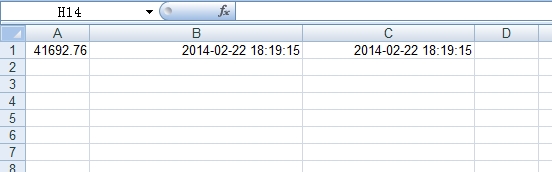
综上可知,时间日期必须处理之后才可以在Excel中显示
效果图:
本文出自 “诺言永远依恋小柴、、、” 博客,请务必保留此出处http://1936625305.blog.51cto.com/6410597/1362147
【web开发】☆★之利用POI操作Excel表格系列教程【4】设置时间单元格
原文:http://1936625305.blog.51cto.com/6410597/1362147