这里str就是配置文件中的”/resource/files/”了。

SpringBoot工程默认读取application.properties配置文件。如果需要自定义properties文件,如何读取呢?
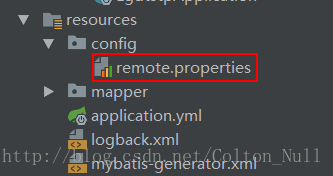
在resource目录下新建一个config文件夹,然后新建一个.properties文件放在该文件夹下。如图remote.properties所示
remote.uploadFilesUrl=/resource/files/
remote.uploadPicUrl=/resource/pic/
@Configuration
@ConfigurationProperties(prefix = "remote", ignoreUnknownFields = false)
@PropertySource("classpath:config/remote.properties")
@Data
@Component
public class RemoteProperties {
private String uploadFilesUrl;
private String uploadPicUrl;
}
其中
@Configuration 表明这是一个配置类
@ConfigurationProperties(prefix = "remote", ignoreUnknownFields = false) 该注解用于绑定属性。prefix用来选择属性的前缀,也就是在remote.properties文件中的“remote”,ignoreUnknownFields是用来告诉SpringBoot在有属性不能匹配到声明的域时抛出异常。
@PropertySource("classpath:config/remote.properties") 配置文件路径
@Data 这个是一个lombok注解,用于生成getter&setter方法,详情请查阅lombok相关资料
@Component 标识为Bean
四、如何使用?
在想要使用配置文件的方法所在类上表上注解
EnableConfigurationProperties(RemoteProperties.class)
并自动注入
@Autowired
RemoteProperties remoteProperties;
在方法中使用 remoteProperties.getUploadFilesUrl()就可以拿到配置内容了。
@EnableConfigurationProperties(RemoteProperties.class)
@RestController
public class TestService{
    @Autowired
    RemoteProperties remoteProperties;

    public void test(){
        String str = remoteProperties.getUploadFilesUrl();
        System.out.println(str);
    }
}
这里str就是配置文件中的”/resource/files/”了。
SpringBoot下读取自定义properties配置文件
原文:https://www.cnblogs.com/ixtao/p/15021915.html