
本篇博文主要介绍如何将UI元素与数据进行绑定、数据绑定的方向、数据更改通知、数据转换、数据绑定支持的绑定方案。
数据绑定是一种简单方式来显示数据,UI元素与数据对象之间的连接或绑定是允许数据在两者之间流动的。另外建立了绑定且数据发生变化时,相应的UI元素会自动显示变化。
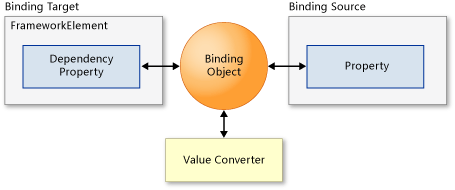
从上面图可以知道,每个绑定必须指定一个源和一个目标。
其中源对象可以是任何CLR对象,包括目标元素自身和其他UI元素。目标可以是FrameworkElement的任何DependencyProperty(依赖属性)。
数据绑定引擎从Binding对象获取以下内容:
1)源对象和目标对象;
2)数据流的方向;
3)值转换器;
例如:使用C#代码和XAML将TextBox的Foreground属性进行绑定。
XAML代码:
<TextBox x:Name="MyTextBox" Text="Text" Foreground="{Binding Brush1, Mode=OneWay}"/>
C#代码:
MyColors textcolor = new MyColors();
textcolor.Brush1 = new SolidColorBrush(Colors.Red);
MyTextBox.DataContext = textcolor;
绑定是使用{Binding…}语法在XAML中创建的。源是通过设置TextBox的DataContent属性在代码中设置的。
另外数据是会被继承的。若我们在某个父元素上设置数据上下文,那么其子元素将使用同一数据。我们可以通过设置Binding.Path属性绑定到源对象的某个属性。
每一个绑定都包含一个Mode属性,用于确定数据流动的方式和时间。
三种类型的绑定:
1)OneTime:绑定会在创建时使用源数据更新目标。
2)OneWay:绑定会在创建时以及数据发生更改时使用源数据更新目标(默认模式)。
3)TwoWay:绑定会在目标和源中的任一个发生更改时同时更新目标和源。
当源数据对象进行了更改,如何将新的源数据对象传递给目标对象呢?解决办法是源数据对象继承INotifyPropertyChanged 接口。因为INotifyPropertyChanged 接口提供了PropertyChanged 事件,该事件会告诉数据绑定引擎,源对象已经改变,方便更改目标值。
例如:
// Create a class that implements INotifyPropertyChanged.
public class MyColors : INotifyPropertyChanged
{
private SolidColorBrush _Brush1;
// Declare the PropertyChanged event.
public event PropertyChangedEventHandler PropertyChanged;
// Create the property that will be the source of the binding.
public SolidColorBrush Brush1
{
get { return _Brush1; }
set
{
_Brush1 = value;
// Call NotifyPropertyChanged when the source property
// is updated.
NotifyPropertyChanged("Brush1");
}
}
// NotifyPropertyChanged will raise the PropertyChanged event,
// passing the source property that is being updated.
public void NotifyPropertyChanged(string propertyName)
{
if (PropertyChanged != null)
{
PropertyChanged(this,
new PropertyChangedEventArgs(propertyName));
}
}
}
示例代码中MyColors类继承了INotifyPropertyChanged 接口,当Brush1属性更改时将触发PropertyChanged事件通知目标对象以及更改。
当我们存储的数据在UI界面显示的时候,对用户来讲不友好时,可以将数据进行相应的转换进行显示。这时我们就需要一个数据的转换器了。
我们可以在任意的绑定上设置转换器,并且自定义转换器类必须继承实现IValueConverter 接口。
例如:
// Custom class implements the IValueConverter interface.
public class DateToStringConverter : IValueConverter
{
#region IValueConverter Members
// Define the Convert method to change a DateTime object to
// a month string.
public object Convert(object value, Type targetType,
object parameter, string language)
{
// value is the data from the source object.
DateTime thisdate = (DateTime)value;
int monthnum = thisdate.Month;
string month;
switch (monthnum)
{
case 1:
month = "January";
break;
case 2:
month = "February";
break;
default:
month = "Month not found";
break;
}
// Return the value to pass to the target.
return month;
}
// ConvertBack is not implemented for a OneWay binding.
public object ConvertBack(object value, Type targetType,
object parameter, string language)
{
throw new NotImplementedException();
}
#endregion
}
当从源对象传递数据时,绑定引擎会调用Convert 并将返回的数据传递回目标。
当从目标传递数据时,绑定引擎会调用ConvertBack 并将返回的数据传递回源。
XAML代码中设置Converter:
<UserControl.Resources>
<local:DateToStringConverter x:Key="Converter1"/>
</UserControl.Resources>
...
<TextBlock Grid.Column="0"
Text="{Binding Month, Converter={StaticResource Converter1}}"/>
转换器中还有两个可选参数:ConverterLanguage(该参数允许指定在转换中使用的语言)和 ConverterParameter(该参数允许为转换逻辑传递一个参数)。
注意:若在数据转换中存在错误,最好不要抛出异常,而是返回DependencyProperty.UnsetValue,它将停止数据传输。
| 方案 | C# |
| 绑定到对象 | 可以为任何对象 |
| 从绑定对象中获取属性更改更新 | 数据对象必须实现INotifyPropertyChanged接口 |
| 绑定到集合 | 使用List(Of T) |
| 从绑定集合中获取集合更改更新 | 使用ObservableCollection(Of T) |
| 实现支持绑定的集合 | 扩展 List(Of T) 或实现 IList、IList(属于 Object)、IEnumerable 或 IEnumerable(属于 Object)。绑定到通用 IList(Of T) 和 IEnumerable(Of T) 的操作不受支持 |
| 实现支持集合更改更新的集合 | 扩展ObservableCollection(Of T) 或实现(非通用)IList 和 INotifyCollectionChanged |
| 实现支持增量加载的集合 | 扩展 ObservableCollection(Of T) 或实现(非通用)IList 和 INotifyCollectionChanged。此外,还实现ISupportIncrementalLoading |
注:该表格根据MSDN提供的文档进行相应的整理。
更多关于数据绑定的文章可参考:
1.数据绑定概述;
原文:http://www.cnblogs.com/lonelyxmas/p/3988340.html