
Hystrix图形化Dashboard一般是用来监控 被调用方/服务提供者 的,监控其被调用的情况。因此在提供方得加入下面的依赖:
        <dependency>
            <groupId>org.springframework.boot</groupId>
            <artifactId>spring-boot-starter-actuator</artifactId>
        </dependency>
然后还没有完,还需要在 服务提供者这一方的IOC容器添加一个对象,如下:
public class HystrixPaymentApplication {

    public static void main(String[] args) {
        SpringApplication.run(HystrixPaymentApplication.class, args);
    }

    /**
     * 此配置是为了服务监控而配置,与服务器容错本身无关,springcloud升级后的坑
     * ServletRegistrationBean因为springboot的默认路径不是/hystrix.stream
     * 只要在自己的项目里配置上下文的servlet就可以了
     */
    @Bean
    public ServletRegistrationBean getservlet(){
        HystrixMetricsStreamServlet streamServlet = new HystrixMetricsStreamServlet();
        ServletRegistrationBean<HystrixMetricsStreamServlet> registrationBean = new ServletRegistrationBean<>(streamServlet);
        registrationBean.setLoadOnStartup(1);
        registrationBean.addUrlMappings("/hystrix.stream");
        registrationBean.setName("HystrixMetricsStreamServlet");
        return registrationBean;
    }
}
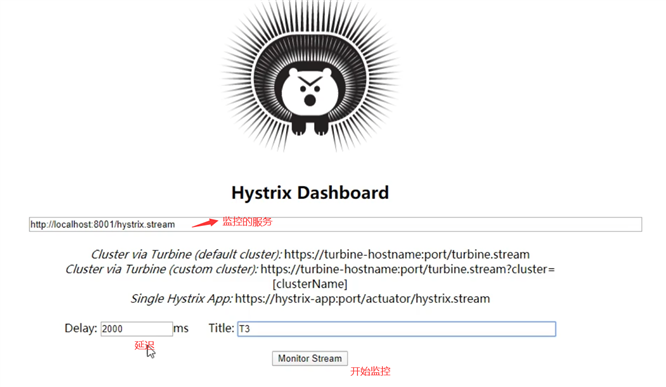
这样就可以启动注册中心,服务提供者,监控程序,访问监控程序的后台界面,输入服务提供者的地址:
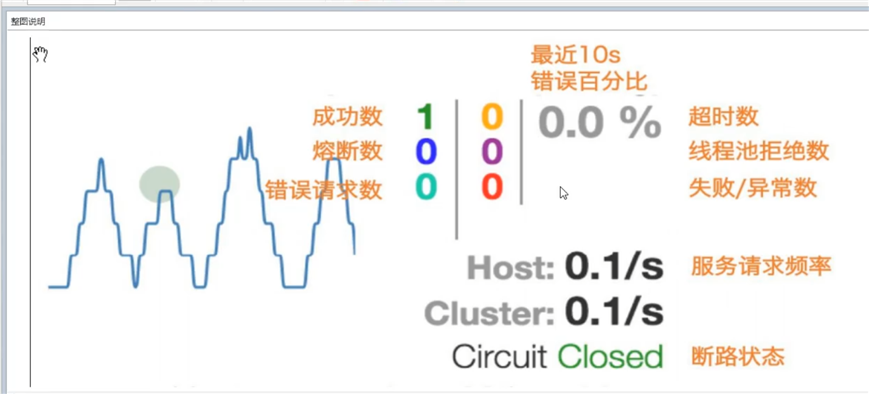
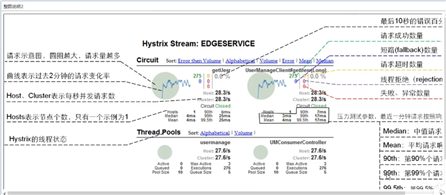
监控界面如下:

springcloud-Hystrix图形化Dashboard实战监控
原文:https://www.cnblogs.com/ibcdwx/p/14440590.html