
#! /bin/bash
. /etc/init.d/functions
###install dependency packages######
[ `rpm -qa | grep openssl-devel` ] || yum -y install  openssl-devel
[ `rpm -qa | grep pcre-devel` ] || yum -y install  pcre-devel
###creat user####
id www &> /dev/null
[ `echo $?` -eq 0 ] || useradd -M -s /sbin/nologin www
###Download nginx###
[ -d /root/tools ] || mkdir -p /root/tools
[ -d /application ] || mkdir -p /application
Nginx_Install() {
    cd  /root/tools
    wget -P /root/tools http://nginx.org/download/nginx-1.15.8.tar.gz
    tar xf nginx-1.15.8.tar.gz && cd /root/tools/nginx-1.15.8
    ./configure --prefix=/application/nginx-15.8 --user=www --group=www --with-http_ssl_module --with-http_stub_status_module
if [ $? -eq 0 ];then
    make && make install
    if [ $? -eq 0 ];then
       action "Install nginx is ok" /bin/true
    else
       exit 1
    fi
else
    exit 2
fi
}
###Nginx Config###
Nginx_Config() {
    ln -s /application/nginx-15.8 /application/nginx
    grep -Ev "#|^$" /application/nginx/conf/nginx.conf.default >/application/nginx/conf/nginx.conf
    sed -i ‘10,21d‘ /application/nginx/conf/nginx.conf
    for i in bbs www
    do
        mkdir -p /application/nginx/conf/extra;
        touch /application/nginx/conf/extra/$i.conf;
        mkdir -p /application/nginx/html/$i ;
        cat >> /application/nginx/conf/extra/$i.conf << ‘EOF‘
    server {
        listen       80;
        server_name  localhost;
        location / {
            root   html;
            index  index.html index.htm;
        }
    }
EOF
        sed -i "s/localhost/$i.etiantian.com/g"  /application/nginx/conf/extra/$i.conf;
        echo "Hello $i NgiNx!!"  >> /application/nginx/html/$i/index.html;
        sed -i "9a\    include extra/$i.conf;" /application/nginx/conf/nginx.conf;
        sed -i "s/html;/html\/$i;/g" /application/nginx/conf/extra/$i.conf;
    done
}
Nginx_Install
Nginx_Config
####start Nginx###
/application/nginx/sbin/nginx
if [ `ps -elf | grep nginx | wc -l` -gt 1 ];then
    action "Nginx start is running" /bin/true
else
    action "Nginx start is failed" /bin/false
fi
验证测试结果:
[root@centos74-ren-test ~]# curl -H host:bbs.etiantian.com 192.168.0.225/index.html
Hello bbs NgiNx!!
[root@centos74-ren-test ~]# curl -H host:www.etiantian.com 192.168.0.225/index.html
Hello www NgiNx!!
[root@centos74-ren-test ~]# curl -x 192.168.0.225:80 bbs.etiantian.com/index.html
Hello bbs NgiNx!!
[root@centos74-ren-test ~]# curl -x 192.168.0.225:80 www.etiantian.com/index.html
Hello www NgiNx!!
[root@centos74-ren-test ~]#

#! /bin/bash
id mysql
[ $? -eq 0 ] || useradd -M -s /sbin/nologin mysql
yum -y install autoconf libaio* &> /dev/null
[ -d /appliaction ] || mkdir -p /application
if [ -d /root/tools ] ;then
    wget -P /root/tools https://cdn.mysql.com/archives/mysql-5.6/mysql-5.6.32-linux-glibc2.5-x86_64.tar.gz
else
    mkdir -P /root/tools
    exit 1
fi
###Mysql Config####
Mysql_Config() {
cd  /root/tools && tar xf mysql-5.6.32-linux-glibc2.5-x86_64.tar.gz
mv /root/tools/mysql-5.6.32-linux-glibc2.5-x86_64 /application/mysql-5.6.32
ln -s /application/mysql-5.6.32 /application/mysql
cd /application/mysql
chown -R mysql.mysql /application/mysql/data/
/application/mysql/scripts/mysql_install_db --basedir=/application/mysql --datadir=/application/mysql/data/ --user=mysql
cp -rf /application/mysql/support-files/mysql.server /etc/init.d/mysqld
sed -ri "s#/usr/local#/application#g" /etc/init.d/mysqld /application/mysql/bin/mysqld_safe
cp -rf /application/mysql/support-files/my-default.cnf /etc/my.cnf
/etc/init.d/mysqld start
/application/mysql/bin/mysqladmin -uroot password "Rcs551552?"
}

Mysql_Config
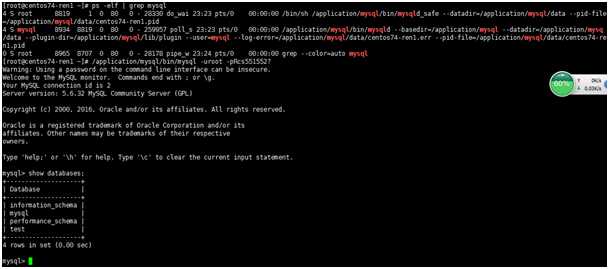
mysql安装测试结果:
#! /bin/bash
yum install -y zlib-devel libxml2-devel libjpeg-devel libjpeg-t urbo-devel libiconv-devel freetype-devel libpng-devel gd-devel libcurl-devel libxslt-devel
####Download Php###
###First Instal Nginx###
Php_Install() {
    wget -P /root/tools http://ftp.gnu.org/pub/gnu/libiconv/libiconv-1.14.tar.gz
    cd /root/tools && tar zxf libiconv-1.14.tar.gz && cd libiconv-1.14
    ./configure --prefix=/usr/local/libiconv
    [ $? -eq 0 ]  || exit 1
    make && make install
    yum -y install libmcrypt-devel mhash mcrypt
    wget -P /root/tools  http://mirrors.sohu.com/php/php-5.5.32.tar.gz
    cd /root/tools/ && tar zxf php-5.5.32.tar.gz
    cd /root/tools/php-5.5.32 && ./configure --with-mysql=/application/mysql-5.6.32 --with-pdo-mysql=mysqlnd  --prefix=/application/php-5.5.32 --with-iconv-dir=/usr/local/libiconv  --with-freetype-dir --with-jpeg-dir --with-png-dir --with-zlib --with-libxml-dir=/usr --enable-xml --disable-rpath --enable-bcmath --enable-shmop --enable-sysvsem --enable-inline-optimization --with-curl --enable-mbregex --enable-fpm --enable-mbstring --with-mcrypt --with-gd --enable-gd-native-ttf --with-openssl --with-mhash --enable-pcntl --enable-sockets --with-xmlrpc --enable-soap --enable-short-tags --enable-static --with-xsl --with-fpm-user=www --with-fpm-group=www --enable-ftp --enable-opcache=no
    ln -s /application/mysql/lib/libmysqlclient.so.18  /usr/lib64/
    touch ext/phar/phar.phar
    make && make install
    ln -s /application/php-5.5.32/ /application/php
    cp php.ini-production /application/php-5.5.32/lib/
    cp /application/php/etc/php-fpm.conf.default /application/php/etc/php-fpm.conf
/application/php/sbin/php-fpm
    sed -i ‘7a\    location ~* .*\.(php|php5)?$ {\n        fastcgi_pass 127.0.0.1:9000;\n        fastcgi_index index.php;\n        include fastcgi.conf;\n            }‘  /application/nginx/conf/extra/bbs.conf

    sed -i ‘7a\    location ~* .*\.(php|php5)?$ {\n        fastcgi_pass 127.0.0.1:9000;\n        fastcgi_index index.php;\n        include fastcgi.conf;\n            }‘  /application/nginx/conf/extra/www.conf
    sed -i ‘4,7d‘ /application/nginx/conf/extra/bbs.conf
    sed -i ‘4,7d‘ /application/nginx/conf/extra/www.conf
    sed -i ‘3a\        root    html/bbs;\n        index  index.html index htm;‘  /application/nginx/conf/extra/bbs.conf
    sed -i ‘3a\        root    html/bbs;\n        index  index.html index htm;‘  /application/nginx/conf/extra/www.conf
    echo -e "<?\nphpinfo();\n?>" >> /application/nginx/html/bbs/test.php
    echo -e "<?\nphpinfo();\n?>" >> /application/nginx/html/www/test.php
}
Php_Install
PHP安装测试结果:

现在是PHP还是静态,我们需要修改Nginx配置文件,让静态的文件让Nginx去处理;让动态的文件让PHP去处理
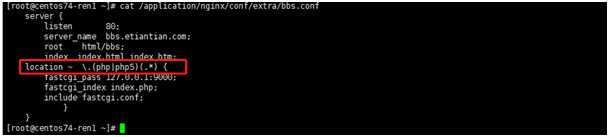
[root@centos74-ren1 ~]# cat /application/nginx/conf/extra/bbs.conf
    server {
        listen       80;
        server_name  bbs.etiantian.com;
        root    html/bbs;
        index  index.html index htm;
    location ~  \.(php|php5)(.*) {
        fastcgi_pass 127.0.0.1:9000;
        fastcgi_index index.php;
        include fastcgi.conf;
            }
}
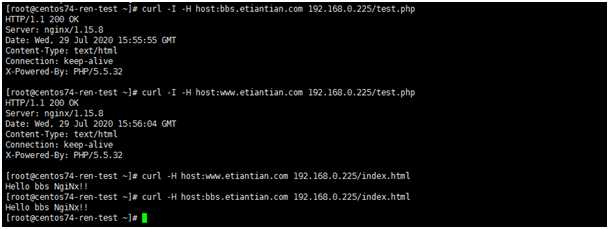
[root@centos74-ren-test ~]# curl -I -H host:www.etiantian.com 192.168.0.225/test.php
HTTP/1.1 200 OK
Server: nginx/1.15.8
Date: Wed, 29 Jul 2020 15:56:04 GMT
Content-Type: text/html
Connection: keep-alive
X-Powered-By: PHP/5.5.32
原文:https://www.cnblogs.com/csren12/p/13747436.html