
<video id="mse" autoplay=true playsinline controls="controls">
			<source src="304.mp4" type="video/mp4">
			你的浏览器不支持Video标签
		</video>
使用VS Code的REST Client插件测试,创建http文件,如下图所示,请求www.example.com首页的前1024字节。
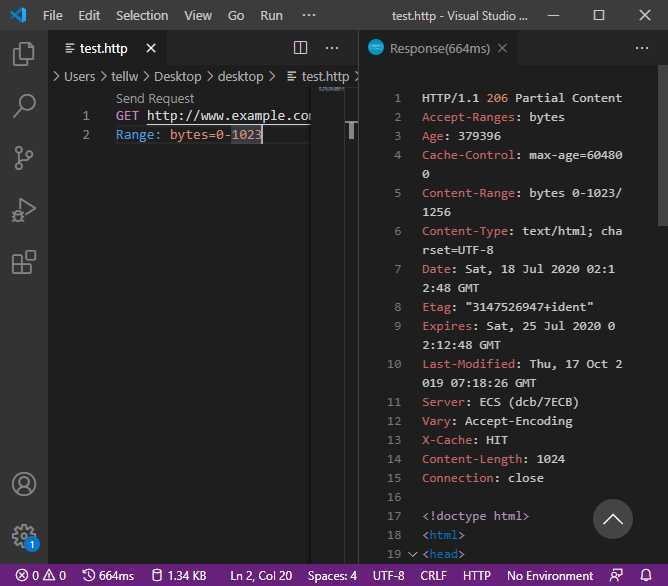
“对于使用 REST Client 发起的 「单一范围请求」,服务器端会返回状态码为 「206 Partial Content」 的响应。而响应头中的 「Content-Length」 首部现在用来表示先前请求范围的大小(而不是整个文件的大小)。「Content-Range」 响应首部则表示这一部分内容在整个资源中所处的位置。”
使用curl命令一次请求文档的多个部分curl http://www.example.com -i -H "Range: bytes=0-50, 100-150"
结果:
HTTP/1.1 206 Partial Content
Accept-Ranges: bytes
Age: 332711
Cache-Control: max-age=604800
Content-Type: text/html; charset=UTF-8
Date: Sat, 18 Jul 2020 03:26:47 GMT
Etag: "3147526947+ident"
Expires: Sat, 25 Jul 2020 03:26:47 GMT
Last-Modified: Thu, 17 Oct 2019 07:18:26 GMT
Server: ECS (dcb/7F3B)
Vary: Accept-Encoding
X-Cache: HIT
Content-Length: 312


--3d6b6a416f9b5
Content-Type: text/html; charset=UTF-8
Content-Range: bytes 0-50/1256

<!doctype html>
<html>
<head>
    <title>Example Do
--3d6b6a416f9b5
Content-Type: text/html; charset=UTF-8
Content-Range: bytes 100-150/1256

eta http-equiv="Content-type" content="text/html; c
--3d6b6a416f9b5--
"因为我们是请求文档的多个部分,所以每个部分都会拥有独立的 「Content-Type」 和 「Content-Range」 信息"
<script src="flv.min.js"></script>
		<video id="videoElement"></video>
		<script>
			if(flvjs.isSupported()){
				var videoElement = document.getElementById(‘videoElement‘);
				var flvPlayer = flvjs.createPlayer({
					type: ‘flv‘,
					url: ‘000.flv‘
				});
				flvPlayer.attachMediaElement(videoElement);
				flvPlayer.load();
				flvPlayer.play();
			}
		</script>
最后找了一个flv文件放在同一目录下,打开网页能听见声音,但视频卡在第一帧的地方,鼠标控制不了播放或暂停。
<video></video>
		<script>
			var vidElement = document.querySelector(‘video‘);
			if(window.MediaSource){
				var mediaSource = new MediaSource();
				vidElement.src = URL.createObjectURL(mediaSource);
				mediaSource.addEventListener(‘sourceopen‘, sourceOpen);
			}else{
				console.log("The Media Source Extensions API is not supported.")
			}
			function sourceOpen(e){
				URL.revokeObjectURL(vidElement.src);
				var mime = ‘video/mp4; codecs="avc1.42E01E, mp4a.40.2"‘;
				var mediaSource = e.target;
				var sourceBuffer = mediaSource.addSourceBuffer(mime);
				var videoUrl = ‘./304.mp4‘;
				fetch(videoUrl).then(function(response){
					return response.arrayBuffer();
				})
				.then(function(arrayBuffer){
					sourceBuffer.addEventListener(‘updateend‘, function(e){
						if(!sourceBuffer.updating && mediaSource.readyState == ‘open‘){
							mediaSource.endOfStream();
						}
					});
					sourceBuffer.appendBuffer(arrayBuffer);
				});
			}
		</script>
打开网页看不了视频(看不到任何东西)。
原文:https://www.cnblogs.com/tellw/p/13334717.html