
数据:文字、图片、视频。。。人类认知的数据表现方式
计算机:二进制、16进制的机器语言
基于数据的重要性和复杂性的不同,我们可能有不同的管理方式。
哪些数据是适合存储到数据库的呢?
重要性比较高的
关系较复杂的数据
RDBMS: 关系型数据库管理系统
比较适合于,安全级别要求高的数据以及关系较复杂的数据
NoSQL:非关系型数据库管理系统
适合于高性能存取数据,一般是配合RDBMS进行使用的
针对大数据处理分析,分布式架构更加擅长
RDBMS:Oracle、Mysql、PG、MSSQL
NoSQL:Mongodb、Redis、ES
NEWSQL(分布式):TiDB、Spanner、AliSQL(RDS+DRDS)、OB、PolarDB
[root@mysql ~]# cd /server/tools/
[root@mysql tools]# ll
total 629756
-rw-r--r-- 1 root root 644869837 Jul  4 11:26 mysql-5.7.26-linux-glibc2.12-x86_64.tar.gz
[root@mysql tools]# tar xf mysql-5.7.26-linux-glibc2.12-x86_64.tar.gz
[root@mysql tools]# mkdir -p /application
[root@mysql tools]#
[root@mysql tools]# mv mysql-5.7.26-linux-glibc2.12-x86_64 /application/
[root@mysql tools]# cd /application/
[root@mysql application]# mv mysql-5.7.26-linux-glibc2.12-x86_64/ mysql-5.7.26
[root@mysql application]# ln -s mysql-5.7.26/ mysql
[root@mysql application]# ll
total 0
lrwxrwxrwx 1 root root  13 Aug 28 09:05 mysql -> mysql-5.7.26/
drwxr-xr-x 9 root root 129 Aug 28 09:02 mysql-5.7.26
[root@mysql application]#
[root@mysql ~]# yum -y remove mariadb-libs-5.5.56-2.el7.x86_64
[root@mysql ~]# useradd -s /sbin/nologin mysql
[root@mysql ~]#
[root@mysql ~]# echo ‘export PATH=$PATH:/application/mysql/bin‘ >> /etc/profile
[root@mysql ~]# source /etc/profile
root@mysql ~]# mysql -V
mysql  Ver 14.14 Distrib 5.7.26, for linux-glibc2.12 (x86_64) using  EditLine wrapper
mysql数据库由两大部分组成:软件部分、数据部分
数据部分应该与软件部分、操作系统的根独立
[root@mysql ~]# fdisk -l
Disk /dev/sdb: 21.5 GB, 21474836480 bytes, 41943040 sectors
Units = sectors of 1 * 512 = 512 bytes
Sector size (logical/physical): 512 bytes / 512 bytes
I/O size (minimum/optimal): 512 bytes / 512 bytes

[root@mysql ~]# mkfs.xfs /dev/sda
sda   sda1  sda2  sda3
[root@mysql ~]# mkfs.xfs /dev/sdb
meta-data=/dev/sdb               isize=512    agcount=4, agsize=1310720 blks
         =                       sectsz=512   attr=2, projid32bit=1
         =                       crc=1        finobt=0, sparse=0
data     =                       bsize=4096   blocks=5242880, imaxpct=25
         =                       sunit=0      swidth=0 blks
naming   =version 2              bsize=4096   ascii-ci=0 ftype=1
log      =internal log           bsize=4096   blocks=2560, version=2
         =                       sectsz=512   sunit=0 blks, lazy-count=1
realtime =none                   extsz=4096   blocks=0, rtextents=0
[root@mysql ~]# mkdir /data
[root@mysql ~]# blkid
/dev/sdb: UUID="986b42ee-540d-47f5-82a6-65a328dd20b4" TYPE="xfs"
[root@mysql ~]# tail -1 /etc/fstab
UUID=986b42ee-540d-47f5-82a6-65a328dd20b4 /data			  xfs 	  defaults 	  0 0
[root@mysql ~]#
[root@mysql ~]# mount -a
[root@mysql ~]# chown -R mysql.mysql /application/*
[root@mysql ~]# chown -R mysql.mysql /data
[root@mysql ~]#
5.6版本:初始化命令:/application/mysql/scripts/mysql_install_db
5.7版本:初始化命令:mysqld --initalize
--initialize 参数:
对于密码复杂度进行定制:12位,4种方式组成
密码过期时间:180天
给root@localhost用户设置临时密码

[root@mysql ~]# mkdir -p /data/mysql/data
[root@mysql ~]# chown -R mysql.mysql /data/
[root@mysql ~]# yum -y install libaio-devel
[root@mysql ~]# mysqld --initialize --user=mysql --basedir=/application/mysql --datadir=/data/mysql/data
2019-08-28T01:33:44.886913Z 0 [Warning] TIMESTAMP with implicit DEFAULT value is deprecated. Please use --explicit_defaults_for_timestamp server option (see documentation for more details).
2019-08-28T01:33:45.393308Z 0 [Warning] InnoDB: New log files created, LSN=45790
2019-08-28T01:33:45.610222Z 0 [Warning] InnoDB: Creating foreign key constraint system tables.
2019-08-28T01:33:45.681098Z 0 [Warning] No existing UUID has been found, so we assume that this is the first time that this server has been started. Generating a new UUID: e0660f6c-c933-11e9-af51-000c29d70b6d.
2019-08-28T01:33:45.682790Z 0 [Warning] Gtid table is not ready to be used. Table ‘mysql.gtid_executed‘ cannot be opened.
2019-08-28T01:33:45.684184Z 1 [Note] A temporary password is generated for root@localhost: DI<-ZsDU=4.0
--initialize-insecure 参数:
无限制,无临时密码
[root@mysql ~]# \rm -rf /data/mysql/data/*
[root@mysql ~]# mysqld --initialize-insecure --user=mysql --basedir=/application/mysql --datadir=/data/mysql/data
2019-08-28T01:40:43.207923Z 0 [Warning] TIMESTAMP with implicit DEFAULT value is deprecated. Please use --explicit_defaults_for_timestamp server option (see documentation for more details).
2019-08-28T01:40:43.482220Z 0 [Warning] InnoDB: New log files created, LSN=45790
2019-08-28T01:40:43.519569Z 0 [Warning] InnoDB: Creating foreign key constraint system tables.
2019-08-28T01:40:43.606086Z 0 [Warning] No existing UUID has been found, so we assume that this is the first time that this server has been started. Generating a new UUID: d980595d-c934-11e9-bbfc-000c29d70b6d.
2019-08-28T01:40:43.608963Z 0 [Warning] Gtid table is not ready to be used. Table ‘mysql.gtid_executed‘ cannot be opened.
2019-08-28T01:40:43.612502Z 1 [Warning] root@localhost is created with an empty password ! Please consider switching off the --initialize-insecure option.
[root@mysql ~]#
[root@mysql data]# cat >/etc/my.cnf<<EOF
[mysqld]
user=mysql
basedir=/application/mysql
datadir=/data/mysql/data
socket=/tmp/mysql.sock
server_id=6
port=3306
[mysql]
socket=/tmp/mysql.sock
EOF
[root@mysql data]#
[root@mysql data]# cp /application/mysql/support-files/mysql.server /etc/init.d/mysqld
[root@mysql data]# service mysqld restart
 ERROR! MySQL server PID file could not be found!
Starting MySQL.Logging to ‘/data/mysql/data/mysql.err‘.
. SUCCESS!
[root@mysql data]#
[root@mysql data]# netstat -lntup|grep 3306
tcp6       0      0 :::3306                 :::*                    LISTEN      2575/mysqld
[root@mysql data]# /etc/init.d/mysqld stop
Shutting down MySQL.. SUCCESS!
[root@mysql data]#
[root@mysql data]# cat /etc/systemd/system/mysqld.service
[Unit]
Description=MySQL Server
Documentation=man:mysqld(8)
Documentation=http://dev.mysql.com/doc/refman/en/using-systemd.html
After=network.target
After=syslog.target
[Install]
WantedBy=multi-user.target
[Service]
User=mysql
Group=mysql
ExecStart=/application/mysql/bin/mysqld --defaults-file=/etc/my.cnf
LimitNOFILE = 5000
[root@mysql data]#
[root@mysql data]# systemctl start mysqld
[root@mysql data]# systemctl status mysqld
● mysqld.service - MySQL Server
   Loaded: loaded (/etc/systemd/system/mysqld.service; disabled; vendor preset: disabled)
   Active: active (running) since Wed 2019-08-28 09:53:46 CST; 4s ago
[root@mysql data]# /application/mysql/bin/mysqld --defaults-file=/etc/my.cnf
[root@mysql ~]# mysqladmin -uroot password 123456
--skip-grant-tables	#跳过授权表
--skip-networking	#跳过远程登录

#启动数据库到维护模式
[root@mysql ~]# mysqld_safe --skip-grant-tables --skip-networking &
[root@mysql ~]# mysql
Welcome to the MySQL monitor.  Commands end with ; or \g.
Your MySQL connection id is 2
Server version: 5.7.26 MySQL Community Server (GPL)

Copyright (c) 2000, 2019, Oracle and/or its affiliates. All rights reserved.

Oracle is a registered trademark of Oracle Corporation and/or its
affiliates. Other names may be trademarks of their respective
owners.

Type ‘help;‘ or ‘\h‘ for help. Type ‘\c‘ to clear the current input statement.

mysql>
mysql> flush privileges;
mysql> grant all on *.* to root@‘localhost‘ identified by ‘1‘;
Query OK, 0 rows affected, 1 warning (0.00 sec)

mysql>
[root@mysql ~]# /etc/init.d/mysqld restart
mysql是一个典型的c/s模式,服务端与客户端两部分组成
服务端程序 mysqld
客户端程序 mysql自带客户端(mysql、mysqladmin、mysqldump等)
第三方客户端  API接口(php-mysql)
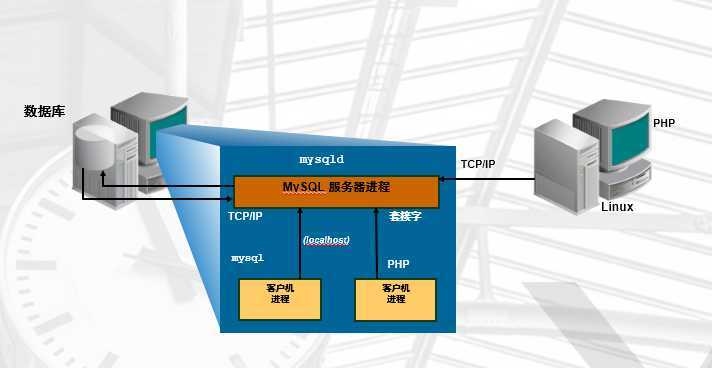
TCP/IP方式(远程、本地):
mysql -uroot -p123456 -h 10.0.1.110 -P3306
Socket方式(仅本地):
mysql -uroot -p123456 -S /tmp/mysql.sock
mysql 常用参数:
-u                   用户
-p                   密码
-h                   IP
-P                   端口
-S                   socket文件
-e                   免交互执行命令
<                    导入SQL脚本

内置命令
help 					打印mysql帮助
\c  ctrl+c 				结束上个命令运行
\q quit; exit; ctrl+d 	退出mysql
\G 						将数据竖起来显示
source 					恢复备份文件
启动后台守护进程,并生成工作线程
预分配内存结构供MySQL处理数据使用
实例就是MySQL的后台进程+线程+预分配的内存结构

实例=mysqld后台守护进程+Master Thread +干活的Thread+预分配的内存
公司=老板+经理+员工+办公室
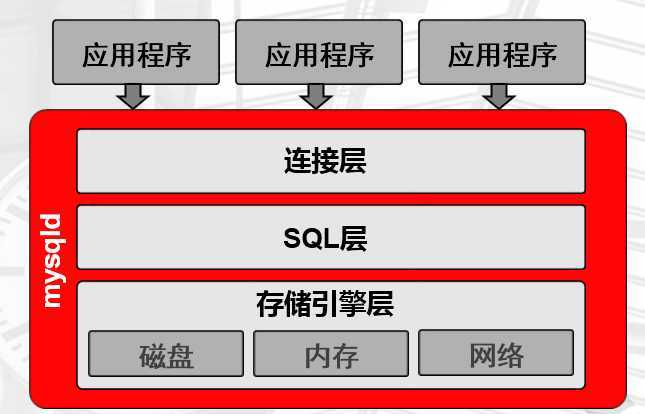
1.提供连接协议:TCP/IP 、SOCKET
2.提供验证:用户、密码,IP
3.开启专用连接线程:接收用户SQL语句,返回结果
通过以下语句可以查看到连接线程基本情况
mysql> show processlist;
4.将语句交给下一层
结构化的查询语言
DQL	#数据查询语言
DDL	#数据定义语言
DML	#数据操作语言
DCL	#数据控制语言

1.接收上层传送的SQL语句
2.语法验证模块:验证语句语法,是否满足SQL_MODE(规范语法的准确性)
3.语义检查:判断SQL语句的类型
4.权限检查:用户对库表有没有权限
5.解析器:对语句执行,进行预处理,生成解析树(执行计划),说白了就是生成多种执行方案.
6.优化器:根据解析器得出的多种执行计划,进行判断,选择最优的执行计划(代价模型:资源(CPU、IO、MEM)的耗损评估性能好坏)
7.执行器:根据最优执行计划,执行SQL语句,产生执行结果
8.提供查询缓存(默认是没开启的),会使用redis tair替代查询缓存功能
9.提供日志记录:binlog,默认是没开启的。
1.根据SQL的执行结果,去磁盘上找到相应数据
2.找到磁盘上16进制的数据
3.再次返回SQL层,结构化层二维表的方式
4.再由连接层线程,最终展现处理
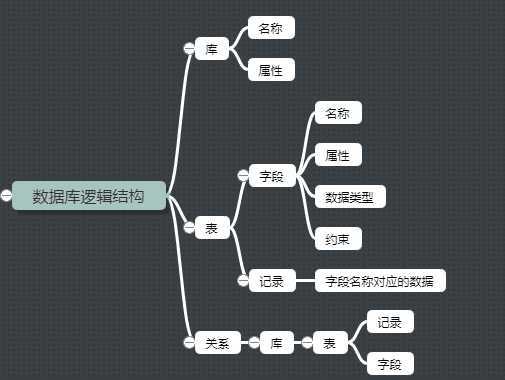
库名,库属性

库 											  ----》Linux目录
create database wordpress charset utf8mb4;    	----》mkdir /wordpress
show databases;							      ----》ls /
use wordpress;								  ----》cd /wordpress
表名
属性
列:列名(字段),列属性(数据类型,约束等)
数据行(记录)

表 											  ----》Linux的文件
列(字段) 										无
列属性											无
数据行(记录)								  ----》Linux数据行
表属性(元数据)							  ----》Linux 文件属性
用文件系统的目录来存储
MyISAM
	user.frm		#存储的表结构(列,列属性)
 	user.MYD		#存储的数据记录
 	user.MYI		#存储索引

InnoDB
	time_zone.frm	#存储的表结构(列,列属性)
	time_zone.ibd	#存储的数据记录和索引
	ibdata1		 	#数据字典信息
段 segment :  一个表(非分区表),就是一个段,相当于一个文件系统
区 extent  :  连续的64个页,大小是1M
页 page    :  默认是连续的4个block,16K
作用:登录mysql和管理mysql
用户名@‘白名单‘
opesn@‘%‘
opesn@‘localhost‘
opesn@‘127.0.0.1‘
opesn@‘10.0.0.%‘
opesn@‘10.0.0.5%‘
opesn@‘10.0.0.0/255.255.254.0‘
opesn@‘10.0.%‘
#新建用户并设置密码
mysql> create user opesn@‘10.0.1.%‘ identified by ‘123456‘;
#8.0以前,可以自动创建用户并授权
mysql> grant all on *.* to opesn@‘10.0.1.%‘ identified by ‘123456‘;
#查看用户
mysql> select user,host from mysql.user;
#修改用户密码
mysql> alter user opesn@‘10.0.1.%‘ identified by ‘123‘;
#删除用户
mysql> drop user opesn@‘10.0.1.%‘;
ALL
SELECT,INSERT, UPDATE, DELETE, CREATE, DROP, RELOAD, SHUTDOWN, PROCESS, FILE, REFERENCES, INDEX, ALTER, SHOW DATABASES, SUPER, CREATE TEMPORARY TABLES, LOCK TABLES, EXECUTE, REPLICATION SLAVE, REPLICATION CLIENT, CREATE VIEW, SHOW VIEW, CREATE ROUTINE, ALTER ROUTINE, CREATE USER, EVENT, TRIGGER, CREATE TABLESPACE

#给被人授权的权限
with grant option
mysql> grant all on *.* to opesn@‘10.0.1.%‘ identified by ‘123456‘ with grant option;
mysql> grant all on *.* to opesn@‘10.0.1.%‘ identified by ‘123456‘;
grant 权限 on 对象 to 用户 identified by 密码;
#查询权限
mysql> show grants for opesn@‘10.0.1.%‘;
#回收权限
mysql> revoke delete on opesn.* from ‘opesn‘@‘10.0.1.%‘;
[root@mysql system]# mysqld_safe --skip-grant-tables --skip-networking &
[root@mysql system]# mysql
mysql> flush privileges;
mysql> alter user root@‘localhost‘ identified by ‘123456‘;
[root@mysql system]# pkill mysqld
[root@mysql system]# systemctl restart mysqld
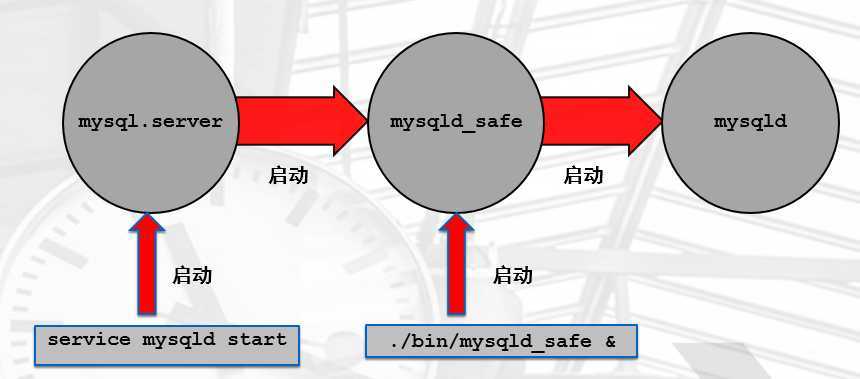
#日常启停
mysql.server start ---> mysqld_safe ---> mysqld
mysql.service      ---> mysqld

#维护性的任务
mysqld_safe --skip-grant-tables --skip-networking &
我们一般会将我们需要的参数临时加到命令行.
也会读取/etc/my.cnf的内容,但是如果冲突,命令行优先级最高
影响数据库的启动
影响到客户端的登录及功能
#初始化配置的方法
(1)初始化配置文件(例如/etc/my.cnf)
(2)启动命令行上进行设置(例如:mysqld_safe  mysqld)
(3)预编译时设置(仅限于编译安装时设置)
[标签]
xxx=xxxx
服务器端:
[mysqld]
[mysqld_safe]
[server]

客户端:
[mysql]
[mysqladmin]
[mysqldump]
[client]
[root@mysql ~]# cat /etc/my.cnf
[mysqld]
user=mysql						#用户
basedir=/application/mysql		 #软件安装目录
datadir=/data/mysql/data		 #数据路径
socket=/tmp/mysql.sock			 #socket文件位置
server_id=6						#服务器id号(1~65535)
port=3306						#端口号
[mysql]
socket=/tmp/mysql.sock			 #socket文件位置
[root@mysql ~]#
[root@mysql ~]# mysqld --help --verbose |grep my.cnf
/etc/my.cnf /etc/mysql/my.cnf /usr/local/mysql/etc/my.cnf ~/.my.cnf
--defautls-file
[root@mysql ~]# mysqld_safe --defaults-file=/tmp/aa.cnf &
[root@mysql ~]# mkdir -p /data/330{7..9}/data
[root@mysql ~]# cat /data/3307/my.cnf
[mysqld]
basedir=/application/mysql
datadir=/data/3307/data
socket=/data/3307/mysql.sock
log_error=/data/3307/mysql.log
port=3307
server_id=7
log_bin=/data/3307/mysql-bin

[root@mysql ~]# cat /data/3308/my.cnf
[mysqld]
basedir=/application/mysql
datadir=/data/3308/data
socket=/data/3308/mysql.sock
log_error=/data/3308/mysql.log
port=3308
server_id=8
log_bin=/data/3308/mysql-bin

[root@mysql ~]# cat /data/3309/my.cnf
[mysqld]
basedir=/application/mysql
datadir=/data/3309/data
socket=/data/3309/mysql.sock
log_error=/data/3309/mysql.log
port=3309
server_id=9
log_bin=/data/3309/mysql-bin
[root@mysql ~]#
[root@mysql ~]#mv /etc/my.cnf /etc/my.cnf.bak
[root@mysql ~]#mysqld --initialize-insecure  --user=mysql --datadir=/data/3307/data --basedir=/application/mysql
[root@mysql ~]#mysqld --initialize-insecure  --user=mysql --datadir=/data/3308/data --basedir=/application/mysql
[root@mysql ~]#mysqld --initialize-insecure  --user=mysql --datadir=/data/3309/data --basedir=/application/mysql
[root@mysql ~]# cd /etc/systemd/system/
[root@mysql system]# cp mysqld.service mysqld3307.service
[root@mysql system]# cp mysqld.service mysqld3308.service
[root@mysql system]# cp mysqld.service mysqld3309.service
[root@mysql system]# sed -i ‘s#--defaults-file=/etc/my.cnf#--defaults-file=/data/3307/my.cnf#g‘ mysqld3307.service
[root@mysql system]# sed -i ‘s#--defaults-file=/etc/my.cnf#--defaults-file=/data/3308/my.cnf#g‘ mysqld3308.service
[root@mysql system]# sed -i ‘s#--defaults-file=/etc/my.cnf#--defaults-file=/data/3309/my.cnf#g‘ mysqld3309.service
[root@mysql system]# chown -R mysql.mysql /data/*
[root@mysql system]# systemctl start mysqld3307.service
[root@mysql system]# systemctl start mysqld3308.service
[root@mysql system]# systemctl start mysqld3309.service
[root@mysql system]# netstat -lntup |grep mysqld
tcp6       0      0 :::3307                 :::*                    LISTEN      11319/mysqld
tcp6       0      0 :::3308                 :::*                    LISTEN      11773/mysqld
tcp6       0      0 :::3309                 :::*                    LISTEN      11821/mysqld
tcp6       0      0 :::3306                 :::*                    LISTEN      3558/mysqld
[root@mysql system]#
[root@mysql system]# mysql -S /data/3307/mysql.sock
原文:https://www.cnblogs.com/opesn/p/12993981.html