
1.首先是去百度智能云(http://ai.baidu.com/tech/face?track=cp:ainsem|pf:pc|pp:chanpin-renlianshibie|pu:renlianshibie-pinpai|ci:|kw:10002421)注册一个账号,填写有些相关的信息。
2.在产品服务找到人脸识别

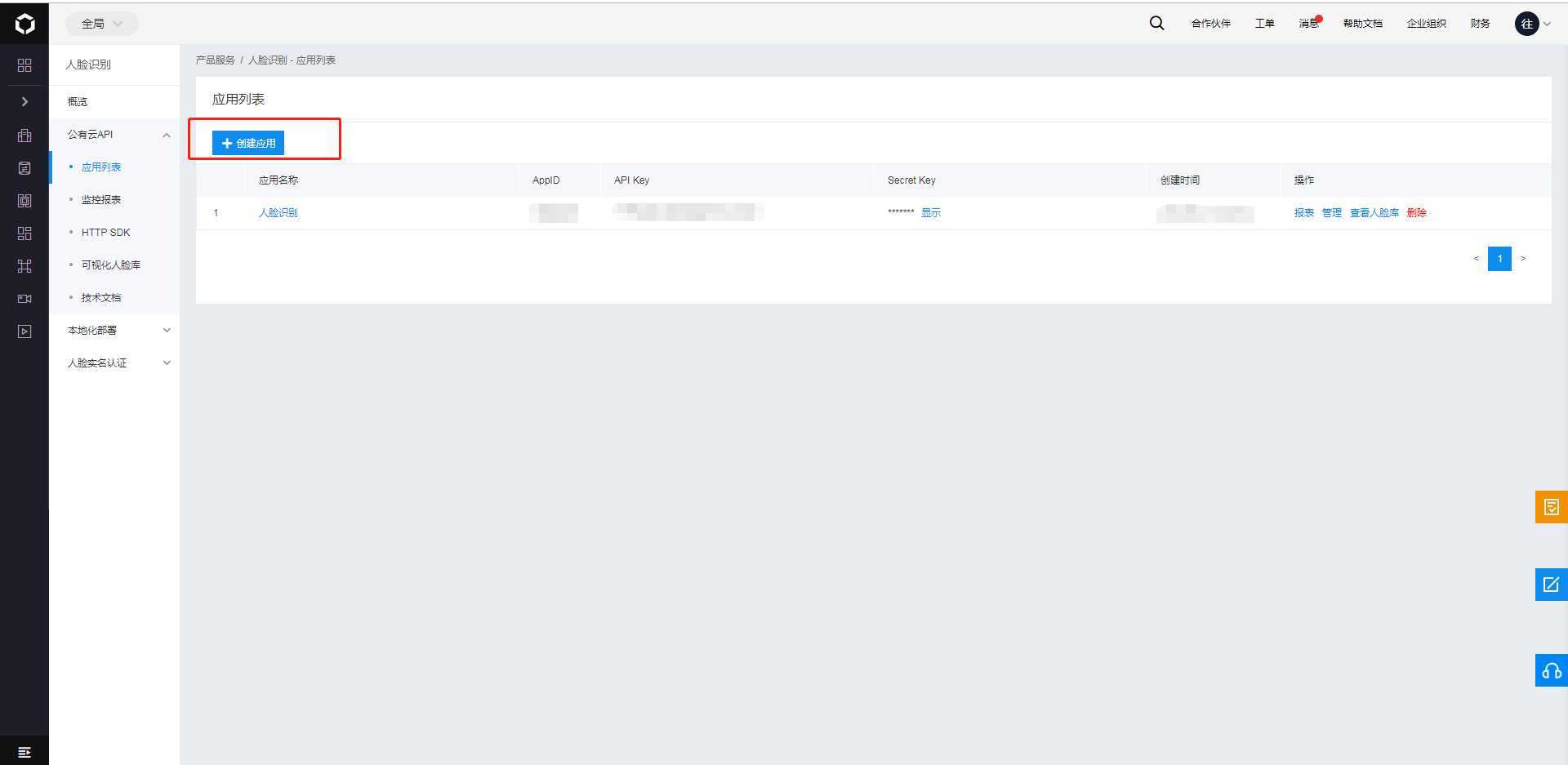
3.创建应用,得到对应的AppID,API Key,Secret Key
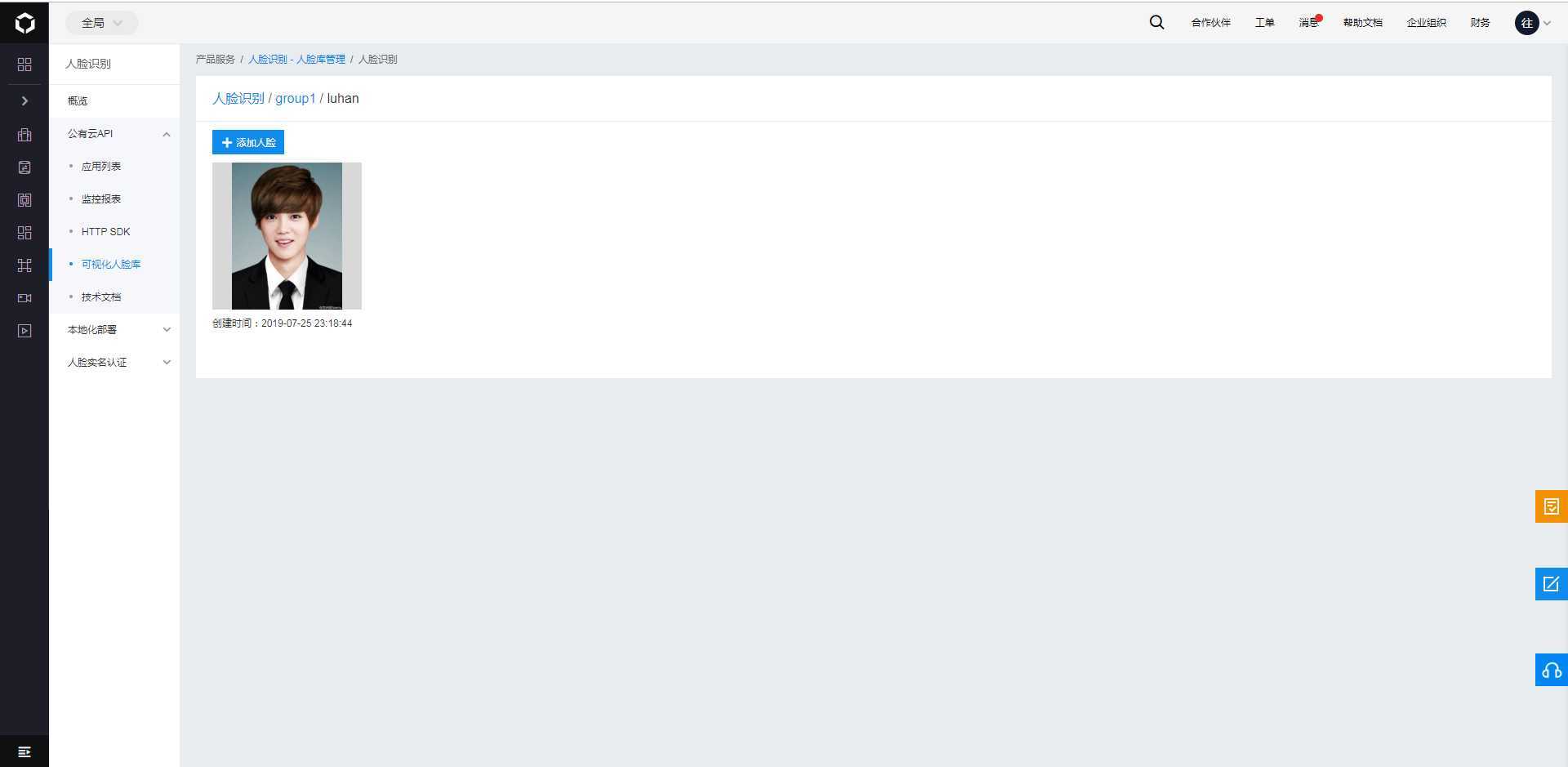
3.新建组

4.新建用户

5.添加人脸
6.新建一个控制台应用程序
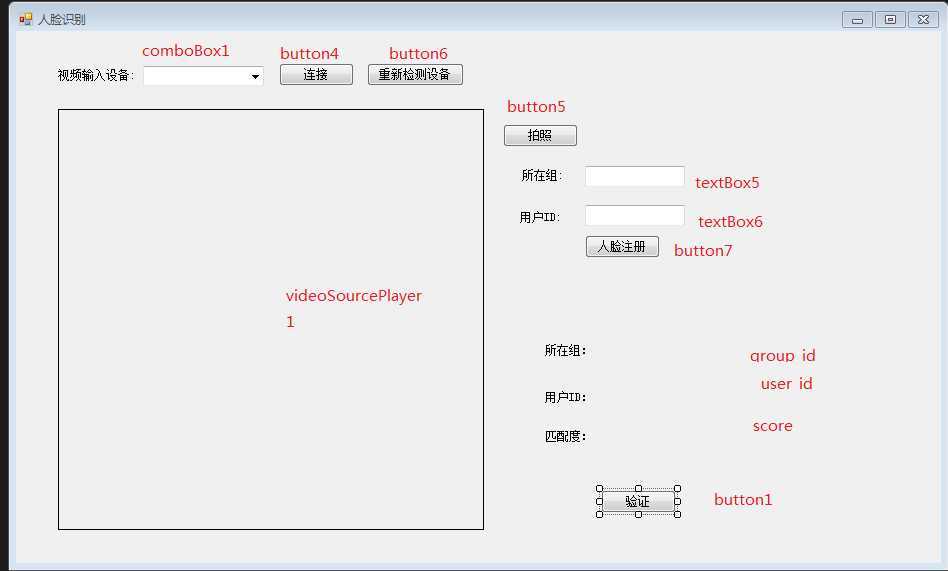
8.先关代码
using AForge.Video.DirectShow;
using Baidu.Aip.Face;
using Newtonsoft.Json.Linq;
using System;
using System.Collections.Generic;
using System.ComponentModel;
using System.Data;
using System.Drawing;
using System.IO;
using System.Linq;
using System.Text;
using System.Threading.Tasks;
using System.Windows;
using System.Windows.Forms;
using System.Windows.Media.Imaging;

namespace WindowsFormsApp1
{
    public partial class Form1 : Form
    {
        public Form1()
        {
            InitializeComponent();
        }
        private FilterInfoCollection videoDevices = null;
        /// <summary>
        /// 连接并且打开摄像头
        /// </summary>
        private void CameraConn()
        {
            if (comboBox1.Items.Count <= 0)
            {
                MessageBox.Show("请插入视频设备");
                return;
            }
            VideoCaptureDevice videoSource = new VideoCaptureDevice(videoDevices[comboBox1.SelectedIndex].MonikerString);
            videoSource.DesiredFrameSize = new System.Drawing.Size(320, 240);
            videoSource.DesiredFrameRate = 1;

            videoSourcePlayer1.VideoSource = videoSource;
            videoSourcePlayer1.Start();
        }
        private void button4_Click(object sender, EventArgs e)
        {
            CameraConn();
        }

        private void Form1_Load(object sender, EventArgs e)
        {
            /// 获取电脑已经安装的视频设备
            videoDevices = new FilterInfoCollection(FilterCategory.VideoInputDevice);
            if (videoDevices != null && videoDevices.Count > 0)
            {
                foreach (FilterInfo device in videoDevices)
                {
                    comboBox1.Items.Add(device.Name);
                }
                comboBox1.SelectedIndex = 0;
            }
        }

        private void button6_Click(object sender, EventArgs e)
        {
            /// 获取电脑已经安装的视频设备
            videoDevices = new FilterInfoCollection(FilterCategory.VideoInputDevice);
            if (videoDevices != null && videoDevices.Count > 0)
            {
                foreach (FilterInfo device in videoDevices)
                {
                    comboBox1.Items.Add(device.Name);
                }
                comboBox1.SelectedIndex = 0;
            }
        }
        /// <summary>
        /// 拍照
        /// </summary>
        /// <param name="sender"></param>
        /// <param name="e"></param>
        private void button5_Click(object sender, EventArgs e)
        {
            if (comboBox1.Items.Count <= 0)
            {
                MessageBox.Show("请插入视频设备");
                return;
            }
            try
            {
                if (videoSourcePlayer1.IsRunning)
                {
                    BitmapSource bitmapSource = System.Windows.Interop.Imaging.CreateBitmapSourceFromHBitmap(
                                    videoSourcePlayer1.GetCurrentVideoFrame().GetHbitmap(),
                                    IntPtr.Zero,
                                     Int32Rect.Empty,
                                    BitmapSizeOptions.FromEmptyOptions());
                    PngBitmapEncoder pE = new PngBitmapEncoder();
                    pE.Frames.Add(BitmapFrame.Create(bitmapSource));
                    string picName = GetImagePath() + "\\" + DateTime.Now.ToFileTime() + ".jpg";
                    if (File.Exists(picName))
                    {
                        File.Delete(picName);
                    }
                    using (Stream stream = File.Create(picName))
                    {
                        pE.Save(stream);
                    }
                }
            }
            catch (Exception ex)
            {
                MessageBox.Show("摄像头异常:" + ex.Message);
            }
        }

        private string GetImagePath()
        {
            string personImgPath = Path.GetDirectoryName(AppDomain.CurrentDomain.BaseDirectory)
                         + Path.DirectorySeparatorChar.ToString() + "PersonImg";
            if (!Directory.Exists(personImgPath))
            {
                Directory.CreateDirectory(personImgPath);
            }

            return personImgPath;
        }
        /// <summary>
        /// 图片转换为Base64
        /// </summary>
        /// <param name="image"></param>
        /// <returns></returns>
        private string ImgToBase64String(string image)
        {
            try
            {
                Bitmap bmp = new Bitmap(image, true);
                MemoryStream ms = new MemoryStream();
                bmp.Save(ms, System.Drawing.Imaging.ImageFormat.Jpeg);
                byte[] arr = new byte[ms.Length];
                ms.Position = 0;
                ms.Read(arr, 0, (int)ms.Length);
                ms.Close();

                return Convert.ToBase64String(arr);
            }
            catch (Exception ex)
            {
                return null;
            }
        }
        /// <summary>
        /// 注册
        /// </summary>
        /// <param name="sender"></param>
        /// <param name="e"></param>
        private void button7_Click(object sender, EventArgs e)
        {
            string sl = "";
            #region 拍照
            if (comboBox1.Items.Count <= 0)
            {
                MessageBox.Show("请插入视频设备");
                return;
            }
            try
            {
                if (videoSourcePlayer1.IsRunning)
                {
                    BitmapSource bitmapSource = System.Windows.Interop.Imaging.CreateBitmapSourceFromHBitmap(
                                    videoSourcePlayer1.GetCurrentVideoFrame().GetHbitmap(),
                                    IntPtr.Zero,
                                     Int32Rect.Empty,
                                    BitmapSizeOptions.FromEmptyOptions());
                    PngBitmapEncoder pE = new PngBitmapEncoder();
                    pE.Frames.Add(BitmapFrame.Create(bitmapSource));
                    string picName = GetImagePath() + "\\" + DateTime.Now.ToFileTime() + ".jpg";
                    sl = picName;
                    if (File.Exists(picName))
                    {
                        File.Delete(picName);
                    }
                    using (Stream stream = File.Create(picName))
                    {
                        pE.Save(stream);
                    }
                }
            }
            catch (Exception ex)
            {
                MessageBox.Show("摄像头异常:" + ex.Message);
            }
            #endregion
            var image = ImgToBase64String(sl);
            var imageType = "BASE64";

            // 设置APPID/AK/SK
            var API_KEY = "***";                   //你的 Api Key
            var SECRET_KEY = "***";        //你的 Secret Key
            var client = new Baidu.Aip.Face.Face(API_KEY, SECRET_KEY);
            client.Timeout = 60000;  // 修改超时时间

            //取决于image_type参数,传入BASE64字符串或URL字符串或FACE_TOKEN字符串
            //你共享的图片路径(点击路径可直接查看图片)

            //注册人脸
            var groupId = "group1";
            var userId = textBox6.Text;
            // 调用人脸注册,可能会抛出网络等异常,请使用try/catch捕获
            var result = client.UserAdd(image, imageType, groupId, userId);

            JObject _jObject = result;
            bool sf = false;
            foreach (var item in _jObject)
            {
                if (item.Key == "error_code")
                {
                    if (item.Value.ToString() == "0")
                    {
                        sf = true;
                        MessageBox.Show("注册成功!");
                        MessageBox.Show(result.ToString());
                    }
                    else
                    {
                        sf = false;
                        MessageBox.Show("注册失败!");
                        MessageBox.Show(result.ToString());
                    }
                }
            }
        }
        /// <summary>
        /// 人脸识别API参数初始化
        /// </summary>
        /// <returns></returns>
        private Baidu.Aip.Face.Face GetFacaClient()
        {
            // 设置APPID/AK/SK
            string APP_ID = "***";
            string API_KEY = "***";
            string SECRET_KEY = "**";

            Face client = new Baidu.Aip.Face.Face(API_KEY, SECRET_KEY);
            client.Timeout = 60000;  // 修改超时时间

            return client;
        }
        /// <summary>
        /// 人脸搜索,从人脸库中查询是否有合适的人像
        /// </summary>
        /// <param name="ImageBase">图片Base64值</param>
        /// <returns></returns>
        public Newtonsoft.Json.Linq.JObject SearchDemo(string ImageBase)
        {
            string image = ImageBase;
            string imageType = "BASE64";
            string groupIdList = "group1";//你的应用名字

            Face client = GetFacaClient();
            // 调用人脸搜索,可能会抛出网络等异常,请使用try/catch捕获
            var result = client.Search(image, imageType, groupIdList);

            return result;
        }
        private void button1_Click(object sender, EventArgs e)
        {
            string sl = "";
            #region 拍照
            if (comboBox1.Items.Count <= 0)
            {
                MessageBox.Show("请插入视频设备");
                return;
            }
            try
            {
                if (videoSourcePlayer1.IsRunning)
                {
                    BitmapSource bitmapSource = System.Windows.Interop.Imaging.CreateBitmapSourceFromHBitmap(
                                    videoSourcePlayer1.GetCurrentVideoFrame().GetHbitmap(),
                                    IntPtr.Zero,
                                     Int32Rect.Empty,
                                    BitmapSizeOptions.FromEmptyOptions());
                    PngBitmapEncoder pE = new PngBitmapEncoder();
                    pE.Frames.Add(BitmapFrame.Create(bitmapSource));
                    string picName = GetImagePath() + "\\" + DateTime.Now.ToFileTime() + ".jpg";
                    sl = picName;
                    if (File.Exists(picName))
                    {
                        File.Delete(picName);
                    }
                    using (Stream stream = File.Create(picName))
                    {
                        pE.Save(stream);
                    }
                }
            }
            catch (Exception ex)
            {
                MessageBox.Show("摄像头异常:" + ex.Message);
            }
            #endregion
            string ImageBase = ImgToBase64String(sl);
            var msg = SearchDemo(ImageBase);

            bool sf = false;
            JObject _jObject = msg;
            StringBuilder str = new StringBuilder();
            foreach (var item in _jObject)
            {
                str.Append(item.Key + ":" + item.Value + ",");
                if (item.Key == "error_code")
                {
                    if (item.Value.ToString() == "0")
                    {
                        sf = true;
                    }
                    else
                    {
                        sf = false;
                    }
                }
            }

            if (sf)
            {
                group_id.Text = "所在组:" + msg["result"]["user_list"][0].Value<string>("group_id");
                user_id.Text = "用户id:" + msg["result"]["user_list"][0].Value<string>("user_id");
                score.Text = "匹配度:" + msg["result"]["user_list"][0].Value<string>("score");
                if (Convert.ToDecimal(msg["result"]["user_list"][0].Value<string>("score")) > 80)
                {
                    MessageBox.Show("与用户"+ msg["result"]["user_list"][0].Value<string>("user_id") + ",相似度:" + Convert.ToDouble(msg["result"]["user_list"][0].Value<string>("score")) + "匹配成功");
                }
                else
                {
                    MessageBox.Show("匹配人脸库的照片的最大相似度:" + Convert.ToDouble(msg["result"]["user_list"][0].Value<string>("score")) + "匹配失败");
                }
            }
            else
            {
                MessageBox.Show("找不到匹配的用户!");
            }
        }
    }
}
原文:https://www.cnblogs.com/zhuzhi0819/p/12877937.html