
编写程序,实现将输入的字符串转换为一维数组,并使用选择排序法对数组进行排序。
思路如下:
代码如下:
|
1
2
3
4
5
6
7
8
9
10
11
12
13
14
15
16
17
18
19
20
21
22
23
24
25
26
27
28
29
30
31
32
33
34
35
36
37
38
39
40
41
42
43
44
45
46
47
48
49
50
51
52
53
54
55
56
57
58
59
60
61
62
63
64
65
66
67
68
69
70
71
72
73
74
75
76
77
78
79
80
81
82
83
84
85
86
87
88
89
90
91
92
93
94
95
96
97
98
99
100
101
102
103
104
105
106
107
108
109
110
111
112
113
114
115
116
117
118
119
120
121
122
123
124
125
126
127
128
129
130
131
132
133
134
135
136 |
import java.awt.EventQueue;import java.awt.GridBagConstraints;import java.awt.GridBagLayout;import java.awt.Insets;import java.awt.event.ActionEvent;import java.awt.event.ActionListener;import java.util.Random;import javax.swing.JButton;import
javax.swing.JFrame;import
javax.swing.JPanel;import
javax.swing.JScrollPane;import
javax.swing.JTextArea;import
javax.swing.border.EmptyBorder;public
class SelectSort extends
JFrame { /** * */ private
static final long serialVersionUID = 6824538613659403529L; private
JPanel contentPane; /** * Launch the application. */ public
static void main(String[] args) { EventQueue.invokeLater(new
Runnable() { public
void run() { try
{ SelectSort frame = new
SelectSort(); frame.setVisible(true); } catch
(Exception e) { e.printStackTrace(); } } }); } /** * Create the frame. */ public
SelectSort() { setTitle("使用选择排序法对数组排序"); setDefaultCloseOperation(JFrame.EXIT_ON_CLOSE); setBounds(100, 100, 450, 300); contentPane = new
JPanel(); contentPane.setBorder(new
EmptyBorder(5, 5, 5, 5)); setContentPane(contentPane); GridBagLayout gbl_contentPane = new
GridBagLayout(); gbl_contentPane.columnWidths = new
int[] { 0, 0
}; gbl_contentPane.rowHeights = new
int[] { 0, 0, 0, 0, 0
}; gbl_contentPane.columnWeights = new
double[] { 1.0, Double.MIN_VALUE }; gbl_contentPane.rowWeights = new
double[] { 1.0, 0.0, 1.0, 0.0, Double.MIN_VALUE }; contentPane.setLayout(gbl_contentPane); JScrollPane scrollPane = new
JScrollPane(); GridBagConstraints gbc_scrollPane = new
GridBagConstraints(); gbc_scrollPane.insets = new
Insets(0, 0, 5, 0); gbc_scrollPane.fill = GridBagConstraints.BOTH; gbc_scrollPane.gridx = 0; gbc_scrollPane.gridy = 0; contentPane.add(scrollPane, gbc_scrollPane); textArea1 = new
JTextArea(); scrollPane.setViewportView(textArea1); JButton button = new
JButton("生成随机数"); button.addActionListener(new
ActionListener() { public
void actionPerformed(ActionEvent e) { do_button_actionPerformed(e); } }); GridBagConstraints gbc_button = new
GridBagConstraints(); gbc_button.insets = new
Insets(0, 0, 5, 0); gbc_button.gridx = 0; gbc_button.gridy = 1; contentPane.add(button, gbc_button); JScrollPane scrollPane_1 = new
JScrollPane(); GridBagConstraints gbc_scrollPane_1 = new
GridBagConstraints(); gbc_scrollPane_1.insets = new
Insets(0, 0, 5, 0); gbc_scrollPane_1.fill = GridBagConstraints.BOTH; gbc_scrollPane_1.gridx = 0; gbc_scrollPane_1.gridy = 2; contentPane.add(scrollPane_1, gbc_scrollPane_1); textArea2 = new
JTextArea(); scrollPane_1.setViewportView(textArea2); JButton button_1 = new
JButton("排序"); button_1.addActionListener(new
ActionListener() { public
void actionPerformed(ActionEvent e) { do_button_1_actionPerformed(e); } }); GridBagConstraints gbc_button_1 = new
GridBagConstraints(); gbc_button_1.gridx = 0; gbc_button_1.gridy = 3; contentPane.add(button_1, gbc_button_1); } private
int[] array = new
int[10]; private
JTextArea textArea1; private
JTextArea textArea2; protected
void do_button_actionPerformed(ActionEvent e) { Random random = new
Random();// 创建随机数对象 textArea1.setText("");// 清空文本域 for
(int i = 0; i < array.length; i++) {// 初始化数组元素 array[i] = random.nextInt(50);// 生成50以内的随机数 textArea1.append(array[i]+" ");// 把数组元素显示的文本域控件中 } } protected
void do_button_1_actionPerformed(ActionEvent e) { textArea2.setText("");// 清空文本域 int
index; for
(int i = 1; i < array.length; i++) { index = 0; for
(int j = 1; j <= array.length - i; j++) { if
(array[j] > array[index]) { index = j;// 查找最大值 } } // 交换在位置array.length-i和index(最大值)两个数 int
temp = array[array.length - i]; array[array.length - i] = array[index]; array[index] = temp; } for
(int i = 0; i < array.length; i++) { textArea2.append(array[i] + " ");// 把排序后的数组元素显示到文本域中 } }} |
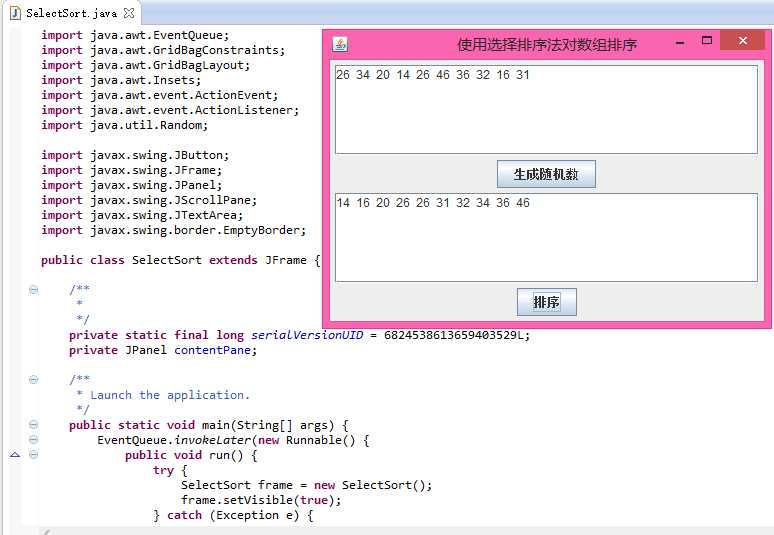
效果如图:
原文:http://www.cnblogs.com/cysolo/p/3553384.html