
第一种:随机图片
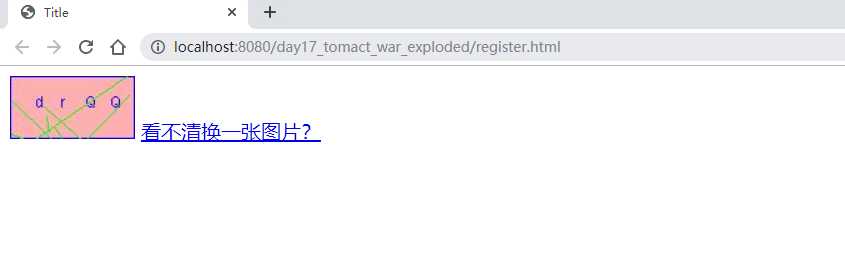
第二种;代码生成
java代码:
@WebServlet("/checkCodeServlet")
public class checkCodeServlet extends HttpServlet {
    protected void doPost(HttpServletRequest request, HttpServletResponse response) throws ServletException, IOException {


    }

    protected void doGet(HttpServletRequest request, HttpServletResponse response) throws ServletException, IOException {
        int width = 100;
        int height = 50;

        //1、创建一对象,在内存中图片(验证码图片对象)
        BufferedImage image = new BufferedImage(width,height,BufferedImage.TYPE_INT_RGB);
        //2.美化图片
        Graphics g = image.getGraphics();//创建画笔对象
        g.setColor(Color.pink);//设置画笔的颜色
        g.fillRect(0,0,width,height);

        //2.2画边框
        g.setColor(Color.blue);
        g.drawRect(0,0,width-1,height-1);

        String str = "ABCDEFGHKIJMNOPQRSTUWXYZabcdefghijklmnopqrstuwxyz0123456789";
        //生成随机角标
        Random random = new Random();
        for (int i = 1; i<=4;i++) {
            int index = random.nextInt(str.length());
            //获取字符
            char ch = str.charAt(index);
            //写验证码
            g.drawString(ch+"",width/5*i,height/2);
        }
        //画干扰线
        g.setColor(Color.green);
        for (int i = 0; i < 10; i++) {
            int x1 = random.nextInt(width);
            int x2 = random.nextInt(width);

            int y1 = random.nextInt(width);
            int y2 = random.nextInt(width);
            g.drawLine(x1,x2,y1,y2);
        }
        //3.将图片输出到页面
        ImageIO.write(image,"jpg",response.getOutputStream());
    }
}
html页面;
<!DOCTYPE html>
<html lang="en">
<head>
    <meta charset="UTF-8">
    <title>Title</title>
    <script>
        /*
        * 分析:
        *      点击图片或者超链接,需要换一张图片
        *      1.给超链接和图片添加点击事件
        *      2.重新设置图片的src属性值*/
        window.onload = function () {
            //获取图片对象
            var image = document.getElementById("checkCode");
            image.onclick = function () {
                //加时间戳
                var date = new Date().getTime();
                image.src="/day17_tomact_war_exploded/checkCodeServlet?"+date;
            }
        }
    </script>
</head>
<body>
    <img src="/day17_tomact_war_exploded/checkCodeServlet" id="checkCode">
    <a id="change" href="javascript:void(0)">看不清换一张图片?</a>
</body>
</html>
原文:https://www.cnblogs.com/naigai/p/11809196.html