
hadoop安装,hbase单机安装,参考链接,https://blog.csdn.net/LiuHuan_study/article/details/84347262
开机启动脚本,参考,
https://github.com/josonle/BigData-Learning
http://kittyandpuppy.coolplayer.net/HBase.pdf
hadoop版本,hadoop-2.7.7
hbase版本,hbase-1.4.10
名称hadoop-service脚本,
#!/bin/bash
# chkconfig: 2345 90 90
# description: hadoop service
# It is used to serve HTML files and CGI.
# processname: hadoop
# Source function library.
. /etc/profile
# See how we were called.
case "$1" in
start)
echo "Starting hadoop..."
$HADOOP_HOME/sbin/start-all.sh
;;
stop)
echo "Stopping hadoop..."
$HADOOP_HOME/sbin/stop-all.sh
;;
restart)
echo "Restarting hadoop..."
exit 1
;;
*)
echo "Usage: $0 {start|stop}"
exit 1
;;
esac
exit 0
名称hbase-service启动脚本,
#!/bin/bash
# chkconfig: 2345 91 89
# description: hbase service
# It is used to serve HTML files and CGI.
# processname: hbase
# Source function library.
. /etc/profile
# See how we were called.
case "$1" in
start)
echo "Starting hbase..."
$HBASE_HOME/bin/start-hbase.sh
;;
stop)
echo "Stopping hbase..."
$HBASE_HOME/bin/stop-hbase.sh
;;
restart)
echo "Restarting hbase..."
exit 1
;;
*)
echo "Usage: $0 {start|stop}"
exit 1
;;
esac
exit 0
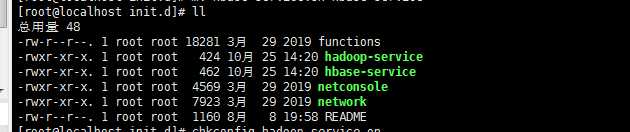
放到 /etc/init.d目录下,然后
chmod +x hadoop-service
chkconfig hadoop-service on
chmod +x hbase-service
chkconfig hbase-service on
reboot后,jps查看进程,
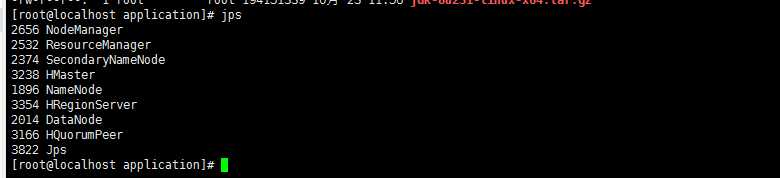
hadoop 与 hbase 添加开机启动,按顺序,先hadoop,后hbase,开机启动脚本,hbase学习
原文:https://www.cnblogs.com/xiongjinpeng/p/11737764.html