
httpd编译安装
1.编译安装apr
httpd-2.4.9需要较新版本的apr和apr-util,所以,要先安装这两个包,在检查环境,要确定Development Tools、Server Platform Development、Desktop Platform Development这三个开发包组是否安装,然后开始编译安装
#tar xf apr-1.5.0.tar.bz2
#cd apr-1.5.0
#./configure --prefix=/usr/local/apr
#make && make install
2.编译安装apr-util
#tar xf apr-util-1.5.3.tar.bz2
#cd apr-util-1.5.3
#./configure --prefix=/usr/local/apr-util --with-apr=/usr/local/apr
#make && make install
3.编译安装httpd-2.4
#./configure --prefix=/usr/local/apache --sysconfdir=/etc/httpd24 --enable-so --enable-ssl --enable-cgi --enable-rewrite --with-zlib --with-pcre --with-apr=/usr/local/apr --with-apr-util=/usr/local/apr-util/ --enable-mpms-shared=all --with-mpm=event --enable-modules=most
#make && make install
4.编译完成之后,加入变量,否则无法用apachectl启动
#vim /etc/profile.d/httpd.sh

编辑好之后用source httpd.sh,就加入环境变量了,这就可以启动了
#apachetctl
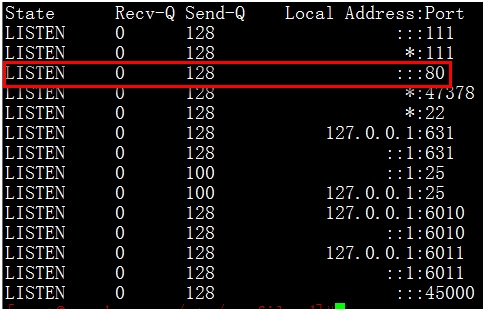
这样80端口就监听了
5.启用man手册
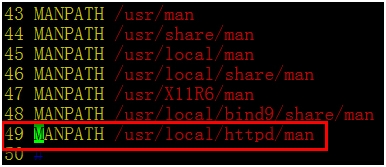
如果不想用绝对路径来查看httpd的手册信息,就要启用HTTPD的MAN手册,下面加一条HTTPD的MAN手册的绝对路径就可以。以后就可以直接用#man httpd了。
#vim /etc/man.config
6.配置服务启动
#vim /etc/rc.d/init.d/httpd
在里面添加下面命令就可了,不过要注意的是还要修改里面的路径
#!/bin/bash
#
# httpd        Startup script for the Apache HTTP Server
#
# chkconfig: - 85 15
#        HTML files and CGI.
# processname: httpd
# config: /etc/httpd/conf/httpd.conf
#if [ -f /etc/sysconfig/httpd ]; then
# Start httpd in the C locale by default.
HTTPD_LANG=${HTTPD_LANG-"C"}

# mod_ssl needs a pass-phrase from the user.
INITLOG_ARGS=""
apachectl=/usr/local/httpd/bin/apachectl
httpd=${HTTPD-/usr/local/httpd/bin/httpd}
prog=httpd
pidfile=${PIDFILE-/usr/local/httpd/logs/httpd.pid}
lockfile=${LOCKFILE-/var/lock/subsys/httpd}
RETVAL=0

 start() {
         echo -n $"Starting $prog: "
         LANG=$HTTPD_LANG daemon --pidfile=${pidfile} $httpd $OPTIONS
         [ $RETVAL = 0 ] && touch ${lockfile}
         return $RETVAL
 }

 stop() {
   echo -n $"Stopping $prog: "
   killproc -p ${pidfile} -d 10 $httpd
   RETVAL=$?
   echo
   [ $RETVAL = 0 ] && rm -f ${lockfile} ${pidfile}
 }
 reload() {
     echo -n $"Reloading $prog: "
     if ! LANG=$HTTPD_LANG $httpd $OPTIONS -t >&/dev/null; then
         RETVAL=$?
         echo $"not reloading due to configuration syntax error"
     else
         killproc -p ${pidfile} $httpd -HUP
         RETVAL=$?
     fi
     echo
 }

 # See how we were called.
 case "$1" in
   start)
   start
   ;;
   stop)
   stop
   ;;
   status)
         status -p ${pidfile} $httpd
   RETVAL=$?
   ;;
   start
   ;;
   condrestart)
   if [ -f ${pidfile} ] ; then
     stop
     start
   fi
   ;;
   reload)
         reload
   ;;
   graceful|help|configtest|fullstatus)
   $apachectl $@
   RETVAL=$?
   ;;
   *)
   echo $"Usage: $prog {start|stop|restart|condrestart|reload|status|    fullstatus|graceful|help|configtest}"
   exit 1
 esac

exit $RETVAL 
本文出自 “鱼儿” 博客,请务必保留此出处http://kyfish.blog.51cto.com/1570421/1541396
HTTPD(三)--HTTP2.4.9编译安装,布布扣,bubuko.com
原文:http://kyfish.blog.51cto.com/1570421/1541396