
1、浏览器内核:渲染引擎(取得内容、整理信息、计算网页显示方式)+js引擎(实现动态效果)。内核主要指渲染引擎。
2、主要浏览器及其内核
(1)trident:国内大多双核浏览器(ie、360急速、百度、猎豹安全、腾讯TT、Avant、世界之窗)的内核,美其名曰"兼容模式"。
(2)edgeHTmL:IE内核(windows10之后,IE将其内置浏览器命名为Edge)
(3)gecko:Firefox内核(开源,但打开速度慢、升级频繁、需要加载flash)
(4)webkit:Safari内核(苹果公司),代表浏览器:傲游浏览器3、Apple Safari(win/iphone/ipad)、symbian手机浏览器、安卓默认浏览器
(5)blink:谷歌内核(blink是webkit的分支,2013年4月3日,开始使用blink)
(6)presto:opera前任内核(目前已投入使用blink)
3、目前移动设备浏览器常用内核有webkit、blink、trident、gecko:
(1)webkit:iphone和ipad等IOS平台内核,android4.4之前系统浏览器内核
(2)blink:android4.4之后系统浏览器(chromium)内核
(3)trident :windows phone 8系统浏览器内核
学习网址:https://www.w3school.com.cn/
W3C及其他组织规定的标准集合。
结构标准:html
表现标准:css
行为标准:js
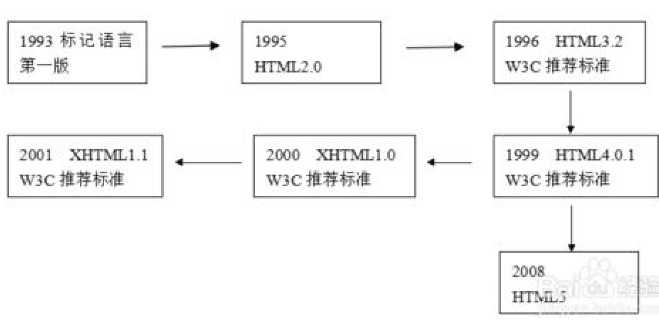
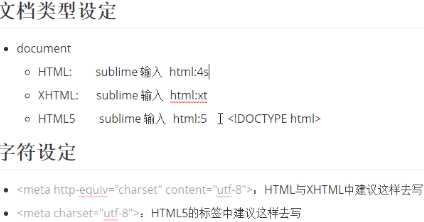

<!DOCTYPE html>
<html lang="en">
<head>
    <meta charset="UTF-8">
    <title>Document</title>
</head>
<body>

</body>
</html>
快捷生成骨架:
最新版本是html:5+tab键,或者 ! 键
<!DOCTYPE html> 告知使用版本html5
注:html:xt+tab,可以看到详细版本
<meta charset=”utf-8”> 告知字符集
gb2312 简体中文,包含6763个汉字
BIG5 繁体中文,港澳台等用
GBK 是gb2312的扩展,外加繁体中文
UTF-8 包含全球语言
注:当有或时,推荐用第一个。
1、标题标签:<h1></h1>到<h6></h6>,依次递减,<h1></h1>尽量少用
2、段落标签:<p></p>
3、水平线: <hr />或者<hr/>或者 <hr>
4、换行标签:<br />或者<br/>或者 <br>;间距比<p></p>小
没有实际意义,相当于盒子
5、<div><div> 默认占一行
6、<span></span> 默认不换行
1、粗体:<strong></strong>或<b></b>
2、斜体:<em></em>或<i></i>
3、删除体:<del></del>或<s></s>
4、下划线:<ins></ ins >或<u></u>
注:b i s u 没有强调的意思,strong、em、del、ins语义更强烈,搜索引擎优化。
1、1个标签可以有多个属性,必须写在标签中,位于标签后面
2、属性之前不分先后顺序,属性之间以空格隔开
3、任何标签的属性都有默认值,省略时则为默认值
4、属性值必须引起来,双引号和单引号皆可
<!--要求:水平线的长度(width)为500像素,颜色为红色-->

<hr width="500"  color=‘red‘ length=‘200‘ >
1、一般设置height、width一般只设置一个,另外一边按比例缩放。
2、建议用相对路径,更换电脑也不怕
<img src="E:\study\mycode\html\imgs\1.jpg" alt="无效路径"  />

<img src="E:\study\mycode\html\imgs\img.jpg" title="这是我的大头贴" height="200" border="20" />
<!DOCTYPE html>
<html lang="en">
<head>
    <meta charset="UTF-8">
    <title>链接标签</title>
</head>
<body>
    <a href="http://www.baidu.com" target="_blank">新窗口打开百度</a></br>
    <a href="E:\study\java\code\html\D001 dome.html" >内部链接</a>
    <a href="#" >只有链接样式</a>

</body>
</html>
1、 外部链接时,必须加http://
2、 路径给"#",只有链接样式,无法跳转
3、 target:_blank 新窗口打开,_self,本窗口打开(默认)
<!--抛锚-->
<h2>目录</h2>
<hr>
<p>1、早年经历</p>
<p><a href="#recode">2、获奖记录</a></p>

<p>3、电影时代</p>

<!--定位-->
<h2 id="recode">获奖记录</h2>
优先级:base<内部属性
<!DOCTYPE html>
<html lang="en">
<head>
    <meta charset="UTF-8">
    <title>Document</title>
    <!--base标签-->
    <base target="_blank">
</head>
<body>
    <a href="http://www.baidu.com">百度</a>
    <a href="http://www.sina.com">新浪</a>
    <!--内部属性-->
    <a href="http://www.sina.com" target=‘_self‘>新浪</a>

</body>
</html>
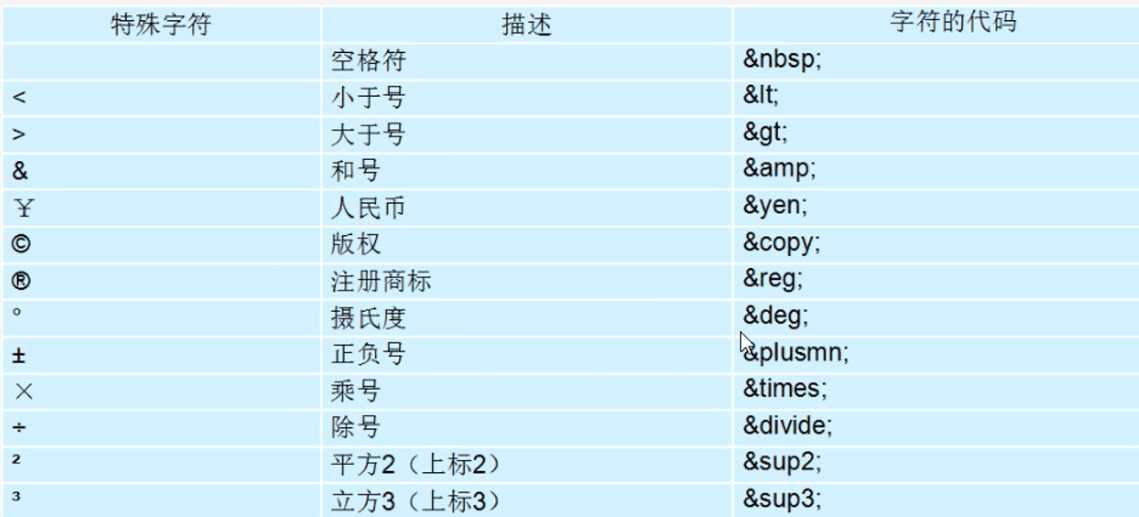
空格:
<: <
>: >
&: &
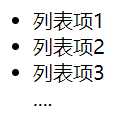
1、各个列表项没有级别顺序之分
2、<ul> </ul>里面只能嵌套<li></li>标签,<li></li>里面可以嵌套其他标签
    <ul>
        <li>列表项1</li>
        <li>列表项2</li>
        <li>列表项3</li>
        ....
    </ul>
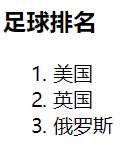
    <h3>足球排名</h3>
    <ol>
        <li>美国</li>
        <li>英国</li>
        <li>俄罗斯</li>
    </ol>
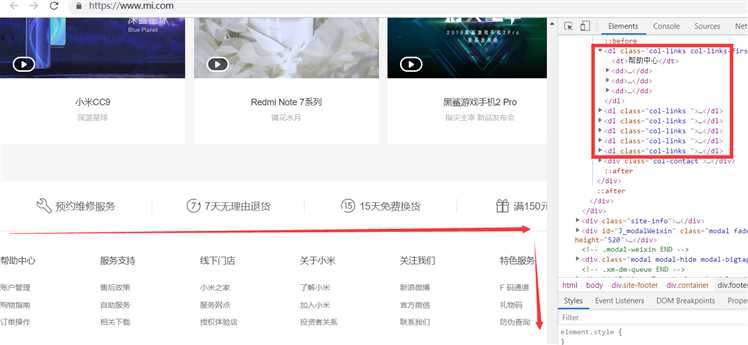
1、对名称或术语解释与描述,没有任何项目符号。
2、一般用于页面底部。
3、1个dt对应多个dd
    <dl>
        <dt>服务支持</dt>

        <dd>售后政策</dd>
        <dd>自助服务</dd>
        <dd>相关下载</dd>
    </dl>
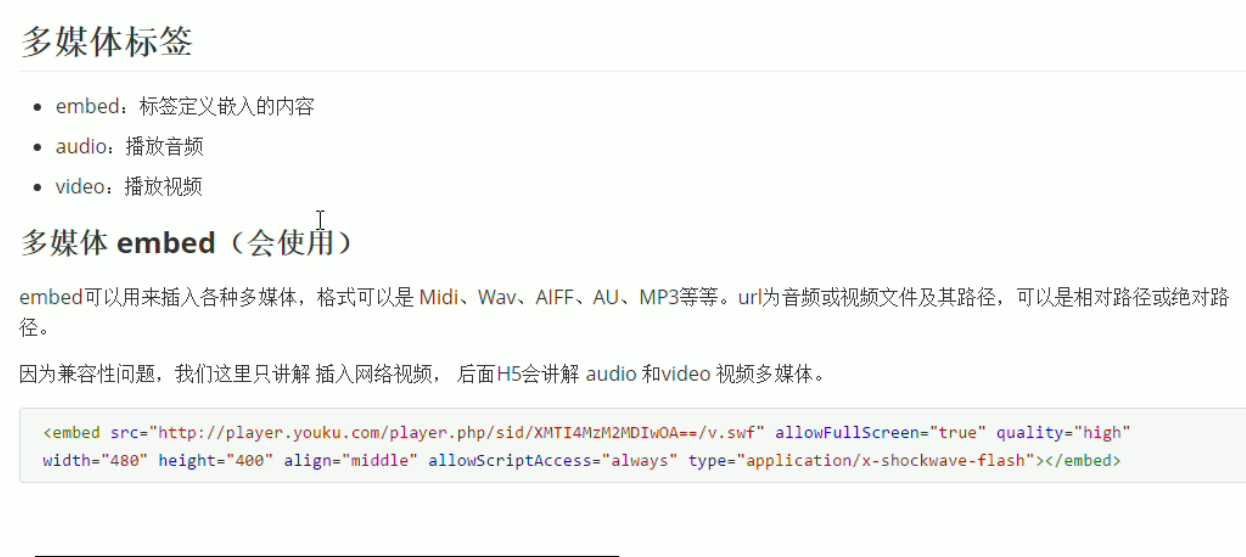
iframe/embed:引入网上的视频
audio:播放音频
video:播放视频
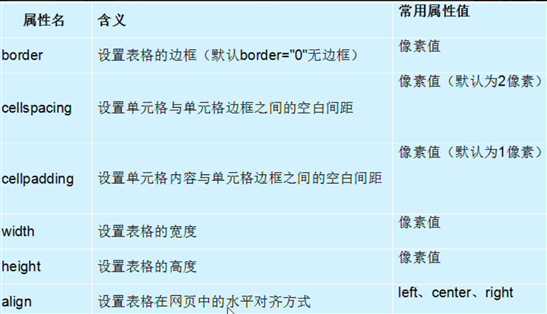
1、标签顺序 table-->tr-->th/td
2、tr里面只能嵌套th或者td,th或者td里面可嵌套任意标签
3、table里面可以嵌套表格结构标签(thead、tbody标签)、表格标题标签(caption),thead里面为th,tbody里面为td
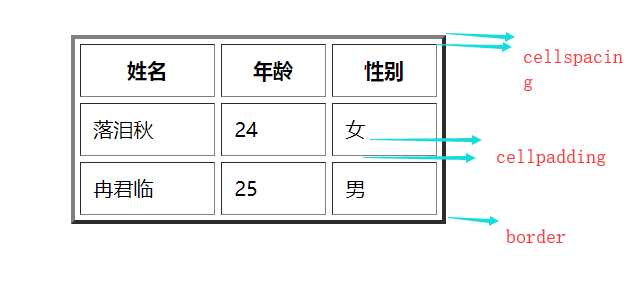
    <table width="300" height=‘10‘ border="10" align="center" cellspacing="5" cellpadding="10">
        <caption>花名册</caption>
        <thead>
            <tr>
                <th>姓名</th>
                <th>年龄</th>
                <th>性别</th>
            </tr>

        </thead>
        <tbody>
            <tr>
                <td>落泪秋</td>
                <td>24</td>
                <td>女</td>
            </tr>
            <tr>
                <td>冉君临</td>
                <td>25</td>
                <td>男</td>
            </tr>
        </tbody>
    </table>
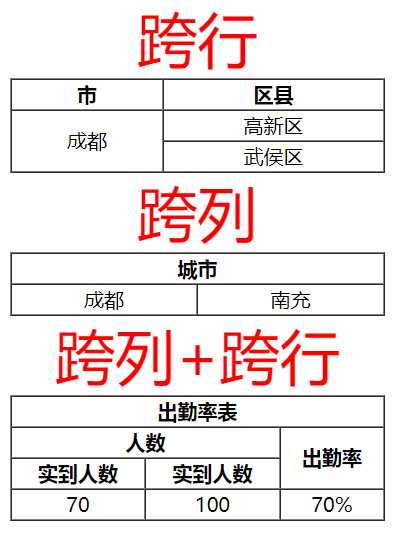
    <table width="300" height=‘10‘ border="1" align="1" cellspacing="0">
        <caption><font color=‘red‘ size="20">跨行</font></caption>
        <thead>
            <tr >
                <th>市</th>
                <th>区县</th>
            </tr>

        </thead>
        <tbody>
            <tr align="center">
                <td rowspan="2">成都</td>
                <td>高新区</td>
            </tr>
            <tr align="center">
                <td>武侯区</td>
            </tr>
        </tbody>
    </table>
   <table width="300" height=‘10‘ border="1" align="1" cellspacing="0">
        <caption><font color=‘red‘ size="20">跨列</font></caption>
        <thead>
            <tr>
                <th colspan="2">城市</th>
            </tr>

        </thead>
        <tbody>
            <tr align="center">
                <td>成都</td>
                <td>南充</td>
            </tr>

        </tbody>
    </table>
    <table width="300" height=‘10‘ border="1" align="1" cellspacing="0">
            <caption><font color=‘red‘ size="20">跨列+跨行</font></caption>
            <tr>
                <th colspan="3">出勤率表</th>
            </tr>
            <tr>
                <th colspan="2">人数</th>
                <th rowspan="2">出勤率</th>
            </tr>
            <tr>
                <th>实到人数</th>
                <th>实到人数</th>
            </tr>
            <tr align="center">
                <td>70</td>
                <td>100</td>
                <td>70%</td>
            </tr>

    </table>
目的:收集信息,与用户交互
组成:表单控件(表单元素)+表单域+提示信息
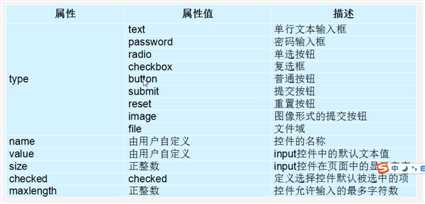
文本框、密码框
        <!-- 文本框 -->
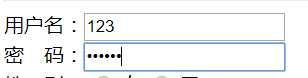
用户名:<input type="text" name="username" maxlength="3" >       <br>
        <!-- 密码框 -->
密 码:<input type="password" name="password" maxlength="6">   <br>
1、通过相同name值实现单选
2、默认选中:checked="checked"
         <!-- 单选框 -->
性 别: <input type="radio" name="sex" checked="checked"> 女
        <input type="radio" name="sex">                   男       <br>
        <!-- 复选框 -->
爱 好: <input type="checkbox" name="hobby" checked="checked">足球
        <input type="checkbox" name="hobby" checked="checked">篮球
        <input type="checkbox" name="hobby">                  乒乓球<br>
        <hr>

        <!-- 普通按钮 -->
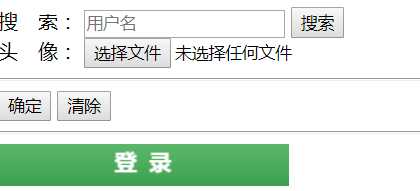
搜 索:    <input type="text"   name="username" placeholder="用户名">
        <input type="button" name="search"   value="搜索">            <br>
        <!-- 文件按钮-->
头 像:    <input type="file" >
        <hr>
        <!-- 提交按钮:不给value时,默认“提交” -->
        <input type="submit" value="确定">
        <!-- 重置按钮:不给value时,默认“重置” -->
        <input type="reset"  value="清除">     <br>
        <hr>
        <!-- 图片按钮:也有提交表单的功能-->
        <input type="image" src="imgs\login.png" >
作用:用于绑定一个表单元素,鼠标点击文字,光标定位到所绑定的输入框(提升用户体验)
        <!-- 直接包裹 -->
        <label>邮 箱:<input type="text" name="email"></label>
        <!-- 如果包裹多个表单元素,想定位到某个元素,使用for -->
        <label for="two">邮 箱:<input type="text" name="email">
                         手 机:<input type="text" name="email" id="two">
        </label>

留言版:<textarea>请输入留言</textarea>

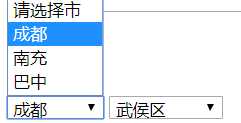
selected="selected"即为默认选项,没有时,默认第一个
        <select>
            <option>请选择市</option>
            <option selected="selected">成都</option>
            <option>南充</option>
            <option>巴中</option>
        </select>
        <select>
            <option>请选择区县</option>
            <option selected="selected">武侯区</option>
            <option>高新区</option>
            <option>青羊区</option>
        </select>
1、用<form></form>包裹的全部时表单域
2、属性:action--提交目的路径,method--提交方式(get、post),name--表单名字(自定义)
3、加上<form></form>后,提交和重置按钮都会有效
<form action="提交路径" method="get" name="userinfo"></form>
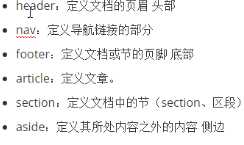
    <header>页眉、头部</header>
    <nav>导航栏</nav>
    <footer>页脚、底部</footer>
    <article>文章</article>
    <section>区域</section>
    <aside>侧边</aside>
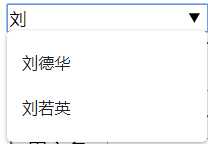
1、datalist比select更强大,它自带模糊匹配功能
2、datalist必须 配合input使用,input里面用list,datalist里面用id进行链接
    <input type="text" placeholder="请输入用户名" list="star">
    <datalist id="star">
        <option>刘德华</option>
        <option>刘若英</option>
        <option>王力宏</option>
    </datalist>
1、对同一组元素打包
2、和legend配合使用,定义组标题

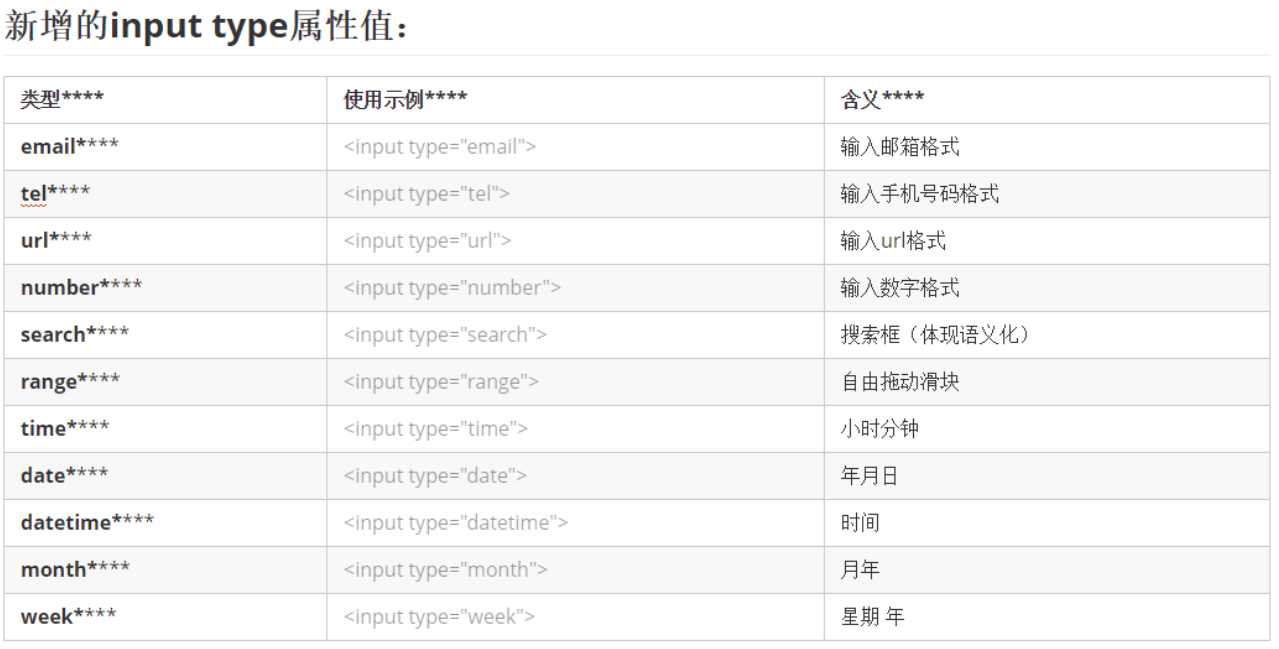
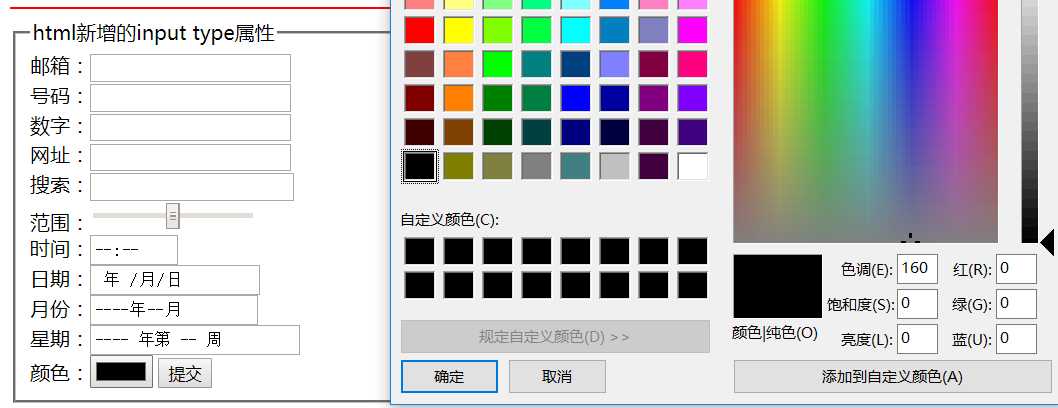
    <fieldset>
        <legend> html新增的input type属性值</legend>
        <form method="get" action="http://www.baidu.com">
            邮箱:<input type="email" >
            <br>
            号码:<input type="tel" >
            <br>
            数字:<input type="number" >
            <br>
            网址:<input type="url" >
            <br>
            搜索:<input type="search" >
            <br>
            范围:<input type="range" >
            <br>
            时间:<input type="time" >
            <br>
            日期:<input type="date" >
            <br>
            月份:<input type="month" >
            <br>
            星期:<input type="week" >
            <br>
            颜色:<input type="color" >
            <input type="submit" >

        </form>

    </fieldset>
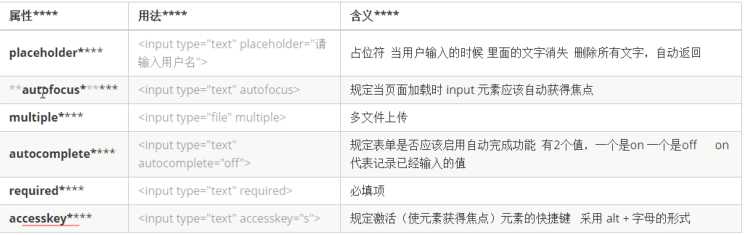
placeholder:占位符,一般用于输入提示。当输入文字时,占位文字消失,当全部删除输入的文字时,占位文字自动恢复,且占位文字比输入文字颜色浅。
autofocus:该元素在页面加载时,自动获得焦点。
multiple:上传文件时,可以选择多个文件。
autocomplete:提交表单后,该元素的输入值自动被记住。
             (1)必须有属性name
        (2)必须提交
required :非空验证
accesskey="s":不管鼠标在哪,按住ALT+S,该元素自动获得焦点。
    <fieldset>
        <legend>html5 新增的属性</legend>
        <form>
            账号:<input type="text" placeholder="请输入账号" autofocus="autofocus" >
            头像:<input type="file" multiple="multiple">
            姓名:<input type="text" autocomplete="on" name="name">
            密码:<input type="password" required accesskey="s">

            <input type="submit">

        </form>


    </fieldset>

原文:https://www.cnblogs.com/rjl888/p/11385876.html