
import sys
def readfile(filename):
    f=open(filename)
    while True:
        line=f.readline()
        if len(line)==0:
            break
            print("wrong! EOF")
        print(line)
if len(sys.argv) < 2:
    print (‘No action specified.‘)
    sys.exit()
if sys.argv[1].startswith(‘--‘):
    option = sys.argv[1][2:]
    # fetch sys.argv[1] but without the first two characters
    if option == ‘version‘:
        print (‘Version 1.2‘)
    elif option == ‘help‘:
        print (‘‘‘\
This program prints files to the standard output.
Any number of files can be specified.
Options include:
  --version : Prints the version number
  --help    : Display this help‘‘‘)
    else:
        print (‘Unknown option.‘)
    sys.exit()
else:
    for filename in sys.argv[1:]:
        readfile(filename)
以上是简明python基础上摘取下来的
都好理解。
用命令行执行你的python程序:如 python my.py --version -y
那么 sys.argv[0]指的是 my.py
sys.argv[1]指的是--version
sys.argv[2]指的是-y
   sys.argv[1]("--version")表示的是一个字符串。
   所以sys.argv[1][2:]就是 字符串下标为2开始的后面的字符串 就是 “version”了.


备注:  my.py 后面要改参数.  即用my.py --version -y
==================================

应用:
把字幕文件 *.VTT 批量转为 *.srt
查看了vtt和srt的区别,使用记事本打开vtt和srt,发现主要有两个
流程图:
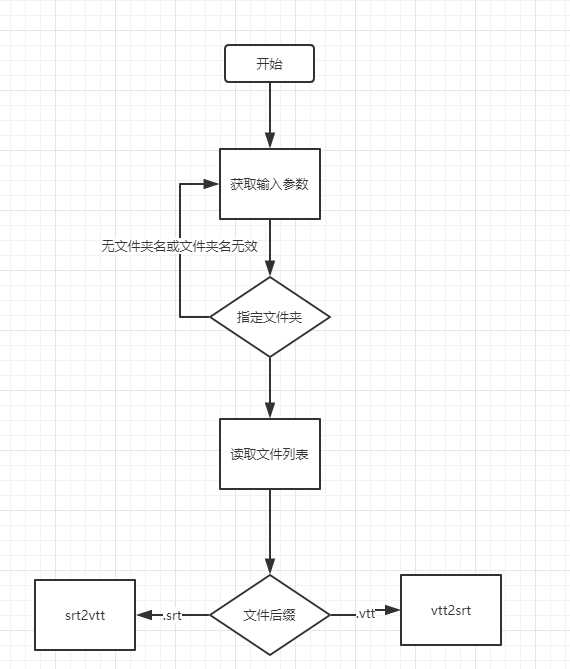
基于python写了一个简单的脚本对其进行批量修改
import os
import sys
import re

if __name__ == ‘__main__‘:
    args = sys.argv
    print(args)

    if os.path.isdir(args[1]):
        file_list = get_file_name(args[1], ".vtt")
        for file in file_list:
            vtt2srt(file)

    elif os.path.isfile(args[1]):
        vtt2srt(args[1])
    else:
        print("arg[0] should be file name or dir")
def get_file_name(dir, file_extension):
    f_list = os.listdir(dir)

    result_list = []

    for file_name in f_list:
        if os.path.splitext(file_name)[1] == file_extension:
            result_list.append(os.path.join(dir, file_name))
    return result_list
def vtt2srt(file_name):
    content = open(file_name, "r", encoding="utf-8").read()
    # 删除WEBVTT行

    content = re.sub("WEBVTT\n\n",‘‘,content)
    # 替换“.”为“,”
    content = re.sub("(\d{2}:\d{2}:\d{2}).(\d{3})", lambda m: m.group(1) + ‘,‘ + m.group(2), content)

    output_file = os.path.splitext(file_name)[0] + ‘.srt‘
    open(output_file, "w", encoding="utf-8").write(content)

def srt2vtt(file_name):
    content = open(file_name, "r", encoding="utf-8").read()
    # 添加WEBVTT行

    content = "WEBVTT\n\n" + content
    # 替换“,”为“.”
    content = re.sub("(\d{2}:\d{2}:\d{2}),(\d{3})", lambda m: m.group(1) + ‘.‘ + m.group(2), content)

    output_file = os.path.splitext(file_name)[0] + ‘.vtt‘
    open(output_file, "w", encoding="utf-8").write(content)
import os
import sys
import re


def get_file_name(dir, file_extension):
    f_list = os.listdir(dir)

    result_list = []

    for file_name in f_list:
        if os.path.splitext(file_name)[1] == file_extension:
            result_list.append(os.path.join(dir, file_name))
    return result_list


def vtt2srt(file_name):
    content = open(file_name, "r", encoding="utf-8").read()
    # 删除WEBVTT行

    content = re.sub("WEBVTT\n\n",‘‘,content)
    # 替换“.”为“,”
    content = re.sub("(\d{2}:\d{2}:\d{2}).(\d{3})", lambda m: m.group(1) + ‘,‘ + m.group(2), content)

    output_file = os.path.splitext(file_name)[0] + ‘.srt‘
    open(output_file, "w", encoding="utf-8").write(content)

def srt2vtt(file_name):
    content = open(file_name, "r", encoding="utf-8").read()
    # 添加WEBVTT行

    content = "WEBVTT\n\n" + content
    # 替换“,”为“.”
    content = re.sub("(\d{2}:\d{2}:\d{2}),(\d{3})", lambda m: m.group(1) + ‘.‘ + m.group(2), content)

    output_file = os.path.splitext(file_name)[0] + ‘.vtt‘
    open(output_file, "w", encoding="utf-8").write(content)


if __name__ == ‘__main__‘:
    args = sys.argv

    if os.path.isdir(args[1]):
        file_list = get_file_name(args[1], ".vtt")
        for file in file_list:
            vtt2srt(file)

    elif os.path.isfile(args[1]):
        vtt2srt(args[1])
        print(‘done‘)
    else:
        print("arg[0] should be file name or dir")
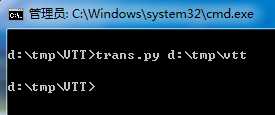
注意:
保存代码到trans.py
若vtt文件在d:\tmp\vtt 文件里,
则写代码:
trans.py d:\tmp\vtt
原文:https://www.cnblogs.com/peterwong666/p/11059673.html