
html乱码:在head标签中加入:
<meta http-equiv="Content-Type" content="text/html; charset=utf-8">
CSS选择器:
<p>30294y-57-<br/>44-32i5-4 这里的代码 <strong>(这里的代码strong)</strong></p>
元素选择器:
 body{
    background: rgb(255,255,255);
    margin: 0;
    padding: 0;


 }

 p{
    font-size: 50;
    color: rgb(0,255,0);
    text-align:center;
    font-family: arial;
    background: red;
 }
分组选择器:h2 和 p都有效
h2, p {color:gray;}
h1, h4, b {background:white;}
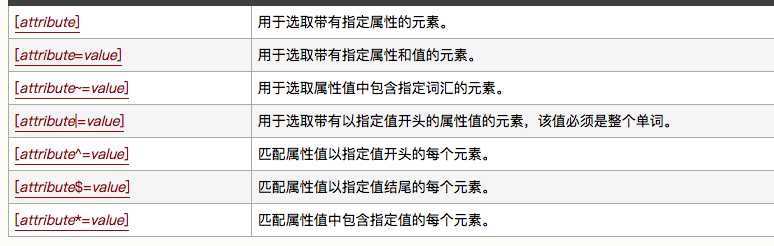
属性选择器:
[title]
{
color:red;
}
input[type="text"]
{
  width:150px;
  display:block;
  margin-bottom:10px;
  background-color:yellow;
  font-family: Verdana, Arial;
}
后代选择器:h1里面的em有效,不管em在h1里面嵌套了多少层
h1 em {color:red;}
如果希望父元素的第一层子元素,可以使用:
h1 > strong {color:red;}
类选择器:class=center有效
.center {text-align: center}
id选择器:
#sidebar {
	border: 1px dotted #000;
	padding: 10px;
	}
相邻兄弟选择器,用一个结合符只能选择两个相邻兄弟中的第二个元素。
li + li {font-weight:bold;}
伪类:
a:link {color: #FF0000}		/* 未访问的链接 */
a:visited {color: #00FF00}	/* 已访问的链接 */
a:hover {color: #FF00FF}	/* 鼠标移动到链接上 */
a:active {color: #0000FF}	/* 选定的链接 */
插入外部的css样式:一般插在head中间
<link rel="stylesheet" type="text/css" href="mystyle.css" />
原文:http://www.cnblogs.com/hualuoshuijia/p/7357112.html