在MVC中实现基本的增删改和传统的asp .net 程序有很大的不同,刚开始使用MVC还是有些不太适应,但是它的页面简洁也相当的不同,同时对服务器的访问性能上也有很大的提高。基于此,下面对我学习过程记录如下:
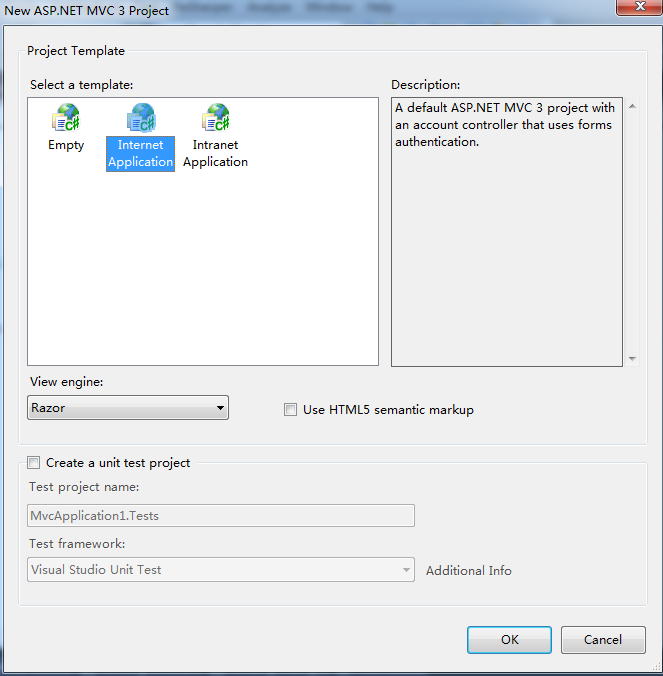
首先,使用VS创建一个以Internet为模板的项目,如下所示:
在“_Layout.cshtml”文件中引入相关脚本文件,此文件的路径如下:
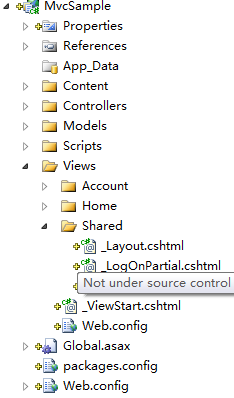
修改成如下内容:
1: <head>
2: <title>@ViewBag.Title</title>
3: <link href="@Url.Content("~/Content/themes/base/jquery.ui.all.css")" rel="Stylesheet" type="text/css" />
4: <link href="@Url.Content("~/Content/Site.css")" rel="stylesheet" type="text/css" />
5: <script src="@Url.Content("~/Scripts/jquery-1.5.1.min.js")" type="text/javascript"></script>
1: 2: <script src="@Url.Content("~/Scripts/jquery-ui-1.8.11.min.js")" type="text/javascript">
1: </script> 1: </script>2: <script src="@Url.Content("~/Scripts/jquery.validate.min.js")" type="text/javascript">
1: </script></script>
6: </head>
在Models文件夹下,新建类文件“Note.cs”,内容如下:
1: public class Note
2: {3: public int Id { get; set; }
4: public string Title { get; set; }
5: public string Body { get; set; }
6: }
再创建类文件“NoteManager.cs”,内容如下:
1: public class NoteManager
2: {3: public Collection<Note> Notes
4: { 5: get 6: {7: if (HttpRuntime.Cache["Notes"] == null)
8: loadInitialData(); return (Collection<Note>)HttpRuntime.Cache["Notes"];
9: } 10: }11: private void loadInitialData()
12: {13: var notes = new Collection<Note>
14: {15: new Note
16: { 17: Id = 1,18: Title = "Set DVR for Sunday",
19: Body = "Don‘t forget to record Game of Thrones!"
20: },21: new Note
22: {Id = 2, Title = "Read MVC article", Body = "Check out the new iwantmymvc.com post"},
23: new Note
24: { 25: Id = 3,26: Title = "Pick up kid",
27: Body = "Daughter out of school at 1:30pm on Thursday. Don‘t forget!"
28: },29: new Note {Id = 4, Title = "Paint", Body = "Finish the 2nd coat in the bathroom"}
30: };31: HttpRuntime.Cache["Notes"] = notes;
32: } public Collection<Note> GetAll() { return Notes; }
33: public Note GetById(int id)
34: {35: return Notes.Where(i => i.Id == id).FirstOrDefault();
36: }37: public int Save(Note item)
38: {39: if (item.Id <= 0)
40: return SaveAsNew(item);
41: var existingNote = Notes.Where(i => i.Id == item.Id).FirstOrDefault();42: if(existingNote == null)
43: {44: return -1;
45: } 46: 47: existingNote.Title = item.Title; 48: existingNote.Body = item.Body; 49: return existingNote.Id;
50: }51: private int SaveAsNew(Note item)
52: {53: item.Id = Notes.Count + 1; Notes.Add(item); return item.Id;
54: } 55: }
修改“HomeController”为如下内容:
1: public class HomeController : Controller
2: {3: public ActionResult Index()
4: {5: return View();
6: } 7: [OutputCache(Duration = 0)]8: public ActionResult List()
9: {10: var manager = new NoteManager();
11: var model = manager.GetAll();12: return PartialView(model);
13: } 14: [OutputCache(Duration = 0)]15: public ActionResult Create()
16: {17: var model = new Note();
18: return PartialView("NoteForm", model);
19: } 20: 21: [OutputCache(Duration = 0)]22: public ActionResult Edit(int id)
23: {24: var manager = new NoteManager();
25: var model = manager.GetById(id);26: return PartialView("NoteForm", model);
27: } 28: [HttpPost]29: public JsonResult Save(Note note)
30: {31: var manager = new NoteManager();
32: var noteId = manager.Save(note);33: return Json(new { Success = noteId > 0 });
34: } 35: }对项目编译一下,再新建一个“NoteForm”View,如下图所示:
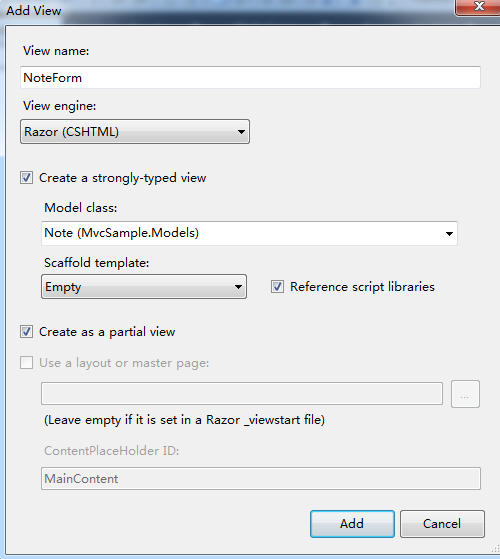
注意:上图中选择部分视图和使用强类型的View
修改后的内容如下所示:
1: @model MvcSample.Models.Note2: <script src="@Url.Content("~/Scripts/jquery.validate.min.js")" type="text/javascript"></script>
1: 2: <script src="@Url.Content("~/Scripts/jquery.validate.unobtrusive.min.js")" type="text/javascript">
1: </script> 2: 3: @using (Html.BeginForm("Save", "Home", FormMethod.Post, new { id = "NoteForm" }))
4: { 5: 6: 7: <div>8: @Html.ValidationSummary(true, "输入的内容有错,请纠正所有错误,再提交.")
9: @Html.HiddenFor(m => m.Id) 10: <div class="editor-label">
11: @Html.LabelFor(m => m.Title, "标题")
12: </div> 13: <div class="editor-field">
14: @Html.TextBoxFor(m => m.Title, new { data_val = "true", data_val_required = "标题不能为空。" })
15: @Html.ValidationMessageFor(m => m.Title) 16: </div> 17: 18: <div class="editor-label">
19: @Html.LabelFor(m => m.Body, "内容")
20: </div>21: <div class="editor-field">
22: @Html.TextBoxFor(m => m.Body, new { data_val = "true", data_val_required = "内容不能为空。" })
23: @Html.ValidationMessageFor(m => m.Body) 24: </div> 25: 26: </div> 27: } 28: 29: <script type="text/javascript" language="javascript">
30: $("#NoteForm").submit(function () {
31: $("#NoteForm").validate();
32: return false;
33: });</script>
再新建“List.cshtml”视图,也是部分视图,如下图所示: 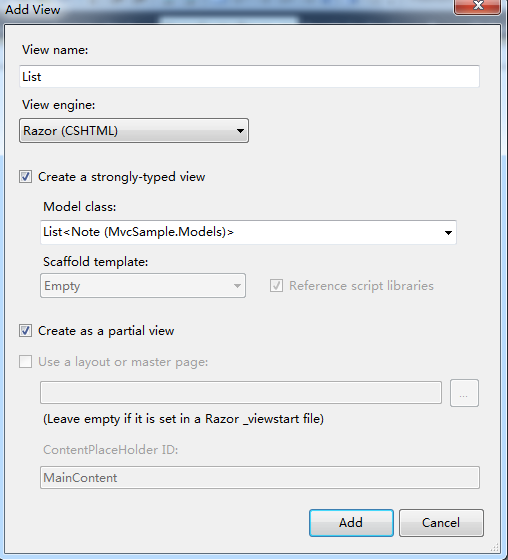
修改后的内容如下:
1: @model IEnumerable<MvcSample.Models.Note>
2: <ul class="NotesList">
3: @foreach (var note in Model) 4: { 5: <li> @note.Title <br /> @note.Body <br />
6: <span class="EditLink" noteid="@note.Id">Edit</span>
7: </li>
8: }9: </ul>
在“Scripts”目录下新建脚本文件“Common.js”,并加入如下内容:
1: function DialogObject(dialogId, formId, addUrl, editUrl, saveUrl, ajaxPostFunction, loadSuccessCallBack) {
2: dialogId = "#" + dialogId;
3: formId = "#" + formId;
4: Success = 0; 5: AlertError = 2;6: this.saveUrl = saveUrl;
7: this.addUrl = addUrl;
8: this.editUrl = editUrl;
9: this.ajaxPostFunction = ajaxPostFunction;
10: this.width = 440;
11: this.height = 330;
12: 13: 14: this.dialogLoad = function () {
15: $(dialogId).dialog({16: autoOpen: false, //对话框的是否自动打开
17: width: this.width, //宽高
18: height: this.height,
19: modal: true, //模态对话框
20: buttons: {//自定义对话框的按钮信息
21: "保存": this._saveFunction,
22: "返回": this._closedialog()
23: } 24: }); 25: }; 26: 27: this.loadEdit = function (id) {
28: 29: $(dialogId).html("")
30: .dialog("option", "title", "编辑")
31: .load(editUrl + "/" + id, this._openDialog());
32: 33: };34: this.loadAdd = function () {
35: $(dialogId).html("")
36: .dialog("option", "title", "新增")
37: .load(addUrl, this._openDialog());
38: };39: this._openDialog = function () {
40: return new Function("$(‘" + dialogId + "‘).dialog(‘open‘);");
41: }; 42: 43: this._closedialog = function () {
44: return new Function("$(‘" + dialogId + "‘).dialog(‘close‘);");
45: }; 46: 47: this.postFunction = function (formData, successCallback) {
48: $.post(saveUrl, 49: formData,50: function (data, textStatus) {
51: switch (textStatus) {
52: case
53: "timeout":
54: break;
55: case "error":
56: break;
57: case "notmodified":
58: break;
59: case "success":
60: successCallback($(dialogId), $(formId), data);61: break;
62: case "parsererror":
63: break;
64: default:
65: break;
66: } 67: 68: }); 69: 70: };71: defaultAjaxPostFunction = this.postFunction;
72: 73: this._saveFunction = function () {
74: var b = $(formId);
75: b.submit();76: if (b.validate().numberOfInvalids() > 0) {
77: return;
78: }79: if (ajaxPostFunction != null)
80: ajaxPostFunction();81: else
82: defaultAjaxPostFunction($(formId).serialize(), function (dlgObject, formObject, data) {
83: if (data.Success == true) {
84: dlgObject.dialog("close");
85: if (loadSuccessCallBack != null) {
86: loadSuccessCallBack(); 87: } 88: }89: // else if (data.Success == AlertError) {
90: // alert(data.data);
91: // }
92: // else {
93: // formObject.html(data.data);
94: // }
95: }); 96: }; 97: 98: 99: }修改默认的Index.cshtml文件内容如下所示:
1: @{ 2: ViewBag.Title = "Home Page"; 3: }4: <h2>
5: Notes</h2>
6: <div id="NoteListBlock">
7: </div>
8: <span class="AddLink">Add New Note</span>
9: <div id="NoteDialog" title="" class="Hidden">
10: </div>
11: <script src="@Url.Content("~/Scripts/Common.js?verion=1")" type="text/javascript"></script>
1: 2: <script type="text/javascript">
3: var noteDialog = new DialogObject("NoteDialog", "NoteForm", "/Home/Create", "/Home/Edit", "/Home/Save", null, LoadList);
4: $(function() {
5: noteDialog.dialogLoad();6: $(".EditLink").live("click", function () {
7: var id = $(this).attr("noteid");
8: noteDialog.loadEdit(id); 9: });10: $(".AddLink").click(function () {
11: noteDialog.loadAdd(); 12: }); 13: 14: LoadList(); 15: }); 16: 17: function LoadList() {
18: LoadMvcPage("/Home/List");
19: } 20: 21: function AddRecord() {
22: noteDialog.loadAdd();23: return false;
24: } 25: 26: function LoadMvcPage(url) {
27: $("#NoteListBlock").load(url);
28: }</script>
在Contents/site.css下加入如下内容:
1: .EditLink 2: { 3: color: Blue; 4: cursor: pointer; 5: } 6: .EditLink:hover 7: { 8: text-decoration: underline; 9: } 10: .AddLink 11: { 12: color: Blue; 13: cursor: pointer; 14: } 15: .AddLink:hover 16: { 17: text-decoration: underline; 18: } 19: #NoteForm label 20: { 21: display: block; 22: margin-bottom: 6px; 23: }24: #NoteForm label > span
25: { 26: font-weight: bold; 27: } 28: #NoteForm input[type=text] 29: { 30: width: 350px; 31: } 32: #NoteForm textarea 33: { 34: width: 350px; 35: height: 80px; 36: } 37: 38: .Hidden 39: { 40: display: none; 41: }
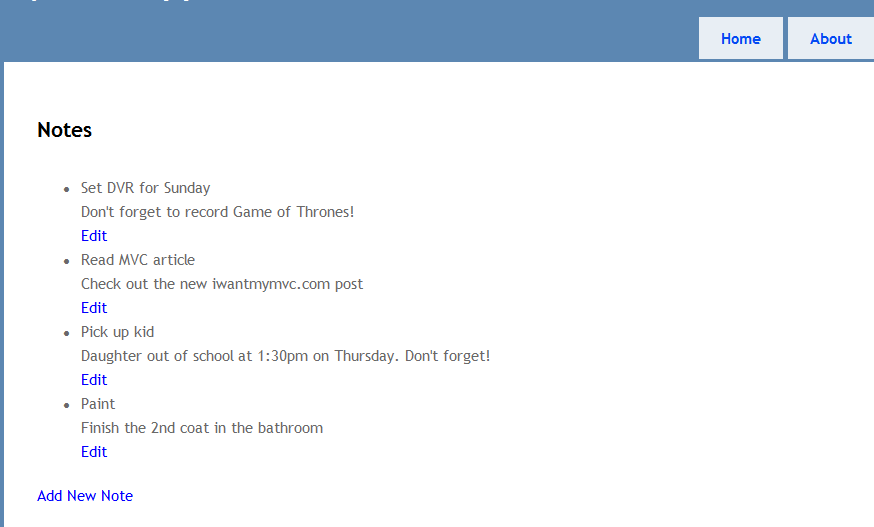
现在来运行程序,效果如下:
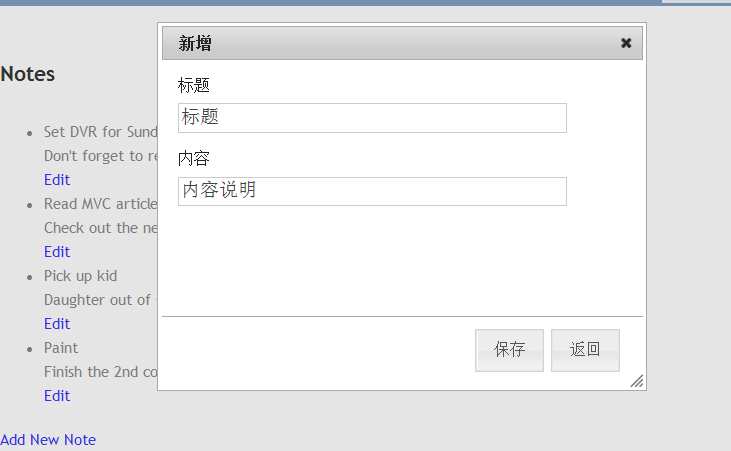
新增:
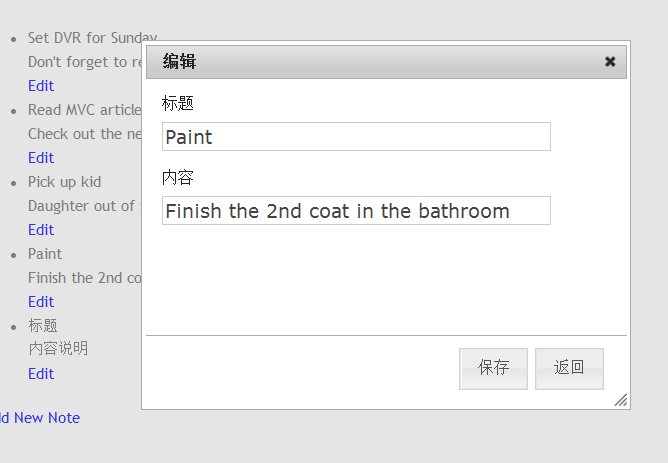
编辑:
下一篇,将进行分页查询的实现
备注:如果弹出对话框显示不正常,请检查Content下的样式文件是否存在。
原文:http://www.cnblogs.com/mvc2014/p/3776058.html