

<html>
<head>
    <meta charest="utf-8">
    <title>test</title>
    <style>
        #div{
            background:darkred;
            position:absolute;
            width:200px;
            height:200px;
            left:-200px;
        }
        #span1{
            background: blue;
            position: relative;
            width:50px;
            top:0;
            left:200px;
        }
        #div2{
            background: red;

            position:relative;
            left:350px;
            width:200px;
            height:200px;
            filter: alpha(opacity:30);
            opacity:0.3;
        }
    </style>
    <script>
        //这是速度动画
//        window.onload = function () {
//            var div = document.getElementById("div");
//            div.onmouseover = function(){
//                start1(0);
//            }
//            div.onmouseout = function(){
//                start1(-200);
//            }
//        };
//        var timer=null;
//        function start1(target) {
//            var speed = 0;
//            clearInterval(timer);
//            var div = document.getElementById("div");
//            timer = setInterval(function () {
//                //用来判断该加还是该减
//                if (div.offsetLeft > target) {
//                    speed = -10;
//                }
//                else {
//                    speed = 10;
//                }
//                //用来判断当达到目标值时的操作
//                if (div.offsetLeft == target) {
//                    clearInterval(timer);
//                } else {
//                    div.style.left = div.offsetLeft + speed + "px";
//                }
//            }, 30)
//        }

        //下面是分散的函数,上面的是把两个函数联合起来了
//        function start(){
//            clearInterval(timer);
//            var div = document.getElementById("div");
//            timer = setInterval(function () {
//                if(div.offsetLeft===0)
//                {
//                    clearInterval(timer);}
//                else
//                {
//                    div.style.left = div.offsetLeft + 10 + "px";}
//            },30);
//        }
//        function stop(){
//            clearInterval(timer);
//            var div = document.getElementById("div");
//            timer = setInterval(function () {
//                if(div.offsetLeft == -200)
//                {
//                    clearInterval(timer);}
//                else
//                {
//                    div.style.left = div.offsetLeft - 10 + "px";}
//            },30);
//        }

        //这是透明度动画
        window.onload = function () {
            var div2 = document.getElementById("div2");
            div2.onmouseover = function () {
                start(80);
            };
            div2.onmouseout = function () {
                start(30);
            }
        };
        var timer = null;
        var opacity = 30;//当前透明度,初始值为30
        function start(target){
            clearInterval(timer);
            var speed ;
            var div2 = document.getElementById("div2");
            timer = setInterval(function () {
                if(opacity > target)//如果当前的透明度大于目标值
                {speed = -10;}
                else
                {speed = 10;}

                if(opacity == target)//如果当前的透明度等于目标值,就结束定时器
                {clearInterval(timer);}
                else{
                    opacity += speed;
                    div2.style.filter = "alpha(opacity:" + opacity +");";
                    div2.style.opacity = opacity/100;
                }
            },300)
        }


        //这里是缓冲动画
//                window.onload = function () {
//                    var div = document.getElementById("div");
//                    div.onmouseover = function(){
//                        start1(0);
//                    };
//                    div.onmouseout = function(){
//                        start1(-200);
//                    }
//                };
//                var timer=null;
//                function start1(target) {
//                    clearInterval(timer);
//                    var div = document.getElementById("div");
//                    timer = setInterval(function () {
//                        var speed = (target - div.offsetLeft)/20;
//                        console.log(div.offsetLeft);
//                        //这里值得注意的是,因为CSS中的像素大小都是整数的,所以一定要记得把speed取整,且应该是向上取整的,
//                        //而对于正数,向上取整为 Math.ceil(),而对于负数要用Math.floor()
//                        if(speed>0)
//                            speed = Math.ceil(speed);
//                        else
//                            speed = Math.floor(speed);
//                        //用来判断当达到目标值时的操作
//                        if (div.offsetLeft == target) {
//                            clearInterval(timer);
//                        } else {
//                            div.style.left = div.offsetLeft + speed + "px";
//                        }
//                    }, 30)
//                }

    </script>
</head>
<body>
<div id="div"><span id="span1">cccccccc</span></div>
<div id="div2">jjjj</div>
</body>
</html>
<html>
<head>
    <meta charset="utf-8">
    <title>test</title>
    <style>
       #div ul {
           list-style: none;
       }
        #div ul li{
            width:200px;
            height:200px;
            margin:40px;
            background: red;
            filter:alpha(opacity:30);
            opacity:0.3;

        }

        /*div{*/
            /*background:red;*/
            /*width:200px;*/
            /*height:200px;*/
            /*filter:alpha(opacity:30);*/
            /*opacity:0.3;*/
            /*margin:30px;*/
        /*}*/
    </style>
    <script>
        window.onload = function () {
            var div = document.getElementsByTagName("li");
            for (var i = 0;i<div.length;i++){
                div[i].timer = null;//这里应该是为每一个元素都定义一个timer,不然后面每个元素都会争抢timer,导致不好的效果。
                div[i].onmouseover = function () {
                    start (this,400);
                };
                div[i].onmouseout = function () {
                    start(this,200);
                }
            }
        };
        //var timer = null;这里就不能再像这样定义一个公用的timer了,而是要为每一个元素都定义一个timer
        function start(obj,target) {
            clearInterval(obj.timer);
            obj.timer = setInterval(function () {
                var speed = (target - obj.offsetWidth)/10;
                speed = speed > 0 ? Math.ceil(speed) : Math.floor(speed);
                if(target == obj.offsetWidth)
                    clearInterval(timer);
                else
                    obj.style.width = obj.offsetWidth + speed + "px";
            },30);
        }

//    window.onload = function () {
//        var div = document.getElementsByTagName("div");
//        for(var i=0;i<div.length;i++){
//            div[i].alpha = 30;
//            div[i].timer = null;
//            div[i].onmouseover = function () {
//                start(this,100);
//            };
//            div[i].onmouseout = function () {
//                start(this,30);
//            };
//        }
//    };
//    function start(obj,target){
//        console.log("123");
//        var speed = 0;
//        clearInterval(obj.timer);
//        obj.timer = setInterval(function () {
//            if(obj.alpha > target)//如果当前的透明度大于目标值
//                { speed = -10;}
//            else
//                { speed = 10;}
//
//            if(target == obj.alpha)
//            {clearInterval(obj.timer);}
//            else{
//                    obj.alpah += speed;
//                    obj.style.filter = "alpha(opacity:" + obj.alpah + ");";
//                    obj.style.opacity = obj.alpha/100;
//                }
//        },30);
//    }

    </script>
</head>
<body>
<div id="div">
    <ul>
        <li></li>
        <li></li>
        <li></li>
    </ul>
</div>
<!--<div></div>-->
<!--<div></div>-->
<!--<div></div>-->
</body>
</html>
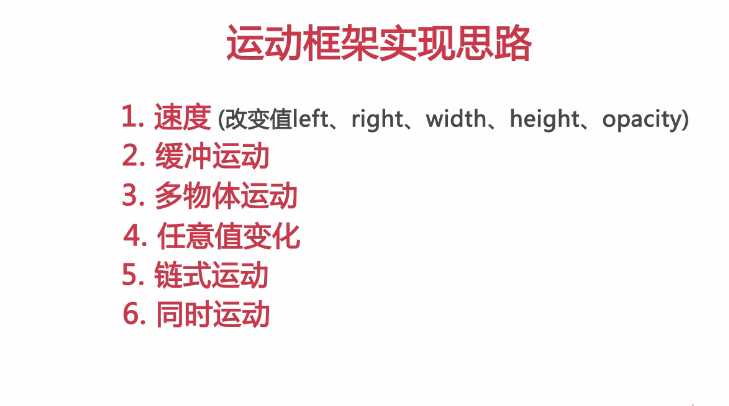
1.offsetWidth属性可以返回对象的padding+border+width属性值之和,style.width返回值就是定义的width属性值。

2.offsetWidth属性仅是可读属性,而style.width是可读写的。

3.offsetWidth属性返回值是整数,而style.width的返回值是字符串。

4.style.width仅能返回以style方式定义的内部样式表的width属性值。

例如:
#div{width:200px;height:200px; border:1px solid #ccc;}这样一个样式,当我们使用var div = document.getElementById("div");div.offsetWidth的值为202,200+1+1,;所以当我们使用div.style.width = div.offsetWidth- 1 + "px"时结果是宽度在增大,而不是减小。所以此时我们可以使用获取样式的方法来只获取到样式定义中的width(200)
function getStyle(obj.attr){
 if(obj.currentStyle){
//currentStyle针对IE浏览器;
    return obj.currentStyle[attr];}
else{return getComputedStyle(obj,flase)[attr];}}
//getComputedStyle 针对Firefox浏览器
这样我们就可以这样使用了,div.style.width = parseInt(getStyle(div,"width")) - 1 + "px";//其中parseInt就是将字符串转换Wie整形的数字。
同样这个方法是可以获取到其他的属性的,比如:div.style.font-size = parseInt(getStyle(div,"font-size")) - 1 + "px";等
原文:http://www.cnblogs.com/fireporsche/p/6287781.html
