加密解密数据安全1 OpenSSL 安装
OpenSSL官方网站:https://www.openssl.org/source/
解压,编译,安装
解压OpenSSL
pi@raspberrypi:~ $ cd openssl/
pi@raspberrypi:~/openssl $ tar xf openssl-1.1.0
pi@raspberrypi:~/openssl $ cd openssl-1.1.0/

编译环境检查
pi@raspberrypi:~/openssl/openssl-1.1.0 $ ./config
pi@raspberrypi:~/openssl/openssl-1.1.0 $ echo $?
0

开始编译
pi@raspberrypi:~/openssl/openssl-1.1.0 $ make -j 8
pi@raspberrypi:~/openssl/openssl-1.1.0 $ echo $?
0

开始安装,注意权限
pi@raspberrypi:~/openssl/openssl-1.1.0 $ sudo make install
pi@raspberrypi:~/openssl/openssl-1.1.0 $ echo $?
0
测试:
pi@raspberrypi:~/openssl $ cat main.c
#include <openssl/sha.h>
#include <string.h>
#include <stdio.h>
int main(int argc,char** str)
{
	if(argc<2)
	{
		printf("%s \"string\"\n",str[0]);
		return 0;
	}
	unsigned char outmd[20];//注意这里的字符个数为20
	memset(outmd,0,sizeof(outmd));

	SHA_CTX stx;
	SHA1_Init(&stx);
	SHA1_Update(&stx,str[1],strlen(str[1]));
	SHA1_Final(outmd,&stx);

	int i;
	for(i=0;i<20;i++)
	{
		printf("%02X",outmd[i]);
	}
	printf("\n");
	return 0;
}
pi@raspberrypi:~/openssl $ gcc main.c -l crypto  -Wall && ./a.out "Hello Linux OpenSSL"
B15F046FCA47459DFBC7B01B11E4F1A6462847FC
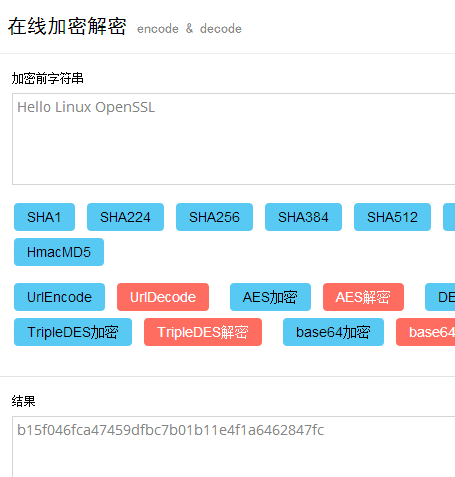
pi@raspberrypi:~/openssl $校验程序是否正确:http://encode.chahuo.com/
本文出自 “魂斗罗” 博客,请务必保留此出处http://990487026.blog.51cto.com/10133282/1881360
原文:http://990487026.blog.51cto.com/10133282/1881360