
修改 HTML = 改变元素、属性、样式和事件。
修改 HTML DOM 意味着许多不同的方面:
在接下来的章节,我们会深入学习修改 HTML DOM 的常用方法。
改变元素内容的最简答的方法是使用 innerHTML 属性。
下面的例子改变一个 <p> 元素的 HTML 内容:
<!DOCTYPE html>
<html>
<body>

<p id="p1">Hello World!</p>

<script>
document.getElementById("p1").innerHTML="New text!";
</script>

<p>上面的段落被一段脚本改变了。</p>

</body>
</html>
New text!
上面的段落被一段脚本改变了。
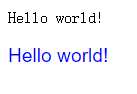
通过 HTML DOM,您能够访问 HTML 元素的样式对象。
下面的例子改变一个段落的 HTML 样式:
<!DOCTYPE html>
<html>
<body>

<p id="p1">Hello world!</p>
<p id="p2">Hello world!</p>

<script>
document.getElementById("p2").style.color="blue";
document.getElementById("p2").style.fontFamily="Arial";
document.getElementById("p2").style.fontSize="larger";
</script>

</body>
</html>
如需向 HTML DOM 添加新元素,您首先必须创建该元素(元素节点),然后把它追加到已有的元素上。
<!DOCTYPE html>
<html>
<body>

<div id="div1">
<p id="p1">This is a paragraph.</p>
<p id="p2">This is another paragraph.</p>
</div>

<script>
var para=document.createElement("p");
var node=document.createTextNode("This is new.");
para.appendChild(node);

var element=document.getElementById("div1");
element.appendChild(para);
</script>

</body>
</html>
This is a paragraph.
This is another paragraph.
This is new.
原文:http://www.cnblogs.com/sihuiming/p/5325647.html