

 1 //定义依赖和插件
 2 var gulp = require(‘gulp‘),
 3     uglify = require(‘gulp-uglify‘),
 4     concat = require(‘gulp-concat‘),
 5     rename = require(‘gulp-rename‘),
 6     connect = require(‘gulp-connect‘), //livereload
 7     rev = require(‘gulp-rev‘), //文件名加md5
 8     revCollector = require(‘gulp-rev-collector‘);
 9
10 var jsSrc = ‘src/js/*.js‘;
11 var jsDist = ‘dist/js‘;
12
13 var htmlSrc = ‘src/*.html‘;
14 var htmlDist = ‘dist‘;
15
16 //定义名为js的任务
17 gulp.task(‘js‘, function () {
18
19     gulp.src(jsSrc)
20         .pipe(concat(‘main.js‘))
21         .pipe(gulp.dest(jsDist))
22         .pipe(rename({suffix: ‘.min‘}))
23         .pipe(uglify())
24         .pipe(gulp.dest(jsDist))
25         .pipe(rev())
26         .pipe(gulp.dest(jsDist))
27         .pipe(rev.manifest())
28         .pipe(gulp.dest(‘rev‘))
29         .pipe(connect.reload())
30
31 });
32
33 //文件路径替换
34 gulp.task(‘rev‘, function () {
35     gulp.src([‘rev/*.json‘, ‘dist/index.html‘])
36         .pipe(revCollector())
37         .pipe(gulp.dest(‘dist‘))
38         .pipe(connect.reload());
39 });
40
41 //定义html任务
42 gulp.task(‘html‘, function () {
43
44     gulp.src(htmlSrc)
45         .pipe(gulp.dest(htmlDist))
46         .pipe(connect.reload());
47
48 });
49
50 gulp.task(‘connect‘, function () {
51     connect.server({
52         livereload: true
53     });
54 });
55
56
57 //定义看守任务
58 gulp.task(‘watch‘, function () {
59
60     gulp.watch(‘src/*.html‘, [‘html‘]);
61
62     gulp.watch(‘src/js/*.js‘, [‘js‘]);
63
64 });
65
66
67 //定义默认任务
68 gulp.task(‘default‘, [ ‘js‘, ‘html‘,‘watch‘, ‘connect‘]);
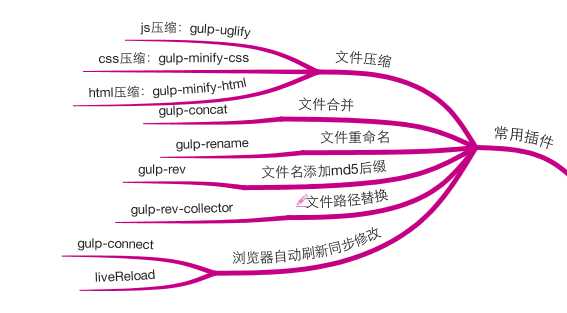
原文:http://www.cnblogs.com/anywing/p/5310903.html
