此方法支持IE 不支持火狐。可能是因为FCKEidtor的keyup方法在火狐下不被支持。
FCKEditor编辑器换为TextBox,应该就没有问题了。
前台:
<tr>
<th>
短敘述
<br />
(限100中文字)<br />
當前文字個數:<asp:Label ID="lblShowTextLength" runat="server" Text="0" ForeColor="Red"></asp:Label><br />
</th>
<td style="text-align: left;">
<FCKeditorV2:FCKeditor ID="fckPrdDescription" runat="server" Height="240px" Width="100%">
</FCKeditorV2:FCKeditor>
</td>
</tr>
JS代码:
<script type="text/javascript">
function FCKeditor_OnComplete(editorInstance)
{
var oEditor = FCKeditorAPI.GetInstance(‘fckPrdDescription‘);
oEditor.EditorDocument.body.onkeyup=function ()
{
if( document.all)
{
$("lblShowTextLength").innerText =oEditor.EditorDocument.body.innerText.length;
}
else
{
var r = oEditor.EditorDocument.createRange() ;
r.selectNodeContents( oEditor.EditorDocument.body ) ;
$("lblShowTextLength").innerText= r.toString().length ;
}
if(parseInt($("lblShowTextLength").innerText)>100)
{
alert("當前已經達到100中文字,請不要繼續輸入!");
oEditor.EditorDocument.body.innerText=oEditor.EditorDocument.body.innerText.substring(0,100);
$("lblShowTextLength").innerText =oEditor.EditorDocument.body.innerText.length;
}
// $("ddd").value =oEditor.EditorDocument.body.innerHTML;
}
if (document.getElementById("hidStatus").value=="Cancel")
{
editorInstance.EditorDocument.designMode="off";
}
}
</script>
演示:
输入多馀100个字符数 提示
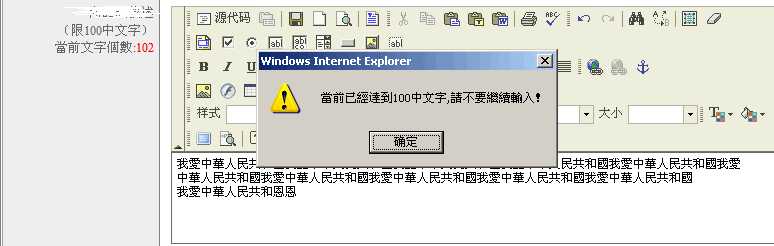
點擊【確定】后 自動截取100個字符
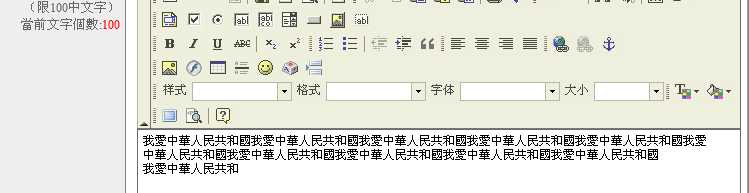
FCKEidtor 自动统计输入字符个数(IE)
原文:http://www.jb51.net/article/18333.htm
