摘要:
段落首字母放大是指放大段落开头的字母或者汉字,主要使用了css的first-letter伪类选择器。
单行放大:
在第一行内放大,效果如下:
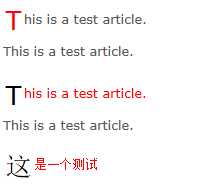
<!DOCTYPE html>
<html lang="en">
<head>
<meta charset="UTF-8">
<title>Document</title>
<style>
body {
background-color: #FFFFFF;
color: #595959;
}
.contain {
width: 150px;
}
.contain p {
font: 80%/1.6 Verdana, Geneva, Arial, Helvetica, sans-serif;
}
.contain p:first-letter {
font-size: 2em;
padding: 0.1em;
color: #000000;
vertical-align: middle;
}
.contain p:first-line {
color: red;
}
.contain p:first-child:first-letter {
color: red;
}
.contain p:first-child:first-line {
color: inherit;
}
</style>
</head>
<body>
<div class="contain">
<p>This is a test article. This is a test article.</p>
<p>This is a test article. This is a test article.</p>
<p>这是一个测试</p>
</div>
</body>
</html>
注意:first-letter支持IE7+,first-line支持IE8+
多行放大:
效果如下:
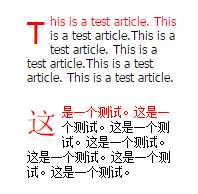
<!DOCTYPE html>
<html lang="en">
<head>
<meta charset="UTF-8">
<title>Document</title></p>
<p></head>
<body>
<style>
* {
margin:0;
padding:0;
}
body {
font-size:12px;
font-family: Tahoma, Geneva, sans-serif;
padding:200px;
}
p {
width:150px;
color:#000;
font-size:1em;
margin-bottom: 20px;
}
p:first-letter{
float: left;
font-size:2.5em;
padding-right:5px;
text-transform:uppercase;
}
p:first-line{
color:#f00;
}
</style>
<p>This is a test article. This is a test article.This is a test article. This is a test article.This is a test article. This is a test article.</p>
<p>这是一个测试。这是一个测试。这是一个测试。这是一个测试。这是一个测试。这是一个测试。这是一个测试。</p>
</body>
</html>
CSS实现段落首字母、首字放大特效
原文:http://www.jb51.net/css/268963.html
