css:
*{margin:0;padding:0;list-style-type:none;}
a,img{border:0;}
body{font:12px/180% Arial, Helvetica, sans-serif, "新宋体";}
/* demo */
.demo{width:800px;margin:0 auto;}
.demo div{margin:40px 0 0 0;}
html:
<div class="demo">
<div>
<iframe name="weather_inc" src="http://i.tianqi.com/index.php?c=code&id=2&num=5" width="650" height="70" frameborder="0" marginwidth="0" marginheight="0" scrolling="no"></iframe>
</div>
<div>
<iframe name="weather_inc" src="http://i.tianqi.com/index.php?c=code&id=7" style="border:solid 1px red" width="225" height="90" frameborder="0" marginwidth="0" marginheight="0" scrolling="no"></iframe>
</div>
<div>
<iframe name="weather_inc" src="http://i.tianqi.com/index.php?c=code&id=9" width="800" height="60" frameborder="0" marginwidth="0" marginheight="0" scrolling="no"></iframe>
</div>
<div>
<iframe name="weather_inc" src="http://i.tianqi.com/index.php?c=code&id=11" width="500" height="15" frameborder="0"></iframe>
</div>
<div>
<iframe name="weather_inc" src="http://i.tianqi.com/index.php?c=code&id=13" width="650" height="221" frameborder="0" marginwidth="0" marginheight="0" scrolling="no"></iframe>
</div>
<div>
<iframe name="weather_inc" src="http://i.tianqi.com/index.php?c=code&id=19" width="800" height="120" frameborder="0" marginwidth="0" marginheight="0" scrolling="no"></iframe>
</div>
</div>
部分效果:
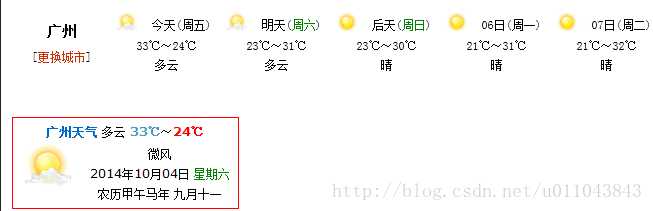
我在项目中做了一个下面的效果
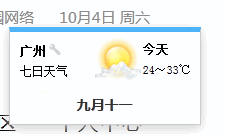
利用iframe在网页中显示天气附效果截图
原文:http://www.jb51.net/web/227281.html
