首页 > Web开发 > 详细

asp.net中url字符串编码乱码的原因与解决方法

时间:2016-02-05 10:00:52      阅读:176      评论:0      收藏:0      [点我收藏+]

先看实例

复制代码 代码如下:

 function webChart() {
            var t = document.getElementById("txtReceive");
            if (t.value == null || t.value == "") {
                alert("请先进行查询");
            }
            else {

                alert(t.value);
                document.getElementById("center-iframe").src = "map/industryMap.aspx?_indeustry=" + t.value;
}}


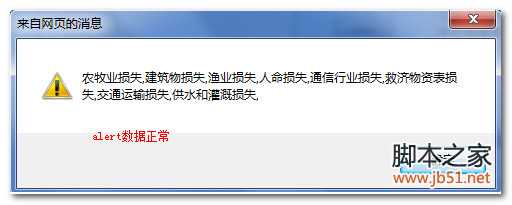
这个时候alert出来的编码很正常,都是汉字。

技术分享

但是在后台获取时已经乱码

复制代码 代码如下:

        protected void Page_Load(object sender, EventArgs e)
        {
            Industry = Request.QueryString["_indeustry"].ToString();

            InitMap();
            getShowMuilt();
        }

web.config已经配置为UTF-8 但是还是不行

复制代码 代码如下:

<system.web>
    <globalization culture="en-US" uiCulture="en" requestEncoding="UTF-8"
                   responseEncoding="UTF-8" fileEncoding="UTF-8" />
  </system.web>


最终解决方案

复制代码 代码如下:

 function webChart() {
            var t = document.getElementById("txtReceive");
            if (t.value == null || t.value == "") {
                alert("请先进行查询");
            }
            else {
                var url = encodeURI("map/industryMap.aspx?_indeustry=" + t.value);
                alert(url);
                document.getElementById("center-iframe").src = url;
}
}

技术分享

asp.net中url字符串编码乱码的原因与解决方法

原文:http://www.jb51.net/article/40569.htm

(0)
(0)
   
举报
评论 一句话评论(0
关于我们 - 联系我们 - 留言反馈 - 联系我们:wmxa8@hotmail.com
© 2014 bubuko.com 版权所有
打开技术之扣,分享程序人生!