
A linked server allows for access to distributed, heterogeneous queries against OLE DB data sources. After a linked server is created by using sp_addlinkedserver, distributed queries can be run against this server. If the linked server is defined as an instance of SQL Server, remote stored procedures can be executed.
1,添加Linked Server
使用 sys.sp_addlinkedserver 添加Linked Server,除了必须在本地自定义一个Linked Server的Alias,还必须指定 Linked Server的Product name,Provider name,Data Source, location, provider string 和 catalog 参数。The data_source, location, provider_string, and catalog parameters identify the database or databases the linked server points to. If any one of these parameters is NULL, the corresponding OLE DB initialization property is not set.
sp_addlinkedserver [ @server= ] ‘server‘ [ , [ @srvproduct= ] ‘product_name‘ ]
     [ , [ @provider= ] ‘provider_name‘ ]
     [ , [ @datasrc= ] ‘data_source‘ ]
     [ , [ @location= ] ‘location‘ ]
     [ , [ @provstr= ] ‘provider_string‘ ]
     [ , [ @catalog= ] ‘catalog‘ ]
Arguments
Is the name of the linked server to create. server is sysname, with no default.
Is the product name of the OLE DB data source to add as a linked server. product_name is nvarchar(128), with a default of NULL. If SQL Server, provider_name, data_source, location, provider_string, and catalog do not have to be specified.
Is the unique programmatic identifier (PROGID) of the OLE DB provider that corresponds to this data source. provider_name must be unique for the specified OLE DB provider installed on the current computer. provider_name is nvarchar(128), with a default of NULL; however, if provider_name is omitted, SQLNCLI is used. (Use SQLNCLI and SQL Server will redirect to the latest version of SQL Server Native Client OLE DB Provider.) The OLE DB provider is expected to be registered with the specified PROGID in the registry.
Is the name of the data source as interpreted by the OLE DB provider. data_source is nvarchar(4000). data_source is passed as the DBPROP_INIT_DATASOURCE property to initialize the OLE DB provider.
Is the location of the database as interpreted by the OLE DB provider. location is nvarchar(4000), with a default of NULL. location is passed as the DBPROP_INIT_LOCATION property to initialize the OLE DB provider.
Is the OLE DB provider-specific connection string that identifies a unique data source. provider_string is nvarchar(4000), with a default of NULL. provstr is either passed to IDataInitialize or set as the DBPROP_INIT_PROVIDERSTRING property to initialize the OLE DB provider.
When the linked server is created against the SQL Server Native Client OLE DB provider, the instance can be specified by using the SERVER keyword as SERVER=servername\instancename to specify a specific instance of SQL Server. servername is the name of the computer on which SQL Server is running, and instancename is the name of the specific instance of SQL Server to which the user will be connected.
 Note Note |
|---|
|
To access a mirrored database, a connection string must contain the database name. This name is necessary to enable failover attempts by the data access provider. The database can be specified in the @provstr or @catalog parameter. Optionally, the connection string can also supply a failover partner name. |
Is the catalog to be used when a connection is made to the OLE DB provider. catalog is sysname, with a default of NULL. catalog is passed as the DBPROP_INIT_CATALOG property to initialize the OLE DB provider. When the linked server is defined against an instance of SQL Server, catalog refers to the default database to which the linked server is mapped
Provider 需要安装,可以从SQL Server 的Linked Servers Catalog下查看已经安装的Providers。
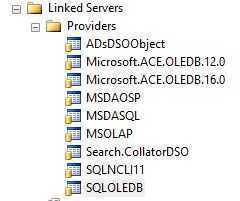
添加 Linked Server的脚本示例
Script1,添加 Excel作为Linked Server
exec sys.sp_addlinkedserver @server= N‘ExcelDataSource‘
    ,@srvproduct= N‘OLE DB Provider for ACE‘
    ,@provider= N‘Microsoft.ACE.OLEDB.12.0‘
    ,@datasrc=  N‘D:\excel_data.xlsx‘
    ,@location= null
    ,@provstr= null
    ,@catalog= null
Script2,添加SQL Server 作为Linked Server
--add linked server
exec sys.sp_addlinkedserver @server= N‘RemoteServerDB‘
    ,@srvproduct= N‘RemoteServerDB‘
    ,@provider= N‘SQLNCLI‘
    ,@datasrc=  N‘ServerName\SQLServerInstanceName‘
    ,@location= null
    ,@provstr= null
    ,@catalog= N‘DB_name‘
2,使用 sys.servers 或 在GUI中打开 Linked Servers catalog 查看添加的Linked Server
sys.servers Contains a row per linked or remote server registered, and a row for the local server that has server_id = 0.
select *
from sys.servers
where name=N‘ExcelDataSource‘

4,使用 sys.sp_dropserver 删除Linked Server
Syntax
sp_dropserver [ @server = ] ‘server‘
     [ , [ @droplogins = ] { ‘droplogins‘ | NULL} ]
[ @droplogins = ] ‘droplogins‘ | NULL
Indicates that related remote and linked server logins for server must also be removed if droplogins is specified. @droplogins is char(10), with a default of NULL.
删除Linked Server,并将login 一起删除
EXEC sys.sp_dropserver @server=N‘ExcelDataSource‘, @droplogins=‘droplogins‘
GO
5,通过 sys.sp_addlinkedsrvlogin 创建Linked Server的Login
当在local Server 上需要访问Linked Server时,Local Server 必须log on 到linked server,sys.sp_addlinkedsrvlogin 就是指定Local Server 登陆Linked Server的Login。
When a user logs on to the local server and executes a distributed query that accesses a table on the linked server, the local server must log on to the linked server on behalf of the user to access that table. Use sp_addlinkedsrvlogin to specify the login credentials that the local server uses to log on to the linked server.
Creates or updates a mapping between a login on the local instance of SQL Server and a security account on a remote server.
sp_addlinkedsrvlogin [ @rmtsrvname = ] ‘rmtsrvname‘
     [ , [ @useself = ] ‘TRUE‘ | ‘FALSE‘ | NULL ]
     [ , [ @locallogin = ] ‘locallogin‘ ]
     [ , [ @rmtuser = ] ‘rmtuser‘ ]
     [ , [ @rmtpassword = ] ‘rmtpassword‘ ]
Arguments
Remarks
A default mapping between all logins on the local server and remote logins on the linked server is automatically created by executing sp_addlinkedserver. The default mapping states that SQL Server uses the user credentials of the local login when connecting to the linked server on behalf of the login. This is equivalent to executing sp_addlinkedsrvlogin with @useself set to true for the linked server, without specifying a local user name. Use sp_addlinkedsrvlogin only to change the default mapping or to add new mappings for specific local logins. To delete the default mapping or any other mapping, use sp_droplinkedsrvlogin.
Instead of having to use sp_addlinkedsrvlogin to create a predetermined login mapping, SQL Server can automatically use the Windows security credentials (Windows login name and password) of a user issuing the query to connect to a linked server when all the following conditions exist:
A user is connected to SQL Server by using Windows Authentication Mode.
Security account delegation is available on the client and sending server.
The provider supports Windows Authentication Mode; for example, SQL Server running on Windows.
After the authentication has been performed by the linked server by using the mappings that are defined by executing sp_addlinkedsrvlogin on the local instance of SQL Server, the permissions on individual objects in the remote database are determined by the linked server, not the local server.
6,Examples to add linked server login
6.1, Connecting all local logins to the linked server by using their own user credentials
EXEC sp_addlinkedsrvlogin ‘Accounts‘, ‘true‘;
If there are explicit mappings created for individual logins, they take precedence over any global mappings that may exist for that linked server.
6.2, Connecting a specific login to the linked server by using different user credentials
The following example creates a mapping to make sure that the Windows user Domain\Mary connects through to the linked server Accounts by using the login MaryP and password d89q3w4u.
EXEC sp_addlinkedsrvlogin ‘Accounts‘, ‘false‘, ‘Domain\Mary‘, ‘MaryP‘, ‘d89q3w4u‘;
7,通过 sys.linked_logins 查看添加的Linked Server Login
Returns a row per linked-server-login mapping, for use by RPC and distributed queries from local server to the corresponding linked server.
8,通过 sys.sp_droplinkedsrvlogin 删除Linked Server Login
Removes an existing mapping between a login on the local server running SQL Server and a login on the linked server.
sp_droplinkedsrvlogin [ @rmtsrvname= ] ‘rmtsrvname‘ ,
   [ @locallogin= ] ‘locallogin‘
[ @rmtsrvname = ] ‘rmtsrvname‘
Is the name of a linked server that the SQL Server login mapping applies to. rmtsrvname is sysname, with no default. rmtsrvname must already exist.
[ @locallogin = ] ‘locallogin‘
Is the SQL Server login on the local server that has a mapping to the linked server rmtsrvname. locallogin is sysname, with no default. A mapping for locallogin to rmtsrvname must already exist. If NULL, the default mapping created by sp_addlinkedserver, which maps all logins on the local server to logins on the linked server, is deleted.
示例:Removing the login mapping for an existing user
The following example removes the mapping for the login Mary from the local server to the linked server Accounts. Therefore, login Mary uses the default login mapping.
EXEC sp_droplinkedsrvlogin ‘Accounts‘, ‘Mary‘
参考文档:
MSDN:sp_addlinkedsrvlogin
MSDN:sp_addlinkedserver (Transact-SQL)
原文:http://www.cnblogs.com/ljhdo/p/5171006.html