
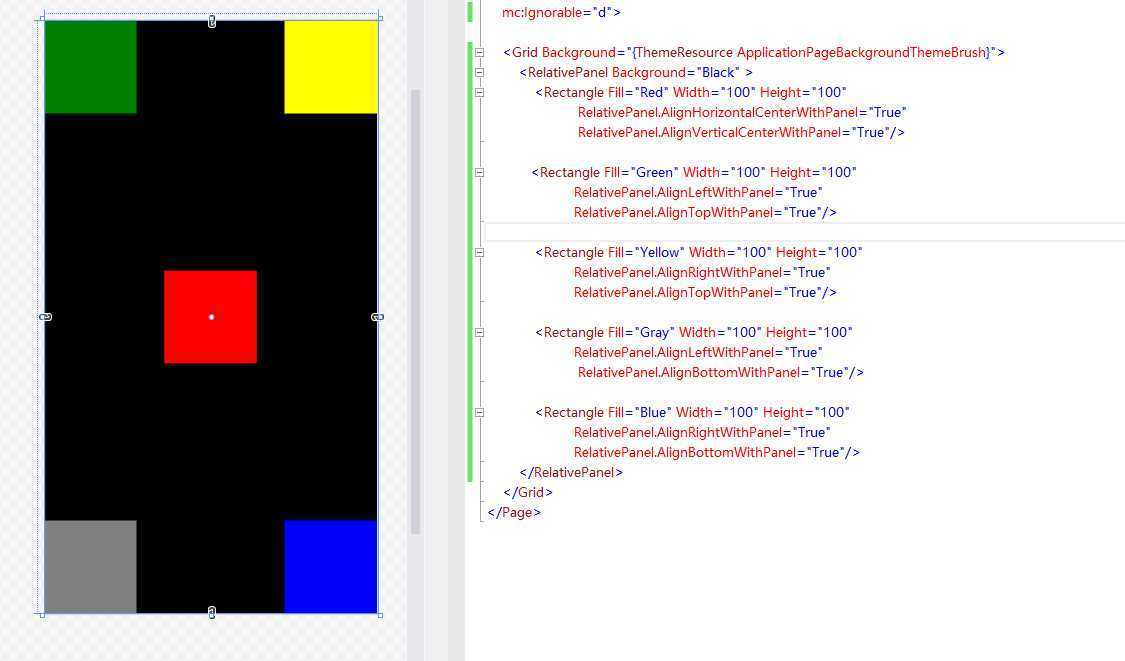
        <RelativePanel Background="Black" >
            <Rectangle Fill="Red" Width="100" Height="100"
                       RelativePanel.AlignHorizontalCenterWithPanel="True"
                       RelativePanel.AlignVerticalCenterWithPanel="True"/>

           <Rectangle Fill="Green" Width="100" Height="100"
                      RelativePanel.AlignLeftWithPanel="True"
                      RelativePanel.AlignTopWithPanel="True"/>

            <Rectangle Fill="Yellow" Width="100" Height="100"
                      RelativePanel.AlignRightWithPanel="True"
                      RelativePanel.AlignTopWithPanel="True"/>

            <Rectangle Fill="Gray" Width="100" Height="100"
                      RelativePanel.AlignLeftWithPanel="True"
                       RelativePanel.AlignBottomWithPanel="True"/>

            <Rectangle Fill="Blue" Width="100" Height="100"
                      RelativePanel.AlignRightWithPanel="True"
                      RelativePanel.AlignBottomWithPanel="True"/>
        </RelativePanel>
原文:http://www.cnblogs.com/luquanmingren/p/5141809.html