
鲁春利的工作笔记,谁说程序员不能有文艺范?
Hive对外提供了三种服务模式,即CLI(command line interface)、Hive Web和Hive Client(如JavaApi方式)。
1、Hive命令行模式(CLI)
启动Hive命令行模式有两种方式
bin/hive
或
bin/hive --service cli
hive命令选项
[hadoop@nnode hive1.2.0]$ bin/hive --help
Usage ./hive <parameters> --service serviceName <service parameters>
Service List: beeline cli help hiveburninclient hiveserver2 hiveserver hwi jar lineage metastore metatool orcfiledump rcfilecat schemaTool version
# 这里对应hive <parameters>对应的参数
Parameters parsed:
  # 允许用户指定一个以冒号分割的附属jar包,如自定义的扩展等。
  --auxpath : Auxillary jars
  # 指定文件目录,覆盖$HIVE_HOME/conf中默认的属性配置
  --config : Hive configuration directory
  # 需要启动的服务,默认为cli,其他见Service List:
  --service : Starts specific service/component. cli is default
Parameters used:
  HADOOP_HOME or HADOOP_PREFIX : Hadoop install directory
  HIVE_OPT : Hive options
For help on a particular service: # 查询特定服务名的帮助
  ./hive --service serviceName --help
Debug help:  ./hive --debug --help
## 使用version服务
[hadoop@nnode hive1.2.0]$ bin/hive --service version
Hive 1.2.0
Subversion git://localhost.localdomain/home/sush/dev/hive.git -r 7f237de447bcd726bb3d0ba332cbb733f39fc02f
Compiled by sush on Thu May 14 18:00:25 PDT 2015
From source with checksum 03a73b649153ba8e11467a779def6315
[hadoop@nnode hive1.2.0]$
## 执行--service不跟任何参数
[hadoop@nnode hive1.2.0]$ bin/hive --service等效于bin/hive --service cli
Service List包括绝大多数将要使用的CLI,可以通过--service name服务名称来启动,默认为启动cli。注意,个别服务实际上已提供了快捷启动方式。
常用服务如下图所示:
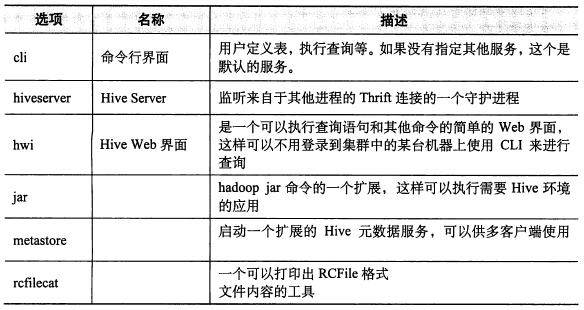
hive cli命令参数
[hadoop@nnode hive1.2.0]$ bin/hive --verbose --help
usage: hive
 -d,--define <key=value>              定义hive命令行使用的参数,如-d A=B or --define A=B
 --database <databasename>            指定使用的数据库
 -e <quoted-query-string>             通过命令行执行SQL语句
 -f <filename>                        执行文件中的SQL语句
 -H,--help                            显示帮助
 --hiveconf <property=value>          给定参数值覆盖hive-default.xml或hive-site.xml中参数值
 --hivevar <key=value>                定义应用到hive中的变量,如--hivevar A=B(等价于-d)
 -i <filename>                        初始化的sql文件
 -S,--silent                          静态模式(无输出)
 -v,--verbose                         详细模式
[hadoop@nnode hive1.2.0]$

## 如
#hive -e ""
#hive -e "">aaa
#hive -S -e "">aaa
#hive -e ‘select a.col from tab1 a‘
#hive -f hdfs://<namenode>:<port>/hive-script.sql
#hive -i /home/my/hive-init.sql
#hive>source file

#hive>!ls            # 使用shell命令
#hive>dfs -ls /      # 使用hdfs dfs命令(省略hdfs)
变量或属性
在CLI中,可以通过set命令显示或修改变量值,也可以通过命令空间指定。
Set操作示例
hive> set env:HOME;
env:HOME=/home/hadoop
hive> set env:HIVE_HOME;
env:HIVE_HOME=/usr/local/hive1.2.0
hive>
命令空间指定方式为
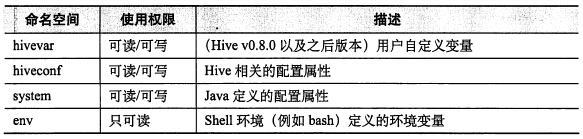
示例代码:
#hive --hivevar column=name
#hive --hiveconf hive.cli.print.current.db=true hive.cli.print.header=true
#system: java定义的配置属性,如system:user.name(也就是System的properties的内容)
#env:shell环境变量,如env:USER、env.HIVE_HOME

## 验证hivevar、system、env
[hadoop@nnode hive1.2.0]$ hive --hivevar column=name
hive> create table test(id int, ${hivevar:column} string, ${system:user.name} string, path string);
OK
Time taken: 1.687 seconds
hive> insert into table test values(1000, ‘lisi‘, ‘root‘, ‘${env:HOME}‘);
# mapreduce过程略
hive> set hive.cli.print.header=true;    # 显示header
hive> select * from test;
OK
test.id test.name       test.hadoop     test.path    # 获取变量的值
1000    lisi            root            /home/hadoop
Time taken: 0.147 seconds, Fetched: 1 row(s)
hive>

## 验证hiveconf
[hadoop@nnode hive1.2.0]$ hive --hiveconf hive.cli.print.current.db=true

hive (default)> use mywork;
OK
Time taken: 1.089 seconds
hive (mywork)> set hive.cli.print.header=true;
hive (mywork)> select eno, ename from employee;
OK
eno     ename
1000    zhangsan
Time taken: 0.223 seconds, Fetched: 1 row(s)
hive (mywork)>
2、Hive的Web模式
通过service启动hwi服务
[hadoop@nnode hive1.2.0]$ bin/hive --service hwi
ls: cannot access /usr/local/hive1.2.0/lib/hive-hwi-*.war: No such file or directory
15/12/12 22:30:08 INFO hwi.HWIServer: HWI is starting up
15/12/12 22:30:10 INFO mortbay.log: Logging to org.slf4j.impl.Log4jLoggerAdapter(org.mortbay.log) via org.mortbay.log.Slf4jLog
15/12/12 22:30:10 INFO mortbay.log: jetty-6.1.26
15/12/12 22:30:11 INFO mortbay.log: Started SocketConnector@0.0.0.0:9999
[hadoop@nnode hive1.2.0]$
提示hwi的war文件不存在,通过find命令查看时确实无法找到hwi的war文件,采用将src下hwi/web目录下的文件打成war包的形式来处理:
E:\Hive\apache-hive-1.2.0-src\hwi\web>jar cvf hive-hwi-1.2.0.war ./*
并将该war文件上传到$HIVE_HOME/lib目录下,并通过配置文件(hive-site.xml)修改hwi的配置参数
<property>
    <name>hive.hwi.listen.host</name>
    <value>nnode</value>
    <description>This is the host address the Hive Web Interface will listen on</description>
</property>
<property>
    <name>hive.hwi.listen.port</name>
    <value>9999</value>
    <description>This is the port the Hive Web Interface will listen on</description>
</property>
<property>
    <name>hive.hwi.war.file</name>
    <value>lib/hive-hwi-1.2.0.war</value>
    <description>This sets the path to the HWI war file, relative to ${HIVE_HOME}.</description>
</property>
再次起启动hwi的service服务,并通过web进行访问
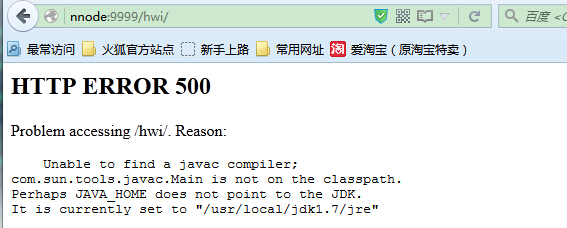
实际上已经将tools.jar添加到了classpath路径中了,没办法,只能将jdk路径下的tools.jar拷贝到hive的lib目录下,然后再次通过hive --service hwi启动,启动后访问,OK了。

3、Hive的远程服务
本文出自 “闷葫芦的世界” 博客,请务必保留此出处http://luchunli.blog.51cto.com/2368057/1722348
原文:http://luchunli.blog.51cto.com/2368057/1722348