
Windows Server 2008 R2 通过Server Manager管理远程服务器报错 "Server Manager cannot connect to <server_name>"
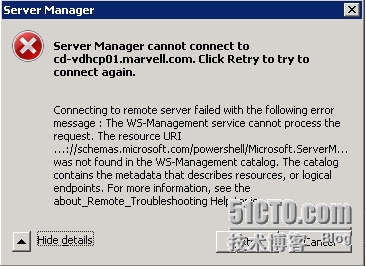
问题的原因
远程服务器没有配置启用接收远程管理请求
解决方案
如果远程服务器是图形界面的Windows Server 2008 R2
在远程服务器上运行Server Manager,进入Configure Server Manager Remote Management选项,勾选Enable remote management of this server from other computers并点击OK


如果远程服务器是Server Core版本
远程桌面到远端服务器,在运行框中输入sconfig,在回执菜单中选择4 Configure Remote Management,然后选择3 Allow Server Manager Remote Management即可

如果系统提示没有安装powershell则需要选择2来安装powershell,安装完成后需要重启在按照上面的方法来开启远程管理。
本文出自 “笑傲风云” 博客,请务必保留此出处http://sky2133.blog.51cto.com/1517395/1721942
Windows Server 2008 R2 远程管理报错 Server Manager cannot connect to
原文:http://sky2133.blog.51cto.com/1517395/1721942