
线性布局,这个东西,从外框上可以理解为一个div,他首先是一个一个从上往下罗列在屏幕上。每一个LinearLayout里面又可分为垂直布局(android:orientation="vertical")和水平布局(android:orientation="horizontal" )。当垂直布局时,每一行就只有一个元素,多个元素依次垂直往下;水平布局时,只有一行,每一个元素依次向右排列。
linearLayout中有一个重要的属性 android:layout_weight="1",这个weight在垂直布局时,代表行距;水平的时候代表列宽;weight值越大就越大。
在XML文件中修改
<?xml version="1.0" encoding="utf-8"?>
<LinearLayout xmlns:android="http://schemas.android.com/apk/res/android"
        android:orientation="vertical"
        android:layout_width="fill_parent"
        android:layout_height="fill_parent">
    <Button android:text="Up"
        android:id="@+id/Button03"
        android:layout_width="fill_parent"
        android:layout_height="wrap_content"></Button>

    <LinearLayout
        android:orientation="horizontal"
        android:layout_width="fill_parent"
        android:layout_height="fill_parent">
    <Button android:text="left"
        android:id="@+id/Button01"
        android:width="120px"
        android:layout_width="wrap_content"
        android:layout_height="wrap_content"></Button>
    <Button
        android:text="right"
        android:id="@+id/Button02"
        android:width="120px"
        android:layout_width="wrap_content"
        android:layout_height="wrap_content"></Button>
    </LinearLayout>
</LinearLayout>
效果如下:

二、使用相对布局(RelativeLayout)来布局屏幕
相对布局可以理解为某一个元素为参照物,来定位的布局方式。
android:layout_方向 = id 表示 在这个id对应的控件的方向上(上|下)
android:layout_align方向 = id 表示和这个控件的(上下左右)对齐
android: layout_to方向Of = id 表示在这个控件的左或者右
eg:
android:layout_below="@id/la1"/>
将当前控件放置于id为la1 的控件下方。
android:layout_alignParentRight="true"
使当前控件的右端和父控件的右端对齐。这里属性值只能为true或false,默认false。
android:layout_marginLeft="10dip"
使当前控件左边空出相应的空间。
android:layout_toLeftOf="@id/true"
使当前控件置于id为true的控件的左边。
android:layout_alignTop="@id/ok"
使当前控件与id为ok的控件上端对齐。
<?xml version="1.0" encoding="utf-8"?>
<RelativeLayout xmlns:android="http://schemas.android.com/apk/res/android"
    android:layout_width="match_parent"
    android:layout_height="match_parent" >

    <TextView
        android:id="@+id/textView2"
        android:layout_width="wrap_content"
        android:layout_height="wrap_content"
        android:layout_alignParentLeft="true"
        android:layout_alignParentTop="true"
        android:text="请输入信息"
        android:textAppearance="?android:attr/textAppearanceLarge" />

    <EditText
        android:id="@+id/editText1"
        android:layout_width="fill_parent"
        android:layout_height="wrap_content"
        android:layout_alignParentLeft="true"
        android:layout_below="@+id/textView2"
        android:ems="10" >

        <requestFocus />
    </EditText>

    <Button
        android:id="@+id/button2"
        android:layout_width="wrap_content"
        android:layout_height="wrap_content"
        android:layout_alignParentRight="true"
        android:layout_below="@+id/editText1"
        android:text="取消" />

    <Button
        android:id="@+id/button1"
        android:layout_width="wrap_content"
        android:layout_height="wrap_content"
        android:layout_alignBaseline="@+id/button2"
        android:layout_alignBottom="@+id/button2"
        android:layout_toLeftOf="@+id/button2"
        android:text="确定" />

</RelativeLayout>

三、使用表格布局(TableLayout)来布局屏幕
表格布局类似Html里面的Table。每一个TableLayout里面有表格行TableRow,TableRow里面可以具体定义每一个元素。每个TableRow 都会定义一个 row (事实上,你可以定义其它的子对象,这在下面会解释到)。TableLayout 容器不会显示row 、cloumns 或cell 的边框线。每个 row 拥有0个或多个的cell ;每个cell 拥有一个View 对象。表格由列和行组成许多的单元格。表格允许单元格为空。单元格不能跨列,这与HTML 中的不一样。
<?xml version="1.0" encoding="utf-8"?>
<TableLayout xmlns:android="http://schemas.android.com/apk/res/android"
    android:id="@+id/TableLayout01"
    android:layout_width="fill_parent"
    android:layout_height="fill_parent" >

    <TableRow android:gravity="center" >

        <Button
            android:id="@+id/Button01"
            android:layout_width="wrap_content"
            android:layout_height="wrap_content"
            android:text="Button01" >
        </Button>
    </TableRow>

    <TableRow>

        <Button
            android:id="@+id/Button2"
            android:layout_width="wrap_content"
            android:layout_height="wrap_content"
            android:text="Button2" >
        </Button>
    </TableRow>

    <TableRow>

        <Button
            android:id="@+id/Button3"
            android:layout_width="wrap_content"
            android:layout_height="wrap_content"
            android:layout_column="1"
            android:text="Button3" >
        </Button>

        <Button
            android:id="@+id/Button4"
            android:layout_width="wrap_content"
            android:layout_height="wrap_content"
            android:layout_column="1"
            android:text="Button4" >
        </Button>
    </TableRow>

    <TableRow>

        <Button
            android:id="@+id/Button5"
            android:layout_width="wrap_content"
            android:layout_height="wrap_content"
            android:layout_column="2"
            android:text="Button5" >
        </Button>
    </TableRow>

</TableLayout>
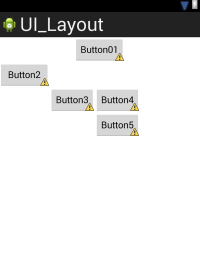
四、使用层布局(FrameLayout)来布局屏幕
层布局是最简单的一种布局方法,它在屏幕上设置一个空白备用区域。不能为FrameLayout中的一个子元素制定一个位置,后一个子元素将会直接在前一个子元素智商进行覆盖填充,把他们部分或全部挡住。
原文:http://www.cnblogs.com/Kevin127/p/5021721.html