
主旨:
0.环境说明
1.创建一个cgi本地服务
2.创建一个html表单页
3.创建一个对应的cgi 脚本文件
4.运行调试
0.环境说明:
系统:win7 32位家庭版
python:2.7
代码编写工具:notepad++
1.创建一个cgi本地服务
打开cmd终端,在电脑创建一个服务代码存储的文件目录,此处为:E:\python_code\cgi_server,这边为了归档cgi文件,在cgi_server目录下创建一个cgi-bin目录
目录创建完毕后再终端运行python -m CGIHTTPServer指令开启服务(这边默认端口为8000,也可以指定一个端口:python -m CGIHTTPServer 8080)
注:编辑cgi的.py文件可以存放在刚刚新建的cgi-bin目录下,action访问路径则为:cgi-bin/*.py
2.创建一个html表单页
<html>
<head><title>hello cgi</title></head>
<body>
<form action="/cgi-bin/indexl.py">
your name is :<input type="text" name="name"/>
<input type="submit"/>
</form>
</body>
</html>
3.创建一个对应的cgi 脚本文件
result后面字符串的第一行内容是为了将此处生成的html页面指向浏览器进行显示输出(ps:本地验证了去掉第一行类型的代码,浏览器也可以正常访问)
cgi.FieldStorage可以获取html页面请求的表单数据,
class FieldStorage
 |  Store a sequence of fields, reading multipart/form-data.
 |
 |  This class provides naming, typing, files stored on disk, and
 |  more.  At the top level, it is accessible like a dictionary, whose
 |  keys are the field names.  (Note: None can occur as a field name.)
 |  The items are either a Python list (if there‘s multiple values) or
 |  another FieldStorage or MiniFieldStorage object.  If it‘s a single
 |  object, it has the following attributes:
 |
 |  name: the field name, if specified; otherwise None
 1 import cgi
 2
 3 form = cgi.FieldStorage()
 4 name = form[‘name‘].value
 5 result = ‘‘‘Content-Type: text/html \n
 6 <html>\n
 7 <head>\n
 8 <title>result html</title>\n
 9 </head>\n
10 <body>\n
11 my name is  %s\n
12 </body>\n
13 </html>‘‘‘
14 print result % name
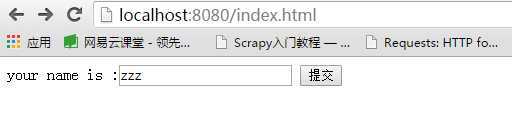
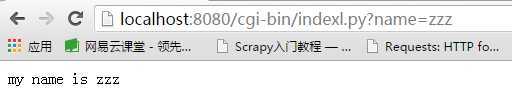
4.运行调试
原文:http://www.cnblogs.com/ayixi/p/5014989.html