
一、CSS语法
1、CSS 语法由三部分构成:选择器、属性和值;
eg:selector {property: value} 选择器 (selector) 通常是你希望定义的 HTML 元素或标签,属性 (property) 是你希望改变的属性,并且每个属性都有一个值。
2、如果值为若干单词,则要给值加引号。eg:p {font-family: "sans serif";}
3、是否包含空格不会影响 CSS 在浏览器的工作效果,同样,与 XHTML 不同,CSS 对大小写不敏感。不过存在一个例外:如果涉及到与 HTML 文档一起工作的话,class 和 id 名称对大小写是敏感的。
4、可以对选择器进行分组,这样,被分组的选择器就可以分享相同的声明。用逗号将需要分组的选择器分开。
eg:h1,h2,h3,h4,h5,h6 {
color: green;
}
5、继承:生效的前提是这个属性没有自己的样式
eg: body{color:red;} //单独定义了样式的就体现自己的样式,未被定义的就体现body的样式
二、选择器
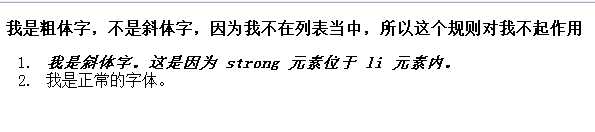
1、派生选择器:通过依据元素在其位置的上下文关系来定义样式.
 1 <!DOCTYPE html PUBLIC "-//W3C//DTD XHTML 1.0 Transitional//EN" "http://www.w3.org/TR/xhtml1/DTD/xhtml1-transitional.dtd">
 2 <html xmlns="http://www.w3.org/1999/xhtml">
 3 <head>
 4 <meta http-equiv="Content-Type" content="text/html; charset=utf-8" />
 5 <title>选择器</title>
 6     <style type="text/css">
 7         li strong{font-style: italic;}
 8     </style>
 9 </head>
10
11 <body>
12     <p><strong>我是粗体字,不是斜体字,因为我不在列表当中,所以这个规则对我不起作用</strong></p>
13     <ol>
14         <li><strong>我是斜体字。这是因为 strong 元素位于 li 元素内。</strong></li>
15         <li>我是正常的字体。</li>
16     </ol>
17 </body>
18 </html>
效果:
2、id选择器:
id 选择器可以为标有特定 id 的 HTML 元素指定特定的样式。id 选择器以 "#" 来定义。id 属性只能在每个 HTML 文档中出现一次。在现代布局中,id 选择器常常用于建立派生选择器。
3、类选择器:
在 CSS 中,类选择器以一个点号显示。类名的第一个字符不能使用数字!和 id 一样,class 也可被用作派生选择器。
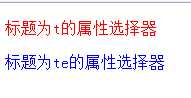
4、属性选择器:对带有指定属性的HTML元素设置样式
*选择器如果不指定其值,它的值怎么写都无所谓,如果指定了其值,那么必须按照其具体的值来写,如果值变化,那么将不再生效。
 1 <!DOCTYPE html PUBLIC "-//W3C//DTD XHTML 1.0 Transitional//EN" "http://www.w3.org/TR/xhtml1/DTD/xhtml1-transitional.dtd">
 2 <html xmlns="http://www.w3.org/1999/xhtml">
 3 <head>
 4 <meta http-equiv="Content-Type" content="text/html; charset=utf-8" />
 5 <title>选择器</title>
 6     <style type="text/css">
 7         [title]{color:blue;}
 8         [title=t]{color:red;}
 9     </style>
10 </head>
11
12 <body>
13     <p title="t">标题为t的属性选择器</p>
14     <p title="te">标题为te的属性选择器</p>
15     </ol>
16 </body>
17 </html>
效果:
三、CSS背景
1、背景颜色:background-color
2、背景图像:background-image
3、背景重复:background-repeat
*属性值 repeat 导致图像在水平垂直方向上都平铺,就像以往背景图像的通常做法一样。
*repeat-x 和 repeat-y 分别导致图像只在水平或垂直方向上重复。
*no-repeat 则不允许图像在任何方向上平铺。
(1)在水平方向重复:
 1 <!DOCTYPE html PUBLIC "-//W3C//DTD XHTML 1.0 Transitional//EN" "http://www.w3.org/TR/xhtml1/DTD/xhtml1-transitional.dtd">
 2 <html xmlns="http://www.w3.org/1999/xhtml">
 3 <head>
 4 <meta http-equiv="Content-Type" content="text/html; charset=utf-8" />
 5 <title>背景</title>
 6 <style type="text/css">
 7     body{
 8         background-image:url(1.png);
 9         background-repeat:repeat-x;
10         }
11 </style>
12 </head>
13
14 <body>
15 </body>
16 </html>
效果:

4、背景定位:background-position
为 background-position 属性提供值有很多方法。
(1)可使用关键字:top、bottom、left、right 和 center。通常,这些关键字会成对出现,如果只出现一个关键字,则认为另一个关键字是center。
(2)还可以使用长度值,如 100px 或 5cm。长度值解释的是元素内边距区左上角的偏移。偏移点是图像的左上角。
(3)最后也可以使用百分数值。百分数值同时应用于元素和图像,不同类型的值对于背景图像的放置稍有差异。background-position 的默认值是 0% 0%,在功能上相当于 top left。
5、背景关联: background-attachment
如果文档比较长,那么当文档向下滚动时,背景图像也会随之滚动。当文档滚动到超过图像的位置时,图像就会消失。可以通过 background-attachment属性防止这种滚动。通过这个属性,可以声明图像相对于可视区是固定的(fixed),因此不会受到滚动的影响:
*background-attachment 属性的默认值是 scroll,也就是说,在默认的情况下,背景会随文档滚动。
四、CSS文本
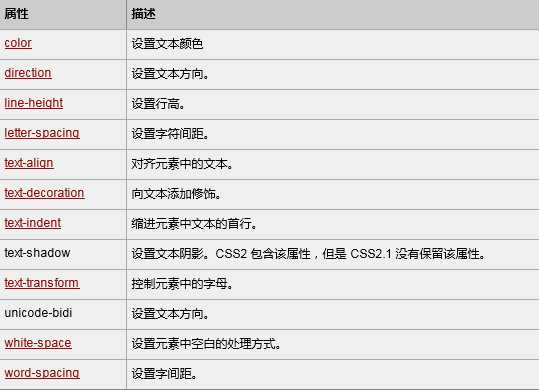
1、CSS文本属性:
2、缩进文本首行:
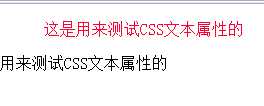
(1)通过使用 text-indent 属性,所有元素的第一行都可以缩进一个给定的长度,一般来说,可以为所有块级元素应用 text-indent,但无法将该属性应用于行内元素,图像之类的替换元素上也无法应用 text-indent 属性。不过,如果一个块级元素(比如段落)的首行中有一个图像,它会随该行的其余文本移动。
(2)text-indent 还可以设置为负值。利用这种技术,可以实现很多有趣的效果,比如“悬挂缩进”,即第一行悬挂在元素中余下部分的左边。不过在为 text-indent 设置负值时要当心,如果对一个段落设置了负值,那么首行的某些文本可能会超出浏览器窗口的左边界。为了避免出现这种显示问题,建议针对负缩进再设置一个外边距或一些内边距。
 1 <!DOCTYPE html PUBLIC "-//W3C//DTD XHTML 1.0 Transitional//EN" "http://www.w3.org/TR/xhtml1/DTD/xhtml1-transitional.dtd">
 2 <html xmlns="http://www.w3.org/1999/xhtml">
 3 <head>
 4 <meta http-equiv="Content-Type" content="text/html; charset=utf-8" />
 5 <title>文本</title>
 6 <style type="text/css">
 7     #id1{text-indent:1cm;color:#F03;}
 8     #id2{text-indent: -1cm;}
 9 </style>
10 </head>
11
12 <body>
13     <p id="id1">这是用来测试CSS文本属性的</p>
14     <p id="id2">这是用来测试CSS文本属性的</p>
15 </body>
16 </html>
效果:
3、字间隔(word-spacing 属性)、字母间隔(letter-spacing 属性):可正可负
 1 <!DOCTYPE html PUBLIC "-//W3C//DTD XHTML 1.0 Transitional//EN" "http://www.w3.org/TR/xhtml1/DTD/xhtml1-transitional.dtd">
 2 <html xmlns="http://www.w3.org/1999/xhtml">
 3 <head>
 4 <meta http-equiv="Content-Type" content="text/html; charset=utf-8" />
 5 <title>文本</title>
 6 <style type="text/css">
 7     p.spread {word-spacing: 20px;}
 8     p.tight {word-spacing: -0.5em;}
 9     h1 {letter-spacing: -0.3em;}
10     h4 {letter-spacing: 20px;}
11 </style>
12 </head>
13
14 <body>
15     <p class="spread">This is a paragraph. The spaces between words will be decreased.</p>
16     <p class="tight">This is a paragraph. The spaces between words will be increased.</p>
17     <h1>This is header 1</h1>
18     <h4>This is header 4</h4>
19 </body>
20 </html>
效果:

4、字符转换:text-transform
这个属性有 4 个值:
5、文本装饰:text-decoration
text-decoration 有 5 个值:
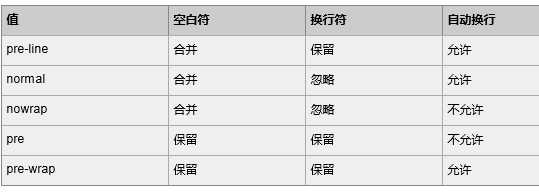
6、空白符:white-space
五、CSS字体
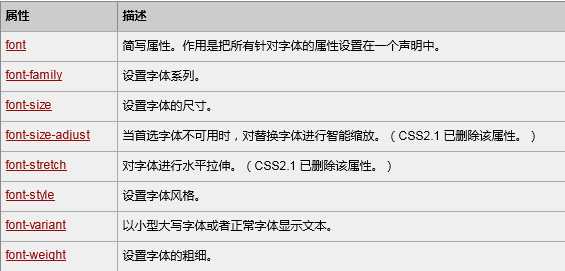
1、CSS字体属性
六、CSS列表
1、CSS列表属性
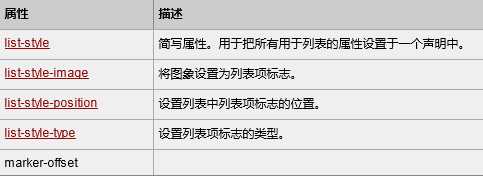
2、list-style-type的值:
*无序列表:disc:实心圆;circle:空心圆;square:实心方块;none:什么都没有
*有序列表:decimal:(1.2.3.);lower-roman:(i.ii.iii.);upper-roman:(I.II.III.);lower-alpha:(a.b.c.);upper-alpha:(A.B.C.)
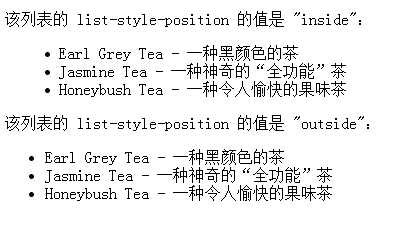
3、list-style-position的值:设置列表中列表项标志的位置
inside往内边缘靠;outside:往外边缘靠
 1 <!DOCTYPE html PUBLIC "-//W3C//DTD XHTML 1.0 Transitional//EN" "http://www.w3.org/TR/xhtml1/DTD/xhtml1-transitional.dtd">
 2 <html xmlns="http://www.w3.org/1999/xhtml">
 3 <head>
 4 <meta http-equiv="Content-Type" content="text/html; charset=utf-8" />
 5 <title>列表</title>
 6 <style type="text/css">
 7     ul.inside {list-style-position: inside;}
 8     ul.outside {list-style-position: outside;}
 9 </style>
10 </head>
11
12 <body>
13     <p>该列表的 list-style-position 的值是 "inside":</p>
14     <ul class="inside">
15         <li>Earl Grey Tea - 一种黑颜色的茶</li>
16         <li>Jasmine Tea - 一种神奇的“全功能”茶</li>
17         <li>Honeybush Tea - 一种令人愉快的果味茶</li>
18     </ul>
19
20     <p>该列表的 list-style-position 的值是 "outside":</p>
21     <ul class="outside">
22         <li>Earl Grey Tea - 一种黑颜色的茶</li>
23         <li>Jasmine Tea - 一种神奇的“全功能”茶</li>
24         <li>Honeybush Tea - 一种令人愉快的果味茶</li>
25     </ul>
26
27 </body>
28 </html>
七、CSS表格
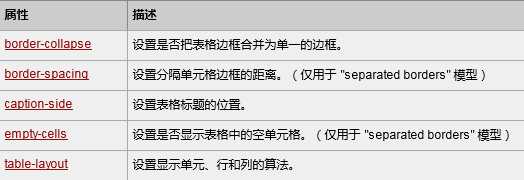
1、CSS<table>属性
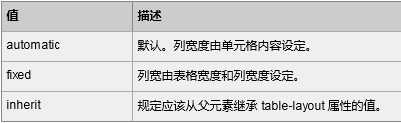
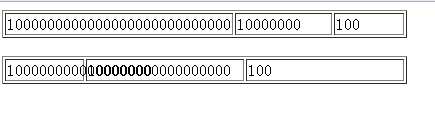
2、table-layout的值:
 1 <!DOCTYPE html PUBLIC "-//W3C//DTD XHTML 1.0 Transitional//EN" "http://www.w3.org/TR/xhtml1/DTD/xhtml1-transitional.dtd">
 2 <html xmlns="http://www.w3.org/1999/xhtml">
 3 <head>
 4 <meta http-equiv="Content-Type" content="text/html; charset=utf-8" />
 5 <title>表格</title>
 6 <style type="text/css">
 7     table.one{table-layout: automatic}
 8     table.two{table-layout: fixed}
 9 </style>
10 </head>
11
12 <body>
13     <table class="one" border="1" width="100%">
14         <tr>
15             <td width="20%">1000000000000000000000000000</td>
16             <td width="40%">10000000</td>
17             <td width="40%">100</td>
18         </tr>
19     </table>
20     <br />
21
22     <table class="two" border="1" width="100%">
23         <tr>
24             <td width="20%">1000000000000000000000000000</td>
25             <td width="40%">10000000</td>
26             <td width="40%">100</td>
27         </tr>
28     </table>
29 </body>
30 </html>
效果:
八、CSS轮廓
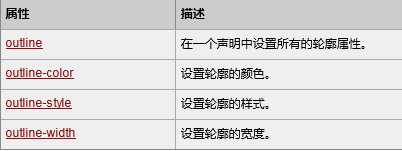
1、CSS边框属性
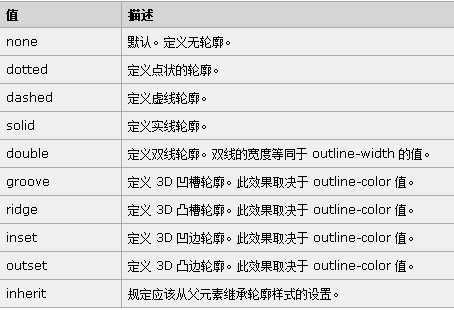
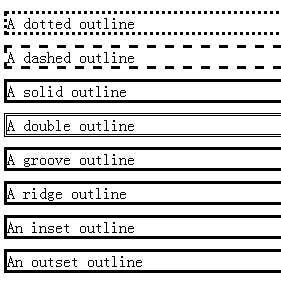
2、outline-style 属性:用于设置元素的整个轮廓的样式
 1 <!DOCTYPE html PUBLIC "-//W3C//DTD XHTML 1.0 Transitional//EN" "http://www.w3.org/TR/xhtml1/DTD/xhtml1-transitional.dtd">
 2 <html xmlns="http://www.w3.org/1999/xhtml">
 3 <head>
 4 <meta http-equiv="Content-Type" content="text/html; charset=utf-8" />
 5 <title>轮廓</title>
 6     <style type="text/css">
 7
 8         p.dotted {outline-style: dotted}
 9         p.dashed {outline-style: dashed}
10         p.solid {outline-style: solid}
11         p.double {outline-style: double}
12         p.groove {outline-style: groove}
13         p.ridge {outline-style: ridge}
14         p.inset {outline-style: inset}
15         p.outset {outline-style: outset}
16     </style>
17
18 </head>
19
20 <body>
21     <p class="dotted">A dotted outline</p>
22     <p class="dashed">A dashed outline</p>
23     <p class="solid">A solid outline</p>
24     <p class="double">A double outline</p>
25     <p class="groove">A groove outline</p>
26     <p class="ridge">A ridge outline</p>
27     <p class="inset">An inset outline</p>
28     <p class="outset">An outset outline</p>
29
30 </body>
31 </html>
效果:
3、在一个声明中设置所有轮廓属性:
eg:border:red solid thin;
“border”后面的三个参数的含义是:边框线的宽度是:thin(细线);边框线的类型:solid(实线);边框线的颜色:red(红色)。
原文:http://www.cnblogs.com/jasmine-95/p/5001726.html