
本章中分析insert元素的解析。
1 配置文件
<insert id="insert" parameterType="cn.vansky.schedule.time.menu.bo.Menu">
    <!--
      WARNING - @mbggenerated
      This element is automatically generated by MyBatis Generator, do not modify.
      This element was generated on Fri Aug 14 16:08:36 CST 2015.
    -->
    insert into tb_menu (menu_name, menu_remark, menu_parent_id,
      menu_url, is_show, is_delete,
      operation_user_name, operation_time)
    values (#{menuName,jdbcType=VARCHAR}, #{menuRemark,jdbcType=VARCHAR}, #{menuParentId,jdbcType=INTEGER},
      #{menuUrl,jdbcType=VARCHAR}, #{isShow,jdbcType=TINYINT}, #{isDelete,jdbcType=TINYINT},
      #{operationUserName,jdbcType=VARCHAR}, #{operationTime,jdbcType=TIMESTAMP})
</insert>
2 方法buildStatementFromContext
private void buildStatementFromContext(List<XNode> list) {
    if (configuration.getDatabaseId() != null) {
      buildStatementFromContext(list, configuration.getDatabaseId());
    }
    buildStatementFromContext(list, null);
  }
  private void buildStatementFromContext(List<XNode> list, String requiredDatabaseId) {
    for (XNode context : list) {
     // 对一个SQL进行解析
      final XMLStatementBuilder statementParser = new XMLStatementBuilder(configuration, builderAssistant, context, requiredDatabaseId);
      try {
        statementParser.parseStatementNode();
      } catch (IncompleteElementException e) {
        configuration.addIncompleteStatement(statementParser);
      }
    }
}
上面是一个总的方法包括,insert、update、delete、select4中元素都会进入此方法。这里也会捕获一种异常,并把错误的解析放入Configuration(全局配置类)的Collection<XMLStatementBuilder> incompleteStatements = new LinkedList<XMLStatementBuilder>()。
3 方法parseStatementNode
public void parseStatementNode() {
    // insert
    String id = context.getStringAttribute("id");
    // null
    String databaseId = context.getStringAttribute("databaseId");
    // 第一次检查这里是不通过的,直接跳过
    if (!databaseIdMatchesCurrent(id, databaseId, this.requiredDatabaseId)) return;
    // null
    Integer fetchSize = context.getIntAttribute("fetchSize");
    // null
    Integer timeout = context.getIntAttribute("timeout");
    // null
    String parameterMap = context.getStringAttribute("parameterMap");
    // cn.vansky.schedule.time.menu.bo.Menu
    String parameterType = context.getStringAttribute("parameterType");
    // class cn.vansky.schedule.time.menu.bo.Menu
    Class<?> parameterTypeClass = resolveClass(parameterType);
    // null
    String resultMap = context.getStringAttribute("resultMap");
    // null
    String resultType = context.getStringAttribute("resultType");
    // null
    String lang = context.getStringAttribute("lang");
    // 获取默认的处理对象
    // org.apache.ibatis.scripting.xmltags.XMLLanguageDriver
    LanguageDriver langDriver = getLanguageDriver(lang);
    // null
    Class<?> resultTypeClass = resolveClass(resultType);
    // null
    String resultSetType = context.getStringAttribute("resultSetType");
    // PREPARED
    StatementType statementType = StatementType.valueOf(context.getStringAttribute("statementType", StatementType.PREPARED.toString()));
    // null
    ResultSetType resultSetTypeEnum = resolveResultSetType(resultSetType);

    // insert
    String nodeName = context.getNode().getNodeName();
    // INSERT
    SqlCommandType sqlCommandType = SqlCommandType.valueOf(nodeName.toUpperCase(Locale.ENGLISH));
    // false
    boolean isSelect = sqlCommandType == SqlCommandType.SELECT;
    // true
    boolean flushCache = context.getBooleanAttribute("flushCache", !isSelect);
    // false
    boolean useCache = context.getBooleanAttribute("useCache", isSelect);
    // false
    boolean resultOrdered = context.getBooleanAttribute("resultOrdered", false);

    // Include Fragments before parsing
    XMLIncludeTransformer includeParser = new XMLIncludeTransformer(configuration, builderAssistant);
    // 解析<include refid="Base_Column_List" />
    includeParser.applyIncludes(context.getNode());

    // Parse selectKey after includes and remove them.
    processSelectKeyNodes(id, parameterTypeClass, langDriver);

    // 这里通过下面分析获取的SQL源(静态SQL源),因为没有动态标签
    SqlSource sqlSource = langDriver.createSqlSource(configuration, context, parameterTypeClass);
    // null
    String resultSets = context.getStringAttribute("resultSets");
    // null
    String keyProperty = context.getStringAttribute("keyProperty");
    // null
    String keyColumn = context.getStringAttribute("keyColumn");
    // org.apache.ibatis.executor.keygen.NoKeyGenerator
    KeyGenerator keyGenerator;
    // insert!selectKey
    String keyStatementId = id + SelectKeyGenerator.SELECT_KEY_SUFFIX;
    // cn.vansky.schedule.time.menu.dao.MenuMapper.insert!selectKey
    keyStatementId = builderAssistant.applyCurrentNamespace(keyStatementId, true);
    if (configuration.hasKeyGenerator(keyStatementId)) {
      keyGenerator = configuration.getKeyGenerator(keyStatementId);
    } else {
      keyGenerator = context.getBooleanAttribute("useGeneratedKeys",
          configuration.isUseGeneratedKeys() && SqlCommandType.INSERT.equals(sqlCommandType))
          ? new Jdbc3KeyGenerator() : new NoKeyGenerator();
    }

    builderAssistant.addMappedStatement(id, sqlSource, statementType, sqlCommandType,
        fetchSize, timeout, parameterMap, parameterTypeClass, resultMap, resultTypeClass,
        resultSetTypeEnum, flushCache, useCache, resultOrdered,
        keyGenerator, keyProperty, keyColumn, databaseId, langDriver, resultSets);
  }
4 方法XMLLanguageDriver.createSqlSource
public SqlSource createSqlSource(Configuration configuration, XNode script, Class<?> parameterType) {
    XMLScriptBuilder builder = new XMLScriptBuilder(configuration, script, parameterType);
    // 入参Class及节点解析
    return builder.parseScriptNode();
}
5 方法XMLScriptBuilder.parseScriptNode
public SqlSource parseScriptNode() {
    // 解析动态标签,if、where、for
    List<SqlNode> contents = parseDynamicTags(context);
    // 所有动态标签集合类
    MixedSqlNode rootSqlNode = new MixedSqlNode(contents);
    SqlSource sqlSource = null;
    if (isDynamic) {
      sqlSource = new DynamicSqlSource(configuration, rootSqlNode);
    } else {
      sqlSource = new RawSqlSource(configuration, rootSqlNode, parameterType);
    }
    return sqlSource;
}
6 方法XMLScriptBuilder.parseDynamicTags
private List<SqlNode> parseDynamicTags(XNode node) {
    List<SqlNode> contents = new ArrayList<SqlNode>();
    // 获取动态标签与内容列表
    NodeList children = node.getNode().getChildNodes();
    for (int i = 0; i < children.getLength(); i++) {
      XNode child = node.newXNode(children.item(i));
      // 内容
      if (child.getNode().getNodeType() == Node.CDATA_SECTION_NODE || child.getNode().getNodeType() == Node.TEXT_NODE) {
        String data = child.getStringBody("");
        // 内容SqlNode
        TextSqlNode textSqlNode = new TextSqlNode(data);
        // 动态修改的内容
        if (textSqlNode.isDynamic()) {
          contents.add(textSqlNode);
          isDynamic = true;
        } else {
        // 静态内容
          contents.add(new StaticTextSqlNode(data));
        }
      } else if (child.getNode().getNodeType() == Node.ELEMENT_NODE) { // issue #628
        // 节点为元素,也就是动态标签where、if、for
        String nodeName = child.getNode().getNodeName();
        // 获取动态标签处理器WhereHandler、ForEachHandler
        NodeHandler handler = nodeHandlers.get(nodeName);
        if (handler == null) {
          throw new BuilderException("Unknown element <" + nodeName + "> in SQL statement.");
        }
        // 处理器处理内容,并把处理的内容加入到SQLNode
        handler.handleNode(child, contents);
        isDynamic = true;
      }
    }
    return contents;
  }
方法5中有2中数据源DynamicSqlSource(动态SQL源)和RawSqlSource(静态SQL源),动态SQL源就是包括where、if、for,静态SQL源就是只包括SQL语句,下面就简单分析一下2中SQL源。
7 RawSqlSource(静态SQL源)
public RawSqlSource(Configuration configuration, String sql, Class<?> parameterType) {
    SqlSourceBuilder sqlSourceParser = new SqlSourceBuilder(configuration);
    Class<?> clazz = parameterType == null ? Object.class : parameterType;
    sqlSource = sqlSourceParser.parse(sql, clazz, new HashMap<String, Object>());
}
public SqlSource parse(String originalSql, Class<?> parameterType, Map<String, Object> additionalParameters) {
    // 参数处理Mapping
    ParameterMappingTokenHandler handler = new ParameterMappingTokenHandler(configuration, parameterType, additionalParameters);
    GenericTokenParser parser = new GenericTokenParser("#{", "}", handler);
    // 解析XML中的SQL语句,#{menuName,jdbcType=VARCHAR},转换成?及对应的处理类型ParameterMapping
    String sql = parser.parse(originalSql);
    return new StaticSqlSource(configuration, sql, handler.getParameterMappings());
}
这里直接解析并生成StaticSqlSource,包括SQL语句及对应的处理类型。
7.1 ParameterMapping对应的menuName
/** 全局配置类 */
private Configuration configuration;
/** menuName */
private String property;
/** IN:输入 */
private ParameterMode mode;
/** class java.lang.String */
private Class<?> javaType = Object.class;
/** VARCHAR */
private JdbcType jdbcType;
/** null */
private Integer numericScale;
/** StringTypeHandler */
private TypeHandler<?> typeHandler;
/** null */
private String resultMapId;
/** null */
private String jdbcTypeName;
/** null */
private String expression;
8 DynamicSqlSource(动态SQL源)
public DynamicSqlSource(Configuration configuration, SqlNode rootSqlNode) {
    this.configuration = configuration;
    this.rootSqlNode = rootSqlNode;
}
很明显这里没有进行生成SQL,那就是在具体获取SQL时进行生成SQL
9 方法addMappedStatement
此方法只是赋值,没有什么特殊处理,所以此方法不在分析,可以自行研究。
总结
附上图片MappedStatement属性值


下面给出动态SQL源的MappedStatement属性值
<insert id="insertSelective" parameterType="cn.vansky.schedule.time.menu.bo.Menu">
    <!--
      WARNING - @mbggenerated
      This element is automatically generated by MyBatis Generator, do not modify.
      This element was generated on Fri Aug 14 16:08:36 CST 2015.
    -->
    insert into tb_menu
    <trim prefix="(" suffix=")" suffixOverrides=",">
      <if test="menuName != null">
        menu_name,
      </if>
      <if test="menuRemark != null">
        menu_remark,
      </if>
      <if test="menuParentId != null">
        menu_parent_id,
      </if>
      <if test="menuUrl != null">
        menu_url,
      </if>
      <if test="isShow != null">
        is_show,
      </if>
      <if test="isDelete != null">
        is_delete,
      </if>
      <if test="operationUserName != null">
        operation_user_name,
      </if>
      <if test="operationTime != null">
        operation_time,
      </if>
    </trim>
    <trim prefix="values (" suffix=")" suffixOverrides=",">
      <if test="menuName != null">
        #{menuName,jdbcType=VARCHAR},
      </if>
      <if test="menuRemark != null">
        #{menuRemark,jdbcType=VARCHAR},
      </if>
      <if test="menuParentId != null">
        #{menuParentId,jdbcType=INTEGER},
      </if>
      <if test="menuUrl != null">
        #{menuUrl,jdbcType=VARCHAR},
      </if>
      <if test="isShow != null">
        #{isShow,jdbcType=TINYINT},
      </if>
      <if test="isDelete != null">
        #{isDelete,jdbcType=TINYINT},
      </if>
      <if test="operationUserName != null">
        #{operationUserName,jdbcType=VARCHAR},
      </if>
      <if test="operationTime != null">
        #{operationTime,jdbcType=TIMESTAMP},
      </if>
    </trim>
</insert>
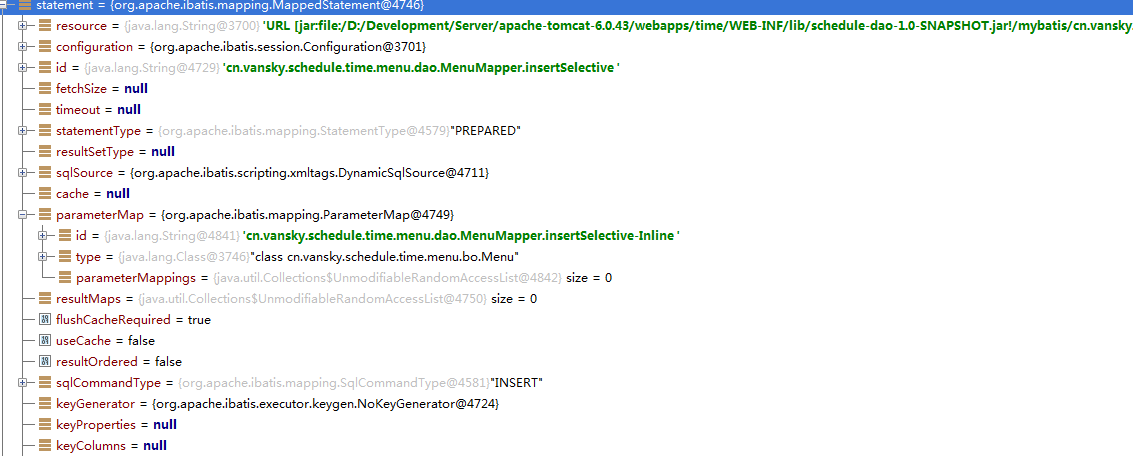
其实这里属性都差不多,主要是SqlSource不一样,那么下来就看它的属性。


原文:http://my.oschina.net/u/1269959/blog/523651