
此文紧接上篇博文《Linux系统-小倒腾之Linux DIY定制裁剪(New kernel+Busybox)o_o(二)》,前面我们已经将定制版Linux系统已经初步有了一个Linux系统拥有的基本功能,那现在需要做的就是从宿主机上将远程服务软件dropbear以及nginx移植至这台定制版Linux中,并且实现它们自己各自的功能。具体实现步骤请看下面:
在移植之前需要在宿主机上进行安装测试,待工作正常,才采取移植操作
====================编译安装dropbear、测试及移植====================
1.解压安装包
[root@station10 ~]# tar -xf  dropbear-2013.58.tar.bz2 -C /usr/src/
[root@station10 ~]# cd /usr/src/dropbear-2013.58/
[root@station10 dropbear-2013.58]#
2.编译操作
[root@station10 dropbear-2013.58]# ./configure
[root@station10 dropbear-2013.58]# make PROGRAMS="dropbear dbclient dropbearkey dropbearconvert scp"
[root@station10 dropbear-2013.58]# make PROGRAMS="dropbear dbclient dropbearkey dropbearconvert scp" install
3.创建dropbear密钥存放目录
[root@station10 dropbear-2013.58]# mkdir /etc/dropbear/
4.生成密钥文件
[root@station10 dropbear-2013.58]# dropbearkey -t rsa -s 1024 -f /etc/dropbear/dropbear_rsa_host_key
Will output 1024 bit rsa secret key to ‘/etc/dropbear/dropbear_rsa_host_key‘
Generating key, this may take a while...
Public key portion is:
.........
.........
[root@station10 dropbear-2013.58]# dropbearkey -t dss  -f /etc/dropbear/dropbear_dss_host_key
Will output 1024 bit dss secret key to ‘/etc/dropbear/dropbear_dss_host_key‘
Generating key, this may take a while...
Public key portion is:
.........
.........
[root@station10 dropbear-2013.58]# ls /etc/dropbear/
dropbear_dss_host_key  dropbear_rsa_host_key
[root@station10 dropbear-2013.58]#
5.启动dropbear测试
因为我实验中用的是sshd的22port,为了避免他们冲突我将使用22022port
[root@station10 dropbear-2013.58]# dropbear -p 22022
#端口监听中
[root@station10 dropbear-2013.58]# ss -tnl | grep 22022
LISTEN     0      20                       :::22022                   :::*
LISTEN     0      20                        *:22022                    *:*
[root@station10 dropbear-2013.58]#
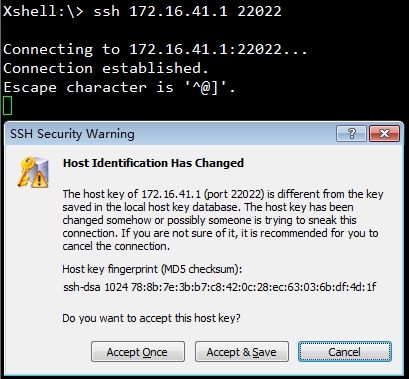
ok!现在dropbear工作起来了,开始移植吧
6.移植dropbear所需程序文件
(1)执行那个bincp脚本:
[root@station10 ~]# sh bincp.sh
A command: dropbear
Copy /usr/local/sbin/dropbear to /mnt/sysroot finished.
Copy /lib64/libcrypt.so.1 to /mnt/sysroot finished.
Copy /lib64/libutil.so.1 to /mnt/sysroot finished.
Copy /lib64/libz.so.1 to /mnt/sysroot finished.
Copy /lib64/libfreebl3.so to /mnt/sysroot finished.
A command: dropbearkey
Copy /usr/local/bin/dropbearkey to /mnt/sysroot finished.
A command: dbclient
Copy /usr/local/bin/dbclient to /mnt/sysroot finished.
A command: scp
Copy /usr/local/bin/scp to /mnt/sysroot finished.
A command: q
[root@station10 ~]# ls /mnt/sysroot/usr/local/bin/
dbclient  dropbearkey  scp
[root@station10 ~]# ls /mnt/sysroot/usr/local/sbin/
dropbear
[root@station10 ~]#
(2)移植名称解析服务文件
我们知道在远程连接时dropbear它需要对用户身份验证,也就是名称解析,这就意味着nssswitch这个框架文件需要移植过去
#移植依赖的库文件
[root@station10 ~]# cp -d /lib64/libnss_files* /mnt/sysroot/lib64/
[root@station10 ~]# cp -d /usr/lib64/libnss3.so /mnt/sysroot/usr/lib64/
[root@station10 ~]# cp -d /usr/lib64/libnss_files.so /mnt/sysroot/usr/lib64/
#移植配置文件
[root@station10 ~]# cp /etc/nsswitch.conf /mnt/sysroot/etc/
(3)移植安全shell文件
dropbear验证用户身份时是需要验证该用户是否是使用的安全shell登录,所以我将宿主机里面/etc/shells文件移植至定制版Linux中
[root@station10 ~]# cp /etc/shells /mnt/sysroot/etc/
#移植bash,执行cpbin脚本
[root@station10 ~]# sh bincp.sh
A command: bash
Copy /bin/bash to /mnt/sysroot finished.
A command: q
[root@station10 ~]#
(4)为定制版Linux生成dropbearkey文件
[root@station10 ~]# cd /mnt/sysroot/etc/
[root@station10 etc]# mkdir dropbear
[root@station10 etc]# dropbearkey -t rsa -s 2048 -f dropbear/dropbear_rsa_host_key
Will output 2048 bit rsa secret key to ‘dropbear/dropbear_rsa_host_key‘
Generating key, this may take a while...
Public key portion is:
.........
.........
[root@station10 etc]# dropbearkey -t dss -f dropbear/dropbear_dss_host_key
Will output 1024 bit dss secret key to ‘dropbear/dropbear_dss_host_key‘
Generating key, this may take a while...
Public key portion is:
.........
.........
[root@station10 etc]# ls dropbear/
dropbear_dss_host_key  dropbear_rsa_host_key
[root@station10 etc]#
(5)pid文件:
在dropbear启动后它会在/var/run目录中生成一个pid文件,需要保证有这个目录
(前面我已经有创建过了)
(6)伪终端
在远程登录是都是使用伪终端,那伪文件系统又从何而来呢?Target上有没有;其实他是挂载而来的,所以需要让其支持伪文件系统
[root@station10 etc]# pwd
/mnt/sysroot/etc
[root@station10 etc]# vim fstab
/dev/sda1       /boot   ext4    defaults 0 0
/dev/sda2       /       ext4    defaults 0 0
proc            /proc   proc    defaults 0 0
sysfs           /sys    sysfs   defaults 0 0
/dev/sda3       swap    swap    defaults 0 0
devpts          /dev/pts devpts defaults 0 0 #加入此行
#/dev/pts这个目录无需创建,
drwxr-xr-x 2 root root 0 Apr  1 19:31 /dev/pts/
[root@station10 sysroot]# sync
7.为其提供开关机机自动启动/关闭脚本
#创建锁文件目录:
mkdir -p /mnt/sysroot/var/lock/subsys/
[root@station10 etc]# mkdir rc.d/init.d
#移植宿主机上面的/etc/rc.d/init.d/funcitons
[root@station10 ~]# cp /etc/rc.d/init.d/functions /mnt/sysroot/etc/rc.d/init.d/
#移植宿主机上面的/sbin/consoletype,它被functions所依赖
[root@station10 ~]# sh bincp.sh
A command: /sbin/consoletype
Copy /sbin/consoletype to /mnt/sysroot finished.
A command: q
[root@station10 ~]#
#创建dropbear
[root@station10 etc]# vim rc.d/init.d/dropbear
#!/bin/bash
#
# description: dropbear ssh daemon
# chkconfig: 2345 66 33
#
dsskey=/etc/dropbear/dropbear_dss_host_key
rsakey=/etc/dropbear/dropbear_rsa_host_key
lockfile=/var/lock/subsys/dropbear
pidfile=/var/run/dropbear.pid
dropbear=/usr/local/sbin/dropbear
dropbearkey=/usr/local/bin/dropbearkey
[ -r /etc/rc.d/init.d/functions ] && . /etc/rc.d/init.d/functions
[ -r /etc/sysconfig/dropbear ] && . /etc/sysconfig/dropbear
keysize=1024
port=22
gendsskey() {
        [ -d /etc/dropbear ] || mkdir /etc/dropbear
        echo -n "Starting generate the dss key: "
        $dropbearkey -t dss -f $dsskey &> /dev/null
        RETVAL=$?
        if [ $RETVAL -eq 0 ]; then
                success
                echo
                return 0
        else
                failure
                echo
                return 1
        fi
}
genrsakey() {
        [ -d /etc/dropbear ] || mkdir /etc/dropbear
        echo -n "Starting generate the rsa key: "
        $dropbearkey -t rsa -s $keysize -f $rsakey &> /dev/null
        RETVAL=$?
        if [ $RETVAL -eq 0 ]; then
                success
                echo
                return 0
        else
                failure
                echo
                return 1
        fi
}
start() {
        [ -e $dsskey ] || gendsskey
        [ -e $rsakey ] || genrsakey
        if [ -e $lockfile ]; then
                echo -n "dropbear daemon is already running: "
                success
                echo
                exit 0
        fi
        echo -n "Starting dropbear: "
        daemon --pidfile="$pidfile" $dropbear -p $port -d $dsskey -r $rsakey
        RETVAL=$?
        echo
        if [ $RETVAL -eq 0 ]; then
                touch $lockfile
                return 0
        else
                rm -f $lockfile $pidfile
                return 1
        fi
}
stop() {
        if [ ! -e $lockfile ]; then
                echo -n "dropbear service is stopped: "
                success
                echo
                exit 1
        fi
        echo -n "Stopping dropbear daemon: "
        killproc dropbear
        RETVAL=$?
        echo

        if [ $RETVAL -eq 0 ]; then
                rm -f $lockfile $pidfile
                return 0
        else
                return 1
        fi
}
status() {
        if [ -e $lockfile ]; then
                echo "dropbear is running..."
        else
                echo "dropbear is stopped..."
        fi
}
usage() {
        echo "Usage: dropbear {start|stop|restart|status|gendsskey|genrsakey}"
}
case $1 in
start)
        start ;;
stop)
        stop ;;
restart)
        stop
        start
        ;;
status)
        status
        ;;
gendsskey)
        gendsskey
        ;;
genrsakey)
        genrsakey
        ;;
*)
        usage
        ;;
esac
#赋予执行权限
[root@station10 etc]# chmod +x rc.d/init.d/dropbear
#创建自动启动/关闭脚本相关文件
[root@station10 etc]# cd rc.d/
#由于busybox没有运行级别这个概念,我这里就假设运行在级别3
[root@station10 rc.d]# mkdir rc3.d
[root@station10 rc.d]# cd rc3.d/
[root@station10 rc3.d]# ln -sv ../init.d/dropbear dropbear.start
`dropbear.start‘ -> `init.d/dropbear‘
[root@station10 rc3.d]# ln -sv ../init.d/dropbear dropbear.stop
`dropbear.stop‘ -> `init.d
/dropbear‘
[root@station10 rc.d]#
[root@station10 etc]# vim rc.d/rc.sysinit
/etc/rc3.d/*.start start   #加入此行系统在开机时它就会加载/etc/rc.d/下面以start结尾的所有服务脚本使之启动
#关机时执行的
[root@station10 rc3.d]# vim ../rc.sysdown
#!/bin/bash
#
sync
sleep 2
sync
/etc/rc.d/rc3.d/*.stop stop
/bin/umount -a -r
[root@station10 rc3.d]# chmod +x rc.sysdown
#修改/etc/inittab文件,最后一行修改为:
[root@station10 rc.d]# vim ../inittab
::shutdown:/etc/rc.d/rc.sysdown
[root@station10 rc.d]# sync
#开机时的我在上面第7点已经写在/etc/rc.d/rc.sysinit文件中了
看来差不多了,现在启动试一下:
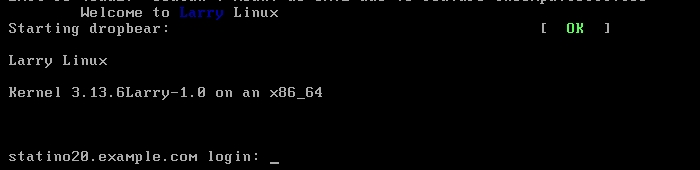
Picture-2(登录后,网卡IP、命令提示符、环境变量没有问题)
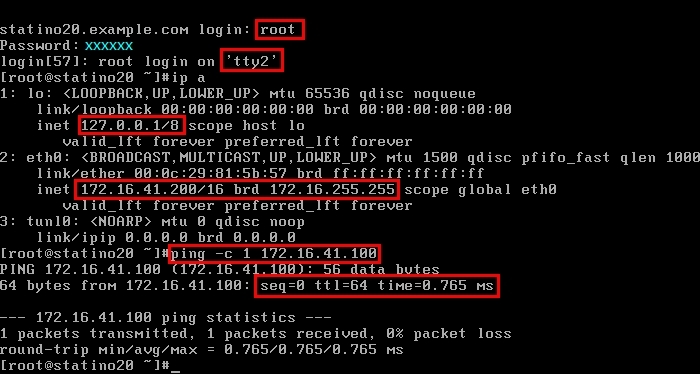

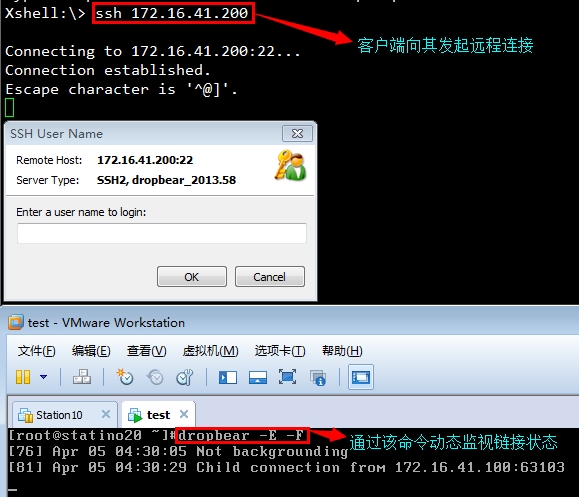


ok!目前doprbear已经可以实现开机自动启动了,并且客户端远程连接也没有问题了
好的!至此dropbear应用程序移植完成...
====================编译安装nginx、测试及移植====================
还是先在宿主机上测试,测试通过在移植
1.解压安装包
[root@station10 ~]# tar -xf nginx-1.4.2.tar.gz -C /usr/src/
[root@station10 ~]# cd /usr/src/nginx-1.4.2/
[root@station10 nginx-1.4.2]#
2.编译安装操作
[root@station10 nginx-1.4.2]# ./configure --prefix=/usr/local --conf-path=/etc/nginx/nginx.conf --error-log-path=/var/log/nginx/error.log --http-log-path=/var/log/access.log --user=nginx --group=nginx --with-pcre  --without-http_rewrite_module --without-http_geo_module --without-http_uwsgi_module --without-http_fastcgi_module --without-http_scgi_module --without-http_memcached_module
[root@station10 nginx-1.4.2]# make && make install
3.创建用户和组
[root@station10 nginx-1.4.2]# groupadd -r nginx
[root@station10 nginx-1.4.2]# useradd -r -g nginx -s /sbin/nologin nginx
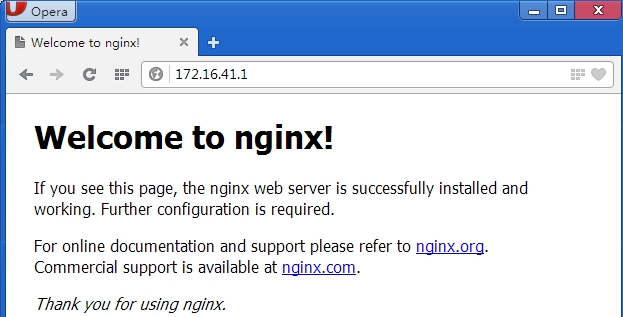
4.启动测试
[root@station10 ~]# nginx
[root@station10 ~]# ss -tnl | grep :80
LISTEN     0      128                       *:80                       *:*
5.移植nginx
(1)执行bincp脚本移植nginx命令
[root@station10 ~]# sh bincp.sh
A command: nginx
Copy /usr/local/sbin/nginx to /mnt/sysroot finished.
Copy /lib64/libpcre.so.0 to /mnt/sysroot finished.
Copy /usr/lib64/libcrypto.so.10 to /mnt/sysroot finished.
A command: q
[root@station10 ~]#
(2)移植nginx配置文件
[root@station10 ~]# cp /etc/nginx/ /mnt/sysroot/etc/ -r
[root@station10 ~]# ls /mnt/sysroot/etc/nginx/
fastcgi.conf            koi-win             scgi_params
fastcgi.conf.default    mime.types          scgi_params.default
fastcgi_params          mime.types.default  uwsgi_params
fastcgi_params.default  nginx.conf          uwsgi_params.default
koi-utf                 nginx.conf.default  win-utf
[root@station10 ~]#
(3)移植运行nginx的用户和组
[root@station10 ~]# openssl passwd  -1
Password:
Verifying - Password:
$1$9Xf6T0AX$SRIJSQJr5vim8Jb8z030k/
[root@station10 ~]#
[root@station10 ~]# tail -1 /etc/passwd >> /etc/passwd
[root@station10 ~]# tail -1 /etc/group >> /mnt/sysroot/etc/group
[root@station10 ~]# tail -1 /etc/shadow >> /mnt/sysroot/etc/shadow
#因为是系统用户我就不给密码了
(4)创建nginx的网页存放目录
[root@station10 ~]# mkdir /mnt/sysroot/usr/local/html
[root@station10 ~]# vim /mnt/sysroot/usr/local/html/index.html #→创建测试页
(5)提供nginx服务脚本
[root@station10 ~]# vim /mnt/sysroot/etc/rc.d/init.d/nginx
#!/bin/sh
#
# nginx - this script starts and stops the nginx daemon
#
# chkconfig:   - 85 15
# description:  Nginx is an HTTP(S) server, HTTP(S) reverse #               proxy and IMAP/POP3 proxy server
# processname: nginx
# config:      /etc/nginx/nginx.conf
# config:      /etc/sysconfig/nginx
# pidfile:     /var/run/nginx.pid

# Source function library.
. /etc/rc.d/init.d/functions

# Source networking configuration.
. /etc/sysconfig/network

# Check that networking is up.
[ "$NETWORKING" = "no" ] && exit 0

nginx="/usr/local/sbin/nginx"
prog=$(basename $nginx)

NGINX_CONF_FILE="/etc/nginx/nginx.conf"

[ -f /etc/sysconfig/nginx ] && . /etc/sysconfig/nginx

lockfile=/var/lock/subsys/nginx

make_dirs() {
   # make required directories
   user=`nginx -V 2>&1 | grep "configure arguments:" | sed ‘s/[^*]*--user=\([^ ]*\).*/\1/g‘ -`
   options=`$nginx -V 2>&1 | grep ‘configure arguments:‘`
   for opt in $options; do
       if [ `echo $opt | grep ‘.*-temp-path‘` ]; then
           value=`echo $opt | cut -d "=" -f 2`
           if [ ! -d "$value" ]; then
               # echo "creating" $value
               mkdir -p $value && chown -R $user $value
           fi
       fi
   done
}

start() {
    [ -x $nginx ] || exit 5
    [ -f $NGINX_CONF_FILE ] || exit 6
    make_dirs
    echo -n $"Starting $prog: "
    daemon $nginx -c $NGINX_CONF_FILE
    retval=$?
    echo
    [ $retval -eq 0 ] && touch $lockfile
    return $retval
}

stop() {
    echo -n $"Stopping $prog: "
    killproc $prog -QUIT
    retval=$?
    echo
    [ $retval -eq 0 ] && rm -f $lockfile
    return $retval
}

restart() {
    configtest || return $?
    stop
    sleep 1
    start
}

reload() {
    configtest || return $?
    echo -n $"Reloading $prog: "
    killproc $nginx -HUP
    RETVAL=$?
    echo
}

force_reload() {
    restart
}

configtest() {
  $nginx -t -c $NGINX_CONF_FILE
}

rh_status() {
    status $prog
}

rh_status_q() {
    rh_status >/dev/null 2>&1
}

case "$1" in
    start)
        rh_status_q && exit 0
        $1
        ;;
    stop)
        rh_status_q || exit 0
        $1
        ;;
    restart|configtest)
        $1
        ;;
    reload)
        rh_status_q || exit 7
        $1
        ;;
    force-reload)
        force_reload
        ;;
    status)
        rh_status
        ;;
    condrestart|try-restart)
        rh_status_q || exit 0
            ;;
    *)
        echo $"Usage: $0 {start|stop|status|restart|condrestart|try-restart|reload|force-reload|configtest}"
        exit 2
esac
[root@station10 ~]# chmod +x /mnt/sysroot/etc/rc.d/init.d/nginx
#创建开关机服务脚本
[root@station10 ~]# cd /mnt/sysroot/etc/rc.d/rc3.d
[root@station10 rc3.d]# ln -sv ../init.d/nginx nginx.start
`nginx.start‘ -> `init.d/nginx‘
[root@station10 rc3.d]# ln -sv ../init.d/nginx nginx.stop
`nginx.stop‘ -> `init.d/nginx‘
[root@station10 rc3.d]# sync
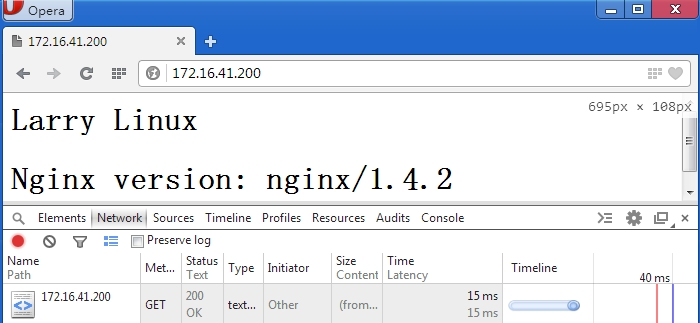
OK! 现在差不多了,我先启动测试一下有没有问题
Picture-1(开机后)

Picture-2(用win访问,没有问题)
Picture-3(再次远程访问),这里先给我的那个普通用户创建一个家目录,然后用他来远程登录

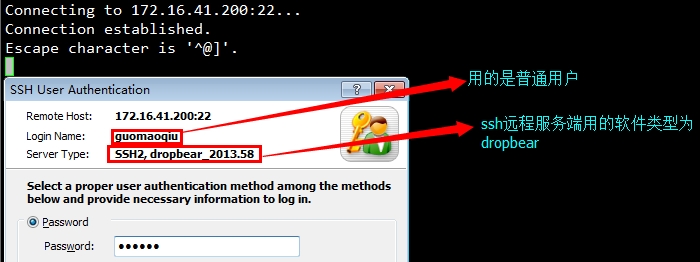

ok!自此两个应用程序的移植已完成;
上篇博文中提到的bincp.sh脚本请点击附件下载,各软件包这里我就不提供了,有兴趣的朋友尝试一下吧;
 小生能力有限,有问题请留言!
本文出自 “一叶知秋” 博客,请务必保留此出处http://maoqiu.blog.51cto.com/8570467/1390910
Linux系统-小倒腾之Linux DIY定制裁剪(定制Linux+SSH/Nginx)o_o(三),布布扣,bubuko.com
Linux系统-小倒腾之Linux DIY定制裁剪(定制Linux+SSH/Nginx)o_o(三)
原文:http://maoqiu.blog.51cto.com/8570467/1390910