
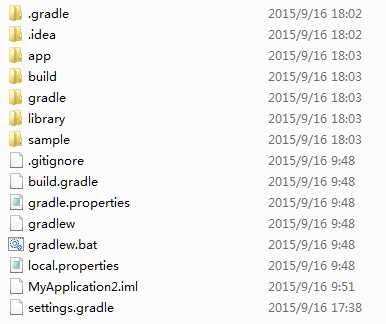
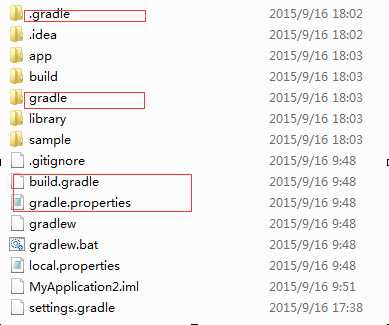
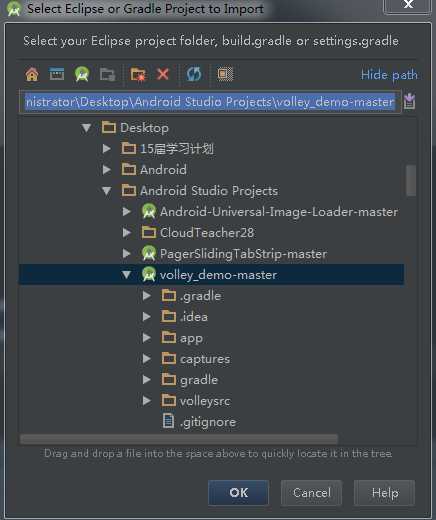
现在从github上面现在的项目大部分都是Android Studio工程,那么问题来了,从github上面down一个工程下来,怎么导入android studio呢?




|
1
2
3
4
5
6
7
8
9
10
11
12
13
14
15
16
17
18
19
20
21
22
23
|
apply plugin: ‘com.android.application‘android { compileSdkVersion 22 buildToolsVersion "22.0.1" defaultConfig { applicationId "com.timliu.volleyactivity" minSdkVersion 21 targetSdkVersion 22 versionCode 1 versionName "1.0" } buildTypes { release { minifyEnabled false proguardFiles getDefaultProguardFile(‘proguard-android.txt‘), ‘proguard-rules.pro‘ } }}dependencies { compile project(‘:volleysrc‘) compile fileTree(dir: ‘libs‘, include: [‘*.jar‘]) compile ‘com.android.support:appcompat-v7:22.2.0‘} |
|
1
2
3
4
5
6
7
8
9
10
11
12
13
14
15
16
17
18
19
20
21
22
23
|
apply plugin: ‘com.android.application‘android { compileSdkVersion 21 buildToolsVersion "20.0.0" //这里也需修改 defaultConfig { applicationId "com.timliu.volleyactivity" minSdkVersion 21 targetSdkVersion 21 versionCode 1 versionName "1.0" } buildTypes { release { minifyEnabled false proguardFiles getDefaultProguardFile(‘proguard-android.txt‘), ‘proguard-rules.pro‘ } }}dependencies { compile project(‘:volleysrc‘) compile fileTree(dir: ‘libs‘, include: [‘*.jar‘]) compile ‘com.android.support:appcompat-v7:21.0.2‘ //这里也需修改} |

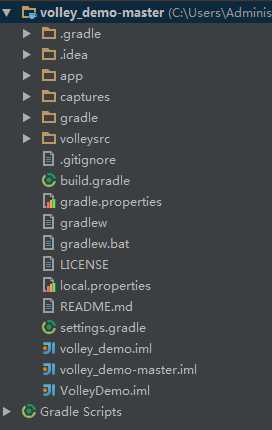
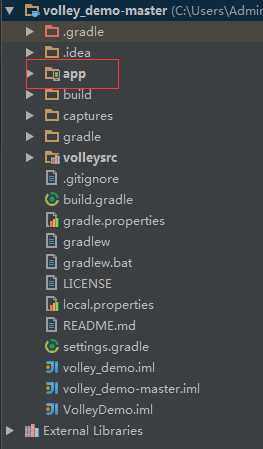
 按钮对项目重新进行编译。此时编译就不会出错了。编译后,你会发现app目录的图标右下角多了个手机的图标,目录结构如下:
原文:http://www.cnblogs.com/android-blogs/p/4846326.html