
有时我们要用到批量操作时都会对字符串进行拆分,可是SQL Server中却没有自带Split函数,所以要自己来实现了。没什么好说的,需要的朋友直接拿去用吧
SET ANSI_NULLS ON
GO
SET QUOTED_IDENTIFIER ON
GO


/*
by kudychen 2011-9-28
*/
CREATE function [dbo].[SplitString]
(
    @Input nvarchar(max), --input string to be separated
    @Separator nvarchar(max)=‘,‘, --a string that delimit the substrings in the input string
    @RemoveEmptyEntries bit=1 --the return value does not include array elements that contain an empty string
)
returns @TABLE table
(
    [Id] int identity(1,1),
    [Value] nvarchar(max)
)
as
begin
    declare @Index int, @Entry nvarchar(max)
    set @Index = charindex(@Separator,@Input)

    while (@Index>0)
    begin
        set @Entry=ltrim(rtrim(substring(@Input, 1, @Index-1)))

        if (@RemoveEmptyEntries=0) or (@RemoveEmptyEntries=1 and @Entry<>‘‘)
            begin
                insert into @TABLE([Value]) Values(@Entry)
            end

        set @Input = substring(@Input, @Index+datalength(@Separator)/2, len(@Input))
        set @Index = charindex(@Separator, @Input)
    end

    set @Entry=ltrim(rtrim(@Input))
    if (@RemoveEmptyEntries=0) or (@RemoveEmptyEntries=1 and @Entry<>‘‘)
        begin
            insert into @TABLE([Value]) Values(@Entry)
        end

    return
end
如何使用:
declare @str1 varchar(max), @str2 varchar(max), @str3 varchar(max)


set @str1 = ‘1,2,3‘
set @str2 = ‘1###2###3‘
set @str3 = ‘1###2###3###‘


select [Value] from [dbo].[SplitString](@str1, ‘,‘, 1)
select [Value] from [dbo].[SplitString](@str2, ‘###‘, 1)
select [Value] from [dbo].[SplitString](@str3, ‘###‘, 0)
执行结果:
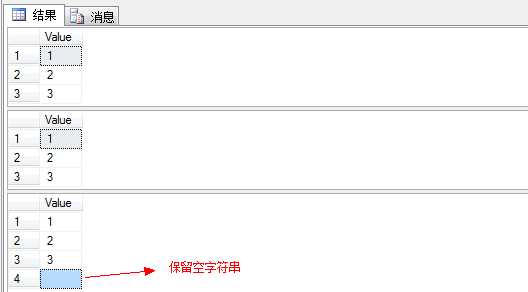
里面还有个自增的[Id]字段哦,在某些情况下有可能会用上的,例如根据Id来保存排序等等。
例如根据某表的ID保存排序:
    update a set a.[Order]=t.[Id]
        from [dbo].[表] as a join [dbo].SplitString(‘1,2,3‘, ‘,‘, 1) as t on a.[Id]=t.[Value]
具体的应用请根据自己的情况来吧:)
实现SQL Server中的切割字符串SplitString函数
原文:http://www.cnblogs.com/flyingskya/p/4813986.html