
在这一部分里,我将讲解如何编写一个应用程序以及访问Windows Phone中文本框的值。
首先从编写应用程序说起。
从File菜单选择New project,并选择Windows Phone applicaton。将三个文本框添加到网格面板,前两个文本框用于输入数值,第三个文本框显示结果。
|
1
2
3
4
5
6
7
8
9
10
11
12
13
14
15
16
17
18
19
20
21
22
|
<!--LayoutRoot?is the root grid where all page content?is placed-->?
<grid x:name="LayoutRoot" background="Transparent">?
????<grid.rowdefinitions>?
????????<rowdefinition height="Auto">?
????????<rowdefinition height="*">?
????</rowdefinition></rowdefinition></grid.rowdefinitions>?
????<!--TitlePanel contains the name of the application and page title-->?
????<stackpanel x:name="TitlePanel" grid.row="0" margin="12,17,0,28">?
????????<textblock x:name="ApplicationTitle" text="MY APPLICATION" style="{StaticResource PhoneTextNormalStyle}">?
????????<textblock x:name="PageTitle" text="1st Application" margin="9,-7,0,0" style="{StaticResource PhoneTextTitle1Style}">?
????</textblock></textblock></stackpanel>?
????<!--ContentPanel - place additional content here-->?
????<grid x:name="ContentPanel" grid.row="1" margin="12,0,12,0">?
????????<textblock x:name="lblfirst" text="Enter 1st Number" margin="25,38,241,527"></textblock>?
????????<textblock x:name="lblsecond" text="Enter 2nd Number" margin="25,98,241,467"></textblock>?
????????<textblock x:name="lblresult" text="Result" margin="25,161,241,404"></textblock>?
????????<textbox x:name="txtfirst" margin="225,24,6,508"></textbox>?
????????<textbox x:name="txtsecond" margin="225,84,6,450"></textbox>?
????????<textbox x:name="txtresult" margin="225,147,6,381"></textbox>?
????????<button x:name="btnadd" height="95" content="Addition" margin="0,232,0,280" click="btnadd_Click"></button>?
????</grid>?
</grid> |
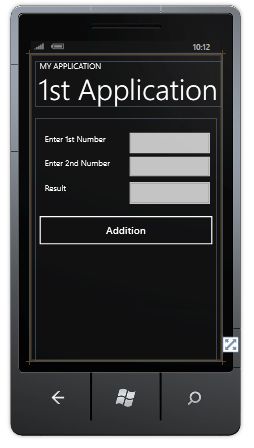
现在为按钮的点击事件编写代码,第一个和第二个文本框接收用户输入的数据,第三个文本框显示两个数字相加的结果。
|
1
2
3
4
5
6
7
8
9
10
11
12
13
14
15
16
17
18
19
20
21
22
23
24
25
26
27
28
29
30
31
32
33
|
using System;?
using System.Collections.Generic;?
using System.Linq;?
using System.Net;?
using System.Windows;?
using System.Windows.Controls;?
using System.Windows.Documents;?
using System.Windows.Input;?
using System.Windows.Media;?
using System.Windows.Media.Animation;?
using System.Windows.Shapes;?
using Microsoft.Phone.Controls;?
???namespace WriteFirstApplication?
{?????public partial class MainPage : PhoneApplicationPage?
????{?
????????// Constructor?
????????public MainPage()?
????????{?
????????????InitializeComponent();?
????????}?
???????????private void btnadd_Click(object sender, RoutedEventArgs e)?
????????{?
??????????????????????????int result = Convert.ToInt32(txtfirst.Text)+Convert.ToInt32(txtsecond.Text);?
????????????txtresult.Text = result.ToString();?
??????????????????????????}?
????}?
} |
所有完成之后运行应用程序。
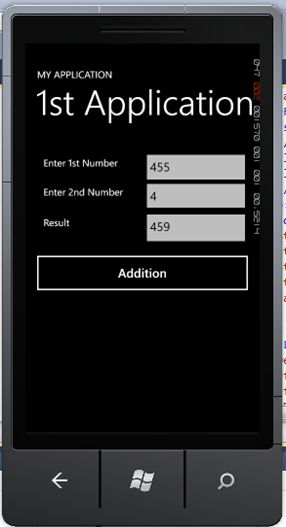
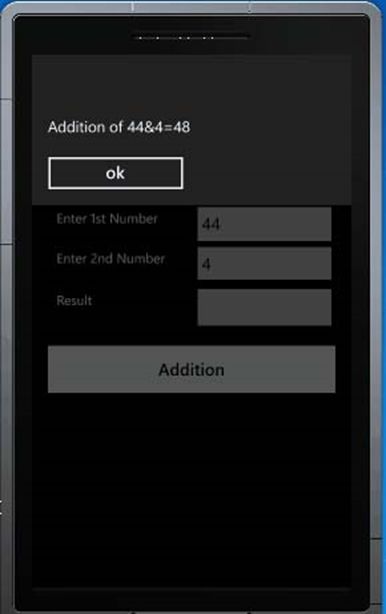
现在编写显示运行消息的信息提示框。你只需要添加一行代码就可以完成信息提示框的设计。
MessageBox.Show(“YourContent”)
|
1
2
3
4
5
6
7
8
9
10
11
12
13
14
15
16
17
18
19
20
21
22
23
24
25
26
27
28
29
30
31
32
33
34
|
using System;?
using System.Collections.Generic;?
using System.Linq;?
using System.Net;?
using System.Windows;?
using System.Windows.Controls;?
using System.Windows.Documents;?
using System.Windows.Input;?
using System.Windows.Media;?
using System.Windows.Media.Animation;?
using System.Windows.Shapes;?
using Microsoft.Phone.Controls;?
???namespace WriteFirstApplication?
{?????public partial class MainPage : PhoneApplicationPage?
????{?
????????// Constructor?
????????public MainPage()?
????????{?
????????????InitializeComponent();?
????????}?
???????????private void btnadd_Click(object sender, RoutedEventArgs e)?
????????{?
??????????????????????????int result = Convert.ToInt32(txtfirst.Text)+Convert.ToInt32(txtsecond.Text);?
MessageBox.Show("Addition of "+ txtfirst.Text +"&"+ txtsecond.Text +"=" +result.ToString());?
????????????????????????????}?
????}?
} |
本文翻译自c-sharpcorner.com,原文地址
原文:http://shoothao.iteye.com/blog/2232366